Seasonal Marketing: Why Your Website Isn't Ready When Google Search Demand Peaks
Seasonal search demand often rises before sales do. See how to spot the start of the wave in Google Trends and Search Console, plan a 4-6 month calendar, prepare landing pages and align SEO with Google Ads.

Your website must be ready before your sales team
For us, SEO for seasonal marketing means preparing a website for rising search demand before active selling begins. Buyers research offers and choose suppliers in advance. If a company only starts creating pages at the peak, it risks missing the first inquiries from Google.
A typical situation: the sales team is ready to take orders, the product range is confirmed, and the advertising budget is allocated. But a competitor is already getting inquiries from search while your seasonal page is still awaiting approval. Even after publication, Google will need time to discover it and include it in search results.
Webdelo is an international B2B company founded in 2006. We connect SEO with getting a product ready for market and assess our work by lead quality and sales. Below, we explain how to identify when demand starts, build a tentative 4-6-month calendar, and coordinate website, content, and advertising work.
Why seasonal demand on Google starts before the sales season
Seasonal searches on Google often increase before sales do: buyers need time to explore their options and decide. Pages should be live before this wave begins. Publishing at the peak leaves less time for indexing and attracting early inquiries.
How buyer behavior changes before the season
First, people work out what they need, then compare solutions, and only afterward look for a specific offer. For example, someone buying an air conditioner might start by choosing its capacity, move on to comparing models, and later search for local installation services. This is an example of a buyer journey, not a fixed sequence for every order.
In B2B, approvals add time between the first search and the deal. A company chooses equipment for a trade show in advance because it needs a budget and a confirmed delivery date. A page published just before the event may miss the supplier selection period.
Why SEO pages need to be published in advance
Google must discover a page, crawl it, and decide whether to index it. Indexing means a page is eligible to appear in search results, but it does not guarantee high rankings. You cannot pay for a place in organic results.
A page from the previous season may still have external and internal links, and Google is already familiar with its content. That is why we prefer updating a suitable permanent URL. A page's age alone does not guarantee an advantage.
What opportunities a business loses by starting late
The cost of starting late depends on how strongly seasonality affects SEO and sales:
- High seasonality. Demand almost disappears outside the season. A missed window is hard to make up for later.
- Moderate seasonality. Demand falls for part of the product range, while other categories continue to sell.
- Low seasonality. Demand is relatively stable, although individual events may cause spikes.
The main risk of starting late is missing the selection period when buyers draw up their supplier shortlist. You then have to catch up through advertising. If advertisers increase their activity at the same time, acquisition costs may rise.
How to identify the start of seasonal demand and plan preparation
To assess seasonal demand on Google, compare Google Trends data, your website's impressions in Search Console, and your own sales. Look for the start of sustained growth in interest, not just the month with the highest revenue. Your main pages should be ready by that earlier point.
How to use Google Trends and Search Console
Google Trends shows a query's relative popularity, not its absolute search volume. A peak on the chart helps reveal the shape of seasonal demand. It does not tell you how many people are ready to buy your product.
Compare queries within the same region and with the same date settings. If your business serves several markets, analyze each separately: weather and purchasing schedules can shift the season.
Google Search Console shows which queries and pages generated impressions and clicks for your website. This is visibility data for a specific site, not the entire market. You can find an overview of the tool and guidance on analyzing search traffic in the Google Search Central documentation.
How to find seasonal queries for products and services
Start with queries for which your website's impressions rise during recurring periods. Add wording from inquiries and sales conversations. Buyers may describe their needs differently from the terms used in your catalog. An SEO competitor analysis shows which queries already bring seasonal traffic to competitors.
Check each group's seasonality in Google Trends. Use the competition metric in Google Ads only to assess the advertising auction: it does not show how difficult it is to rank in organic search.
Also check events that may not seem like obvious seasonal drivers:
- industry trade shows and preparation deadlines
- budget and tax cycles
- vacations and bonus payments
- regional weather changes
How to identify when demand starts rising from past periods
Where possible, compare two or three previous seasons. The standard Search Console performance report is limited to 16 months of history, so longer comparisons require previously saved exports. If you do not have these, use the available history alongside sales data and Google Trends.
Mark the first weeks of sustained growth and check whether the pattern repeats. Work backward from that point to allow time for approvals, development, and publication. This gives you a practical start date based on your business.
Seven mistakes that cost businesses seasonal leads
Seasonal preparation breaks down in three areas: planning, content, and promotion. Below are seven mistakes to check for before allocating your budget. A shared calendar helps reveal task dependencies and assign responsibility.
Planning mistakes: starting late and having no calendar
- Starting after sales begin to rise. The team focuses on revenue, even though buyers have already been researching offers for several weeks. The website readiness deadline should align with the start of search demand.
- No shared calendar. The SEO specialist is waiting for copy, the writer is waiting for promotion details, and sales has not yet approved the offer. Every task needs a deadline, an owner, and clear dependencies.
Content mistakes: unprepared pages and outdated offers
- No suitable landing page. Someone searches for a seasonal equipment package but lands in the general catalog. They have to work out which items fit their needs and whether those items are available together.
- Last year's terms are still published. Old dates or prices make an offer look unreliable to buyers. Assign content checks to someone who knows the current sales terms.
- The page is deleted after every season. A new URL is then created, and links have to be built again. For a recurring offer, it usually makes more sense to keep a permanent page and update it.
Promotion mistakes: disconnected SEO, advertising, and analytics
- Advertising does not match the website. An ad promises seasonal delivery, but the page shows general terms without a date. Separate campaigns by offer and demand period.
- Lead tracking has not been checked. The form works, but the inquiry's source does not reach the customer management system. After the season, it is impossible to confidently connect spending with sales.
Seasonal SEO calendar: what to do and when
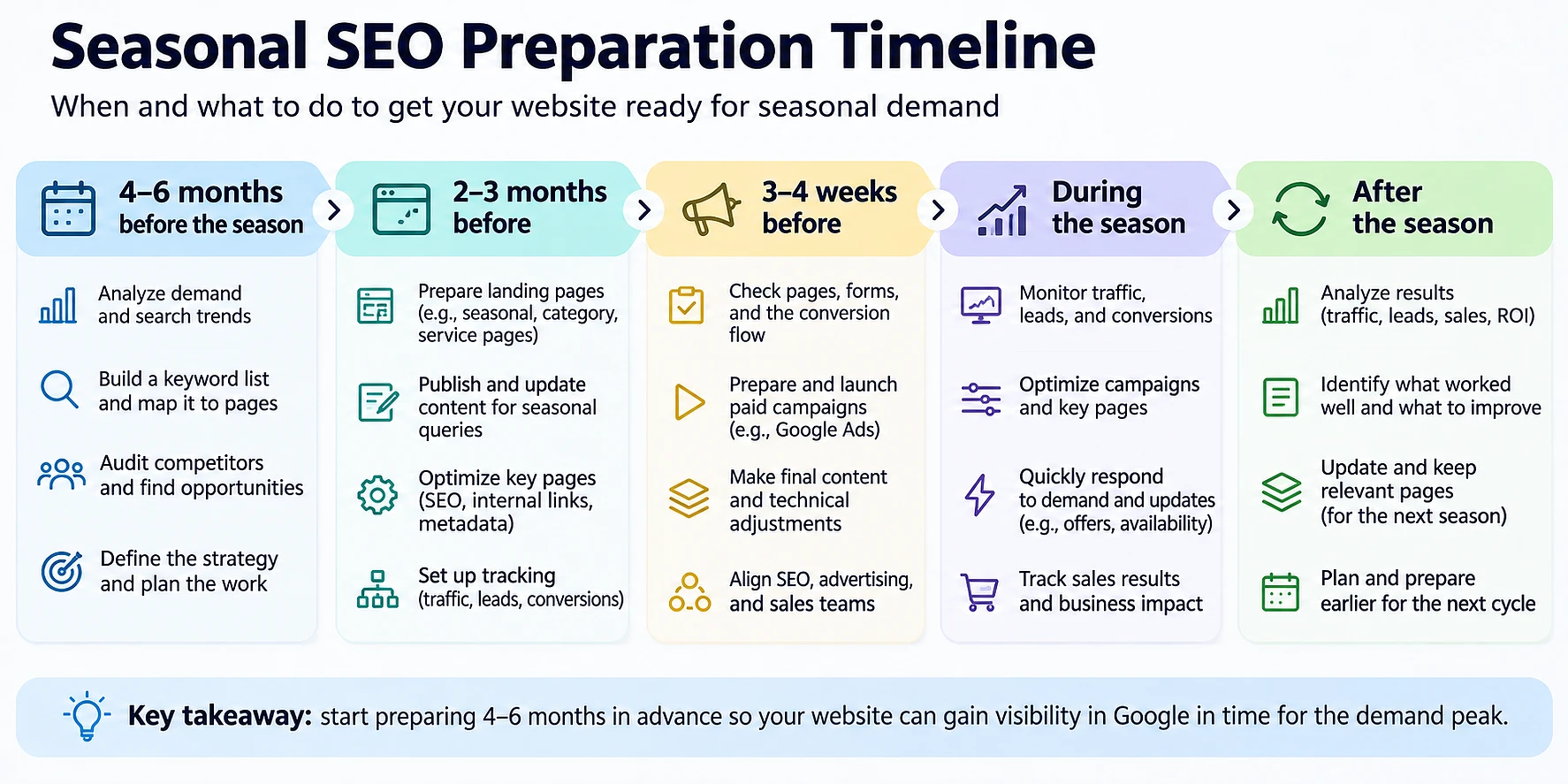
The SEO preparation calendar has five stages, from analysis 4-6 months ahead to a post-season review. This is a suggested preparation window, not a promise of rankings by a specific date. Count backward from when search demand begins to rise.
4-6 months before
Compare past sales with search data and choose priority categories. Review competitors' offers to see which terms buyers will encounter alongside yours. Then decide which pages to update and which to create.
In B2B, it is important at this stage to get purchasing cycle timelines from sales. If supplier approval takes up a significant part of the season, plan to publish before those discussions begin.
2-3 months before
Publish landing pages and content for early demand. Add links from relevant website sections and check that Google can access the pages. Do not delay publication until advertising is fully ready if the content is already useful to buyers.
For an existing website with pages already prepared, this lead time is sometimes enough. New sections and lengthy approvals require more time. That is why we do not use one timeline for every project.
3-4 weeks before
Confirm prices, availability, and fulfillment times. Add seasonal links from the homepage and category pages. Prepare ads and check that a test inquiry reaches the sales team.
Time the advertising launch to the emergence of purchase intent. A date on the calendar should not force you to spend money on an offer your audience is not yet searching for.
During and after the season
During active demand, check inquiries and key pages daily to make sure everything works. Allow for Search Console reporting delays when assessing search trends. If delivery terms change, update the website and ads together.
Before the peak, check whether your website can handle the traffic surge: the steps are covered in our guide to Black Friday website performance. This lets you agree in advance on how to handle urgent changes and assign responsibility for failures.
After the season, keep the pages and records of the results. Note when demand actually started growing and which tasks ran late. This data will form the basis of the next calendar.
| Timing | SEO and content | Advertising and analytics |
|---|---|---|
| 4-6 months before | Choose categories, review pages, and create a publishing plan | Compare past demand with sales and define success metrics |
| 2-3 months before | Publish content, add internal links, and check indexing | Prepare the campaign structure and lead source tracking |
| 3-4 weeks before | Update terms and add seasonal sections and links | Check inquiry tracking and launch ads as demand grows |
| During the season | Keep pages current and fix critical errors | Monitor leads, inquiry quality, and budget spending |
| After the season | Keep useful pages and note tasks for the next cycle | Compile sales by source and save comparable reports |
Which pages to prepare for seasonal demand
Landing pages for seasonal demand should address the user's needs at a specific stage of their decision. You will usually need permanent seasonal pages, category or service pages, and informational content. A separate URL is justified when existing pages do not address the relevant query.
Permanent landing pages for seasonal promotions
For an annual offer, choose a permanent URL without a year. Update the terms on that page before the next season. This preserves useful links and a familiar route for returning buyers.
Outside the season, you can keep the page accessible with an explanation of when the offer will return. If the exact date is unknown, do not invent one. Offer a current alternative or a way to ask about future availability.
Service and product category pages
Seasonal interest does not always require a separate landing page. For example, an existing service page may meet demand for air conditioner installation. Updating availability and booking terms may be enough.
We choose this approach when the buyer's needs remain the same. A seasonal section should help people decide while keeping the page's main content clear all year.
Informational content for early demand
A content plan for seasonal demand starts with questions that arise before a purchase. These might cover how to choose equipment or prepare for an industry trade show. The content should lead to the next step: a relevant category or service.
Set the publication date based on when people start looking for information. If you release a guide at the same time as orders peak, part of your audience will already have finished comparing options.
When to update a page instead of creating a new URL
Update the page if search intent - the person's goal behind the query - has not changed. New dates and product ranges do not in themselves require a new URL. A separate page is needed for a distinct offer that serves different demand.
That is why we do not recommend creating a new promotional page every year just to change the year. The decision should be based on the offer's content and the buyer's experience.
| Page type | Type of demand | Action |
|---|---|---|
| Permanent seasonal landing page | A recurring seasonal offer | Keep the URL and update the terms before the season |
| Category or service page | A core product with a seasonal rise in interest | Add the current offer to the existing page |
| Informational content | Understanding a need and comparing solutions | Publish before searches begin rising and link to a commercial page |
| New commercial page | A distinct need the website does not yet address | Create a separate URL with distinct content |
How to prepare content and SEO before sales begin
Pre-season website optimization brings together keyword mapping, offer checks, and preparing pages for indexing. Buyers should find up-to-date content when demand starts rising. To achieve this, approve sales terms while the copy is being written.
Mapping seasonal queries to existing pages
Create a working list with the query group, target page, required change, and task owner. Choose one main URL for each buyer need. If there is no suitable page, add its creation to the calendar.
This gives SEO services a specific seasonal priority: prepare pages with the nearest demand window first. The general website improvement backlog should not push them to the end of the queue.
Updating sales offers and content
Ask the sales team to confirm the terms that affect the buyer's decision. Availability and actual delivery times are especially important. The promise in the headline must match what the company can deliver.
Then update the page title and search description. Add answers to seasonal questions: will the order arrive by the required date, and when do orders close? Do not replace useful answers with repeated keywords.
Indexing and internal linking before the peak
Add links to new pages from relevant categories and content. Make sure the pages are not blocked from indexing and are included in the sitemap. Check individual URLs using the URL Inspection tool in Search Console.
Requesting indexing does not guarantee that a page will appear in search results by the required date. The Indexing API is not a universal way to speed up indexing for seasonal landing pages either. Accessible pages and timely publication remain the foundation, as described in Google's crawling and indexing guides.
How to coordinate seasonal SEO and Google Ads
Organic search and Google Ads should share the same offer and lead tracking. SEO helps build visibility in advance, while advertising provides paid reach once campaigns launch. Both channels depend on how well the landing page meets buyer expectations.
What organic search does before the season
Before the season, organic pages help buyers understand their needs and compare solutions. Clear offers should already be on the website when purchase-driven demand grows. This approach preserves useful content for future preparation cycles.
At Webdelo, digital marketing is tied to a product's readiness for market. That is why a seasonal plan should account for delivery capacity and the ability to handle inquiries, not just attract visitors.
When to start paid advertising
Launch seasonal advertising campaigns when purchase-driven demand appears and the offer is ready to sell. Prioritize queries where organic search does not yet provide enough visibility. Check whether Google Ads is available in your market under the service's current restrictions.
Before the peak, advertising also lets you test responses to an offer. Assess inquiry quality: a large number of clicks does not necessarily mean the right buyers are visiting the page.
How to align offers, budgets, and lead tracking
The terms in the ad must match the landing page. Allocate budget based on organic leads and the sales team's ability to handle additional inquiries. Use the same definition of a qualified lead for both channels.
Record each inquiry's source and the deal outcome in your customer management system. When bringing in contractors, grant access to customer data for specific tasks only. Not everyone on the project needs a full customer export to analyze seasonal results.
How to check website readiness just before the seasonal peak
Preparing a website for seasonal sales ends with checking the journey from search to order. A few weeks before the peak, confirm that the pages are ready and go through the journey yourself. The checklist below helps identify seasonal obstacles without turning the check into a full conversion audit.
12-point checklist
- Seasonal pages are published and indexed.
- A main target page has been chosen for each query group.
- Prices, timelines, and terms have been confirmed by sales.
- Last year's dates and expired offers have been removed or clearly labeled.
- Seasonal sections are available on the homepage and in relevant categories.
- Internal links point to current seasonal pages.
- The offer and contact button are visible on mobile devices.
- Forms submit successfully, and the listed phone numbers work.
- A test inquiry appears in the customer management system with its source.
- Ads match the offer on the website.
- The sales team knows the seasonal terms and limitations.
- Someone has been assigned to monitor performance daily during the season.
Where seasonal demand is lost: impressions, clicks, leads, and sales
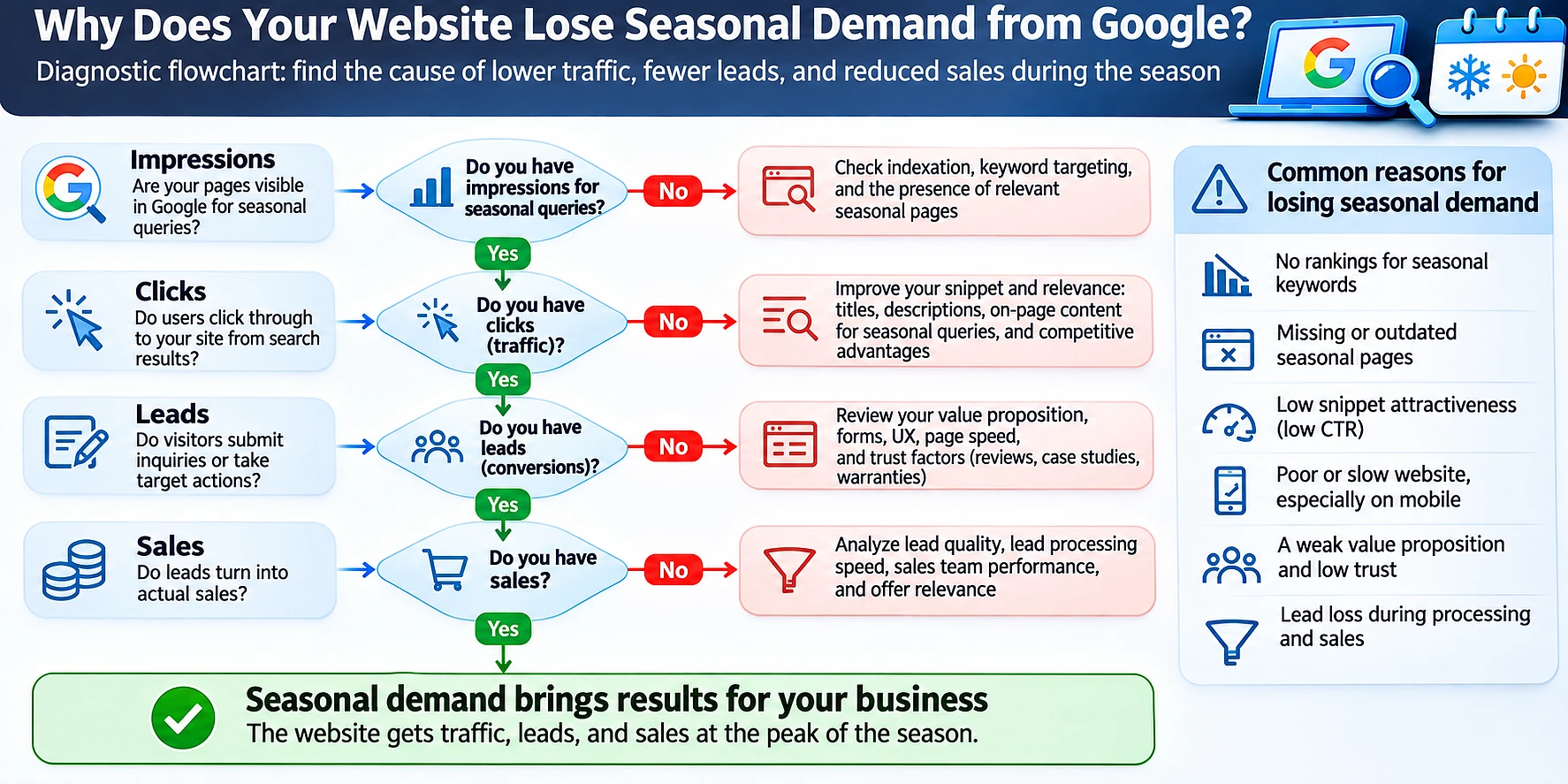
This sequence of metrics helps you decide where to look, but it does not automatically establish the cause. First, find the stage where results fall short of expectations:
- Few impressions. Check when demand starts, indexing, and the visibility of seasonal pages.
- Impressions but few clicks. Compare the query with the title and description shown in search results.
- Clicks but few leads. Check that the offer is current and the form works.
- Leads but few sales. Review inquiry quality, response times, and reasons for lost sales.
Which fixes to prioritize if the season has already started
If you need to prepare a website for the season with just two weeks left, start with pages that already receive visitors. Fix forms and incorrect terms. Then add seasonal offers to suitable existing pages.
Run ads for pages that are ready to receive inquiries. You can keep publishing new content, but relying on its organic visibility for the upcoming peak is risky.
Which seasonal metrics to compare with last year
For a seasonal business, the main comparison is between equivalent periods year over year. Assess search metrics alongside leads and sales. Comparing with the previous month is useful for day-to-day monitoring, but it does not by itself show the results of preparation.
Impressions and clicks for seasonal queries
Compare the same groups of pages and queries in one market. If traffic has fallen while rankings remain relatively stable, check overall interest in Google Trends. Demand may have weakened, or the season may have started at a different time.
Rising impressions with falling clicks are a reason to examine the query mix and how search results appear. Then check titles and descriptions. New impressions for less relevant queries can change results without the page itself getting worse.
Leads and sales in comparable periods
Adjust the comparison dates if a holiday or trade show took place at a different time. For weather-dependent businesses, account for the actual start of the season. Otherwise, comparing the same calendar weeks may be misleading.
In B2B, track seasonal inquiries through to the deal's completion. A sale may happen after the search peak. Mark qualified leads separately so that a rise in irrelevant inquiries does not look like success.
What to save for next season's preparation
Save the working data that will let you reconstruct the sequence of events:
- the date search demand started rising
- the list of pages and queries that generated inquiries
- publication dates and offer update dates
- advertising spending and lead outcomes
- tasks that were not completed on time
The last list is especially useful when planning the next season. It shows where more lead time is needed: approving terms or publishing pages.
How Webdelo helps you prepare for the season in advance
At Webdelo, we treat seasonal preparation as a joint effort between marketing, development, and sales. We start with demand data and the readiness of commercial pages. Planning produces a clear, prioritized action list with checks on how the work affects inquiries.
Seasonal demand analysis and commercial page audits
We compare historical search interest with sales and industry events. An SEO website audit helps determine which seasonal pages can already be used and what prevents Google from discovering them. We separately flag offers that do not yet have a suitable page.
A prioritized calendar for SEO, content, and advertising
We bring tasks together in a shared calendar with owners and dependencies. Work required to receive seasonal inquiries comes first. We set separate checkpoints for approving sales terms and checking analytics.
An action plan for the next seasonal peak
We define metrics for comparing seasons and set readiness check dates. Preparation timelines depend on the website's condition and the sales cycle. We do not promise SEO results within a fixed number of months.
Request a seasonal demand audit and SEO preparation plan from Webdelo.
Plan website readiness for the start of search demand, not the sales peak
Seasonal demand on Google often rises before revenue, so the website must be ready when buyers start choosing suppliers. A 4-6-month planning window helps spread out the work, but demand history and the scope of required changes determine the exact start date.
Start by choosing your next seasonal offer. Find when interest in it begins, assign a target page, and put someone in charge of getting it ready. This gives SEO, content, and advertising a shared deadline and a measurable outcome: qualified inquiries and sales.
Frequently Asked Questions
When should seasonal SEO preparation begin?
Count back from the moment search demand starts rising, not from the sales peak. As a rough guide, analysis and category selection start 4-6 months ahead, pages go live 2-3 months ahead, and offers and ads are checked 3-4 weeks ahead. The exact start date depends on the state of the website, internal approvals, and the sales cycle. This is a time buffer for preparation, not a promise of rankings by a certain date.
How can you identify seasonal search demand on Google?
Compare Google Trends, your site's impressions in Search Console, and your own sales across two or three past seasons. Google Trends shows relative query popularity rather than the number of searches, while Search Console only reflects your own site's visibility. Standard Search Console history is limited to 16 months, so it is worth exporting data in advance. Look for the first weeks of steady growth and add wording that buyers use in inquiries and sales conversations.
Should you create new seasonal landing pages every year?
For a recurring offer, it is usually better to keep a permanent page with a URL that has no year in it and update the terms before each season. This keeps existing internal and external links and gives returning buyers a familiar page. New dates or a new product range alone do not justify a new URL. A separate page makes sense when you have a distinct offer that answers a different search intent.
What if peak season is only two weeks away?
Start with pages that already get visitors: fix forms, check phone numbers, and remove incorrect or last year's terms. Then add seasonal offers to suitable existing pages and link to them from the homepage and categories. Point ads only at pages that are ready to take inquiries. You can still publish new content, but counting on its organic visibility for the upcoming peak is risky.
Can Google Ads compensate for starting SEO late?
Only partly. Google Ads delivers paid reach as soon as campaigns launch, but organic positions cannot be bought, and the early supplier-selection window may already be gone. If competitors ramp up their ads at the same time, acquisition costs can rise. It is safer to plan SEO and advertising together, with one offer, a shared landing page, and unified lead tracking.
Should seasonal pages be removed after the peak?
Usually not: deleting the page after every season means creating a new URL and rebuilding links next time. Off-season, you can keep it live with a note on when the offer will return. If the exact date is unknown, do not make one up; offer a current alternative or a way to ask about future availability instead.
How do you measure seasonal SEO and advertising performance?
Compare equivalent periods year over year and look at impressions and clicks together with leads and sales. Shift the comparison window if a holiday, trade show, or weather-driven season fell on different dates. Use the same definition of a qualified lead for organic and paid channels and keep the lead source in your CRM until the deal closes. In B2B, the sale may happen well after the search peak.