Keyword Cannibalization: Why Your Pages Compete in Google and How to Fix It
Not every shared keyword is a problem. See how to check competing URLs in Google Search Console, read search intent, merge pages with 301 redirects, use canonical correctly and keep pages that drive qualified B2B leads.

What Is Keyword Cannibalization and Why Does It Happen?
In SEO, keyword cannibalization happens when several URLs on the same website target the same user need and undermine the performance of the most relevant page. Google may choose a less useful URL for the visitor, and the business may lose potential leads. Sharing keywords alone does not mean there is a problem.
For the Webdelo team, the starting point is the connection between content and qualified leads, meaning inquiries from customers who are a good fit for the company. If the number of articles is growing but these inquiries are not, it is worth checking how search traffic is distributed across pages. Internal competition may be one reason, alongside weak demand or a contact form that is difficult to use.
What matters is search intent: the task a user wants to complete through search. Pages titled "CRM Implementation" and "Sales Management System Setup" can compete even without identical wording. If both offer the same service to the same audience, different titles do not give them distinct value.
Duplicate Content and Cannibalization: What Is the Difference?
Duplicate content is identical or nearly identical content available at different URLs. Page cannibalization can also occur between original pieces if they address the same task. That is why URL accessibility and the purpose of each page need separate checks.
- Technical duplication: a category is available at both its main URL and a URL with parameters.
- Content conflict: two articles provide almost the same answer under different titles.
- Structural conflict: the homepage and a service section describe the same offering in the same way.
For a technical duplicate, choose the primary URL and align the indexing signals. For separate pieces of content, first answer an editorial question: why does the reader need each page?
When Query Overlap Is Normal
Articles titled "What Is CRM?" and "How to Choose a CRM for Your Sales Team" may receive impressions for the same broad query. The first explains the concept, while the second helps readers compare solutions. Keeping both pages makes sense when their roles are distinct.
The same applies to a service page and a detailed guide. We do not consider a shared keyword sufficient reason to merge them. First, we need to see that their tasks overlap and that the target page is being harmed.
Cannibalization in Marketing and SEO
Cannibalization in marketing means that one of a company's products takes sales away from another. For example, a new retail location may draw customers away from a nearby store in the same chain. This strategy can be justified if it helps the company expand its market.
In SEO, the term refers to competition between a website's own URLs for search demand. Harmful page conflicts should not be confused with the useful presence of several pages in search results. Additional results can help users when they address different tasks.
Why Pages on the Same Website Start Competing
Pages often start competing when content grows without a query-to-URL map. Authors create similar content, old versions remain available, and internal links do not clarify the purpose of each URL.
Similar Articles and the Lack of a Keyword Map
Without a shared plan, an editor may see a new topic where a suitable page already exists. For example, "How to Choose a CRM" and "Choosing a CRM for Your Business" may repeat the same criteria and recommendations. Different wording hides the same promise to the reader.
A similar situation arises in commercial sections when subcategories are created without a distinct offering. If "CRM Implementation" and "CRM Implementation for Companies" describe the same scope of work, users will struggle to understand the difference.
When reviewing site structure, we look for the following causes of overlap:
- New content repeats the task of an existing article.
- An updated service page has a new URL, but the old one remains indexed.
- A category is accessible through several catalog paths.
- Subcategories differ only in name and do not address distinct demand.
- Several pages target the same query without having defined roles.
Internal Links That Blur Page Priority
Identical anchor text pointing to different pages makes their purpose harder to understand. This is especially noticeable when the menu sends users to one URL while related articles point to another with the same offering.
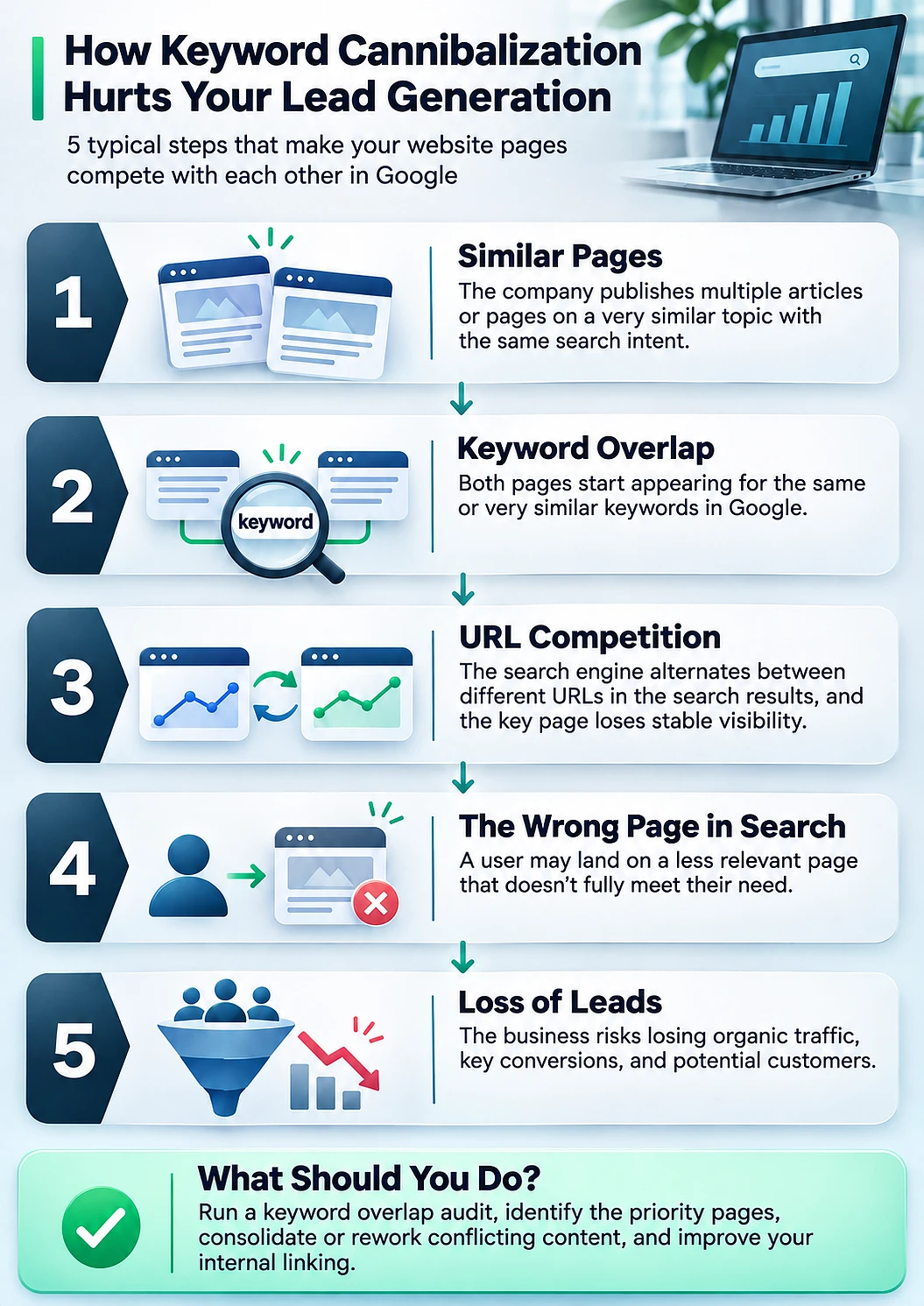
Internal linking should support the chosen structure. Links that promise a service should lead to the service page, while links to a guide should describe its informational purpose. The diagram shows how similar content can lead to a risk of lost leads.
How Keyword Cannibalization Affects Traffic and Leads
The main risk of cannibalization is sending users to a page that does not match their intent well. Even if overall traffic stays the same, the website may receive fewer relevant inquiries. That is why we assess click distribution alongside conversions.
The Wrong URL in Search Results and Lost Conversions
Imagine that a search for "buy an alarm system" brings up an article about choosing equipment. The user expects a catalog with prices and purchasing details but gets an overview instead. They have to find the commercial section themselves, and some visitors may return to the search results.
In B2B, a similar conflict occurs when a search for "hire a CRM implementation company" leads to an article explaining definitions. Even useful content cannot replace a page that outlines the scope of work and offers a clear way to discuss a project.
However, an informational article in search results is not always a mistake. Search results may reflect mixed intent, with some users researching the topic and others choosing a provider. First, we check the types of results, then decide which URL should receive commercial search traffic.
Why a Page With Less Traffic Can Be More Valuable
A focused page about integrating CRM with ERP may receive fewer clicks than a general CRM overview but attract better-fit customers. Deleting it because of lower traffic is risky: removing the URL may also remove a precise answer to a commercial need.
There is no universal percentage of traffic or leads lost to cannibalization. Choosing the priority URL requires data on leads and their quality, not just rankings or visit counts.
7 Signs of Potential Keyword Cannibalization
Changes in ranking URLs and similarities in their purpose can signal page cannibalization. Each of the seven signs below is a reason to review a pair of pages, not to set up a redirect immediately.
- The URL shown for a query changes. A service page appears today, then an article appears later. This is known as URL swapping.
- Two pages receive impressions for the same set of queries. Both rank lower than expected given their content and competitors.
- The same anchor text points to different pages. Internal links use identical descriptions for URLs with overlapping purposes.
- The title tags and H1 headings are almost interchangeable. The headings do not make it clear which distinct task each page addresses.
- One URL improves after another is updated. A related page gains visibility for the same group of queries.
- The content addresses the same task at different levels of detail. The shorter version offers no distinct value compared with the detailed one.
- The target page loses traffic while a secondary page gains it. Traffic shifts to a URL that is less suited to the desired action.
A Sign or Proof?
A change in the ranking URL may be explained by the user's device or search location. One page rising while another falls does not prove a causal relationship either.
Before changing the structure, we compare the same segments over comparable periods. Then we check whether the pages truly serve as substitutes and whether the outcome that matters to the business is suffering.
How to Identify and Check Keyword Cannibalization
Checking for keyword cannibalization combines three sources: Google Search Console, current search results, and conversion analytics. GSC helps identify overlapping URLs, search results reveal the nature of demand, and analytics shows the value of landing pages. Two pages receiving impressions for the same query do not prove a conflict on their own.
Checking Google Search Console: Query First, Then Pages
Google Search Console shows queries and metrics for your website's search presence. A useful starting point is a commercially important query that brings up an unexpected URL.
- Open the Search results performance report and select a period with enough impressions.
- Apply a filter for a specific query. To check related wording, create a separate group of queries.
- Go to the "Pages" tab and see which URLs receive impressions and clicks.
- Compare periods to identify consistent traffic patterns and changes in ranking URLs.
- Repeat the comparison using the same country and device filters.
- Review the content of the pages you find and compare it with conversion actions in your analytics.
For suspected technical duplicates, also use URL Inspection. It lets you check the canonical URL selected by Google. Performance data is usually attributed to the canonical URL, so the absence of a second URL in the report does not rule out a duplicate.
Data Exports and Third-Party Tools
A large website needs a working list of query-page pairs. For manual checks, export the "Pages" tab after filtering by query. For bulk analysis, you can obtain a combined breakdown by query and URL through the Search Console API.
Normalizing queries helps remove differences in capitalization and extra spaces. Keep meaningful modifiers: words such as "cost" and "guide" may indicate different intents.
For each suspicious pair, add:
- Impressions, clicks, and average position for the selected periods.
- The page type and its main promise to the user.
- Publication dates and dates of significant updates.
- The canonical URL and indexing status.
- Organic conversions and information about lead quality.
Ahrefs and similar tools help identify overlaps and ranking history more quickly. Their estimates provide a starting point for investigation. We base the final decision on website data and manual analysis, keeping in mind that GSC does not show every query either.
Analyzing Intent Through Search Results
Look at the types of pages Google displays for the query in question. Results dominated by catalogs suggest a different expected answer than results dominated by guides. Record the date, region, and device so that later comparisons are meaningful.
Then describe the purpose of each URL in one sentence: "Helps compare CRM systems against the sales team's requirements" or "Lets users request implementation of their chosen CRM." Matching promises are a reason to consider merging the pages. Different promises need to be checked against the actual page content.
| Situation | When It Is Normal or a Separate Technical Issue | When Harmful Cannibalization Is Likely |
|---|---|---|
| Articles with overlapping intent | A review reveals distinct tasks or different audiences. | Both articles promise the same outcome, and one would be enough for the user. |
| A commercial page and an informational page | The service page helps users hire a provider, while the article helps them understand the topic. | The content effectively repeats the same offering, and the less relevant URL receives commercial search traffic. |
| Technical URL duplicates | The additional URLs are necessary, and the primary URL is consistently identified. | Duplicates are available for indexing with conflicting signals. A technical review is needed first. |
| Several pages appearing for one query | They address different aspects of mixed intent and attract suitable visitors. | The pages address the same task, and the distribution of impressions coincides with worse performance for the target page. |
| A priority URL being displaced | Another URL better matches user intent. The business's chosen priority needs to be reconsidered. | Within a comparable segment, a less relevant page receives impressions while the target URL loses valuable traffic. |
How to Fix Keyword Cannibalization
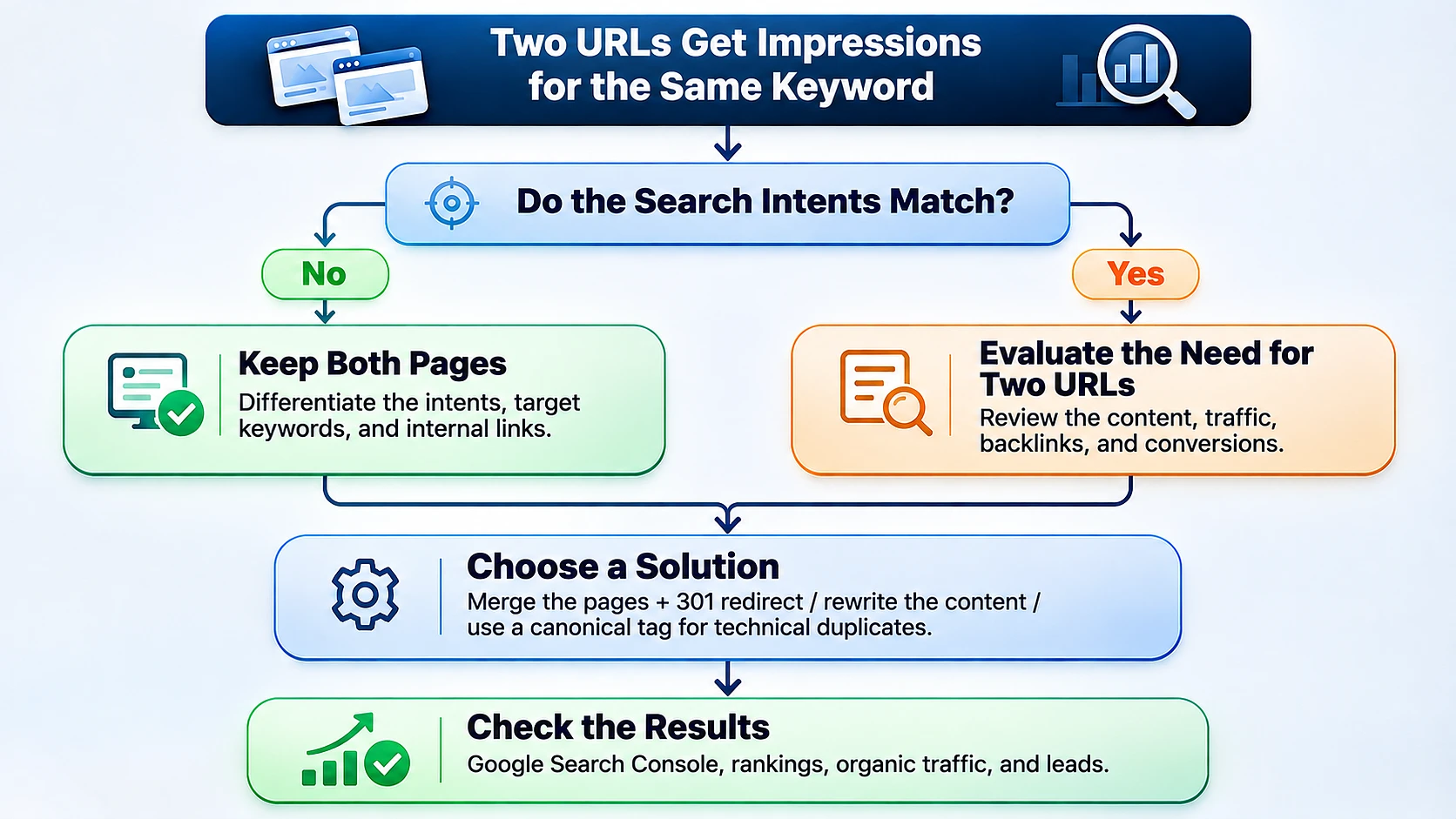
The right way to fix keyword cannibalization depends on the cause of the overlap. Content addressing the same task can be merged using a 301 redirect, while pages serving different tasks can be differentiated more clearly. In this approach, canonical tags are used for technical duplicates, not for separate pages with different content.
| Problem | Solution | What to Check After the Change |
|---|---|---|
| Two pieces address the same task, and the second offers no distinct value. | Combine the useful content at the chosen URL and set up a 301 redirect from the other. | The final page is accessible, the redirect works, and the necessary answers remain. |
| The pages serve different stages of the buying process, but their purposes are mixed. | Separate their intents through content, title tags, H1 headings, and navigation. | Each page clearly addresses its own task. |
| One page is available at technically different URLs that need to be retained. | Align rel="canonical" and internal links to point to the primary URL. | Which canonical URL Google selects. |
| A secondary page promises more in its headings than its content delivers on its topic. | Rewrite the headings and text around its distinct task. | The promise matches the content, and the query mix changes accordingly. |
| Internal links send users to different URLs serving the same purpose. | Reinforce the priority of the chosen URL and clarify the anchor text of other links. | Links provide logical paths and no longer point to old URLs. |
Merging Pages and Setting Up a 301 Redirect
Choose the primary URL based on how well it serves the task and the value it has built over time. Consider conversions, backlinks, and the page's place in the site structure. Having the most clicks does not automatically make a URL the best candidate.
- List the useful sections from both pages, including unique answers and examples.
- Move the necessary content to the primary URL without repetition.
- Set up a permanent 301 redirect directly from the old URL to the final one.
- Update internal links and the sitemap to point to the final URL.
- Check for redirect loops and make sure the new version is accessible for indexing.
A redirect preserves access for visitors following old external links. It does not guarantee that all rankings will be retained, so record your baseline metrics before merging. Redirecting to an irrelevant homepage is not a substitute for moving the content.
Separating Intents Without Deleting Pages
If the pages offer distinct value, make that difference clear in their content. An article about choosing a CRM should help readers compare solutions, while an implementation page should explain the service and the next step for the customer.
Then align title tags, H1 headings, and anchor text with the purpose of each URL. Add a contextual link from the article to the service page where the reader may genuinely need help. Simply removing keywords without changing the page's promise usually does not resolve the conflict in purpose.
Canonical Tags Only for Technical Duplicates
The rel="canonical" attribute identifies the preferred URL among duplicate versions. For example, it is appropriate for the same page with and without a tracking parameter. It is a signal to Google, not a binding instruction to select that URL.
Separate articles, or a service page and a guide, should not be consolidated through canonical tags just because they share queries. They require a decision about content and purpose. We do not use noindex as a standard fix either: excluding a useful page from search can remove a valuable source of traffic.
Commercial vs. Informational Pages: Merge or Keep?
A service page and an informational article are usually worth keeping if they address different customer tasks. Merging is justified when their actual content and offering are the same. An article appearing for a commercial query calls for a review of search results and relevance, not automatic deletion.
How This Works in B2B
In B2B, customers often need to understand a solution before contacting a provider. A guide helps them define requirements. A service page explains the project approach and what is needed to get started. We cover this split in more detail in our article on B2B SEO content strategy.
For example, "How to Prepare Data for CRM Migration" is useful to a specialist planning the transition. A "CRM Migration" page serves a company ready to discuss having the work done. A contextual link between them helps readers move from research to an inquiry.
We start by checking whether editing can preserve both roles. Sometimes it is enough to clarify the article's headings and remove the duplicated sales pitch. If all the content remains the same, changing the title tag alone will not be enough.
How to Prevent Keyword Cannibalization
Prevention starts with a query-to-URL map that records each page's primary intent and role in the site structure. Before publication, compare the new topic with existing content. If a suitable page already exists, first consider updating it.
Mapping Queries to URLs
The map should explain each page's purpose, not just store a list of keywords. For each URL, it helps to record:
- The user's main task.
- The primary query group and meaningful modifiers.
- The page type: service, category, article, or another format.
- The visitor's expected action.
- Related pages and the direction of internal links.
Update the map whenever content is published or the structure changes. It gives editors and SEO specialists a shared reference so that different providers do not create several answers to the same task.
Pre-Publication SEO Checks and Internal Linking
In professional SEO services, this check belongs in topic approval, before writing begins. This helps direct the content budget toward unmet search demand.
- Does the website already have a page that makes the same promise to the reader?
- How does the new piece differ in its task and content?
- Is that difference visible in the title tag and H1?
- Which existing pages should link to the new one?
- Which commercial URL will the content direct interested visitors to?
If you cannot explain the distinct value of a new page, it makes more sense to expand an existing one. A new variation of a search phrase does not, by itself, require a new URL.
How to Measure the Results After Fixing Cannibalization
We assess results by looking at the distribution of search traffic and the quality of leads after the changes. In GSC, we check which URL receives impressions and clicks for target queries. In analytics, we look at whether those visits produce the right inquiries.
Google Search Console Metrics
Before making edits, save the baseline data and record the date each URL changes. Use the same query groups and filters for comparison. Account separately for seasonality and other website changes that may have affected the results.
- Ranking URLs: whether the page that matches the user's task receives impressions.
- Clicks and impressions: how performance has changed across the entire cluster, including merged URLs.
- Average position: how visibility changes with a comparable query mix.
- Indexing: whether the final URL is accessible and changes to the old URLs have been processed.
Check that redirects work correctly as soon as you set them up. For ongoing monitoring, follow the recommendation in Google's Search Console guide: review reports about once a month or after content changes. This is a monitoring schedule, not a promised timeframe for ranking recovery.
The Connection to Qualified Leads
In analytics, compare organic visits landing on priority pages and the inquiries associated with them. Then check lead quality using CRM data: does the customer's request match the service and target audience?
Do not attribute each page's conversions to specific search queries. Standard GSC and web analytics reports do not provide that direct connection. To make a decision, compare trends across the query cluster with landing page results while acknowledging the limits of the data.
If total traffic falls after a merge but relevant inquiries increase, the outcome may be positive. If only rankings improve, the commercial impact still needs to be confirmed.
How Webdelo Helps Resolve Competing Pages
At Webdelo, a cannibalization audit connects search data with page purpose and business goals. For each suspicious pair, we check intent and choose an action supported by evidence. Shared keywords are not an automatic reason to merge pages. This check is part of a comprehensive SEO audit.
The result is a plan of changes that both editors and developers can follow:
- A list of clusters and URLs showing signs of conflict, with supporting data.
- A decision for each pair: merge with a 301 redirect, separate their tasks, or address technical duplicates.
- Recommendations for content, headings, and internal links.
- A query-to-URL map for existing and planned pages.
- A list of checks and metrics to monitor after implementation.
Request an SEO website audit to identify why your pages compete and get a plan to fix the issues with organic leads in mind.
Assessing the business impact requires Search Console data, web analytics, and information about lead quality. If some data is unavailable, the plan clearly separates confirmed issues from hypotheses that still need testing.
Frequently Asked Questions
What is keyword cannibalization in SEO?
Keyword cannibalization happens when several URLs on the same website target the same user need and undermine the performance of the most relevant page. Google may show a less useful URL, and the business can lose potential leads. Search intent is what matters: pages can compete even with different wording if they offer the same thing to the same audience.
Is it always bad when multiple pages rank for the same keyword?
No, a shared keyword alone does not indicate a problem. For example, "What is a CRM" and "How to choose a CRM for a sales team" can both get impressions for one query while solving different tasks. Cannibalization becomes harmful when pages answer the same need and the target URL loses valuable clicks and leads.
How do I check for keyword cannibalization in Google Search Console?
In the Performance report, filter by a specific query, then open the Pages tab to see which URLs receive impressions and clicks. Compare several periods using the same country and device filters to separate persistent competition from a one-off URL switch. Two URLs in the report do not prove a conflict on their own, so verify the findings against the live search results, page content, and conversion data.
When should I merge pages to fix keyword cannibalization?
Merge pages when they serve the same need and the second page has no standalone value. Choose the primary URL based on intent match, conversions, backlinks, and site structure, not just click volume. Move the useful content to the final page, set up a 301 redirect, update internal links, and record baseline metrics before making the change.
Can a canonical tag fix keyword cannibalization?
The rel="canonical" attribute is only appropriate for technical duplicates, such as the same page with and without a tracking parameter. For distinct articles or a service page and a guide, canonical does not solve the issue: you need to define each page's purpose and rework the content. Noindex is not a standard fix either, since it can remove a valuable traffic source from search.
How does keyword cannibalization affect leads?
The main risk is that a user with commercial intent lands on an informational article instead of a service page and cannot easily start a project conversation. Overall traffic may stay the same while qualified leads decline. That is why the impact is measured by lead quality in your CRM, not just rankings: after a merge, traffic can drop while relevant inquiries increase.
How can I prevent keyword cannibalization when publishing new content?
Maintain a query-to-URL map that records each page's main user task, query group, page type, and expected visitor action. Check new topics at the approval stage, before writing starts: does a page with the same promise already exist, and how will the new one differ? If you cannot define a standalone purpose, update the existing page instead.