SLI — Service Level Indicators

This page describes the Service Level Indicators (SLI) we use for client projects, how we measure them, and where the boundaries of those measurements lie. We publish this information so you can understand not just the target values, but also the methodology, limitations, and how to interpret the metrics.

This page is informational in nature. The SLI and SLO values listed here are typical benchmarks for managed projects and do not replace the specific terms outlined in your contract, SOW, or SLA.

How to read this page SLI, SLO, SLA What we measure Tools Error Budget Support Plans Incidents Glossary

How to read this page

SLI are measurable metrics — not marketing promises.
SLO on this page are benchmarks for common scenarios; final target values are set after onboarding and an architecture review.
Data sources depend on the project setup: external synthetic checks, infrastructure metrics, APM, and CI audits.
Scheduled maintenance windows, force majeure events, and third-party outages may be excluded from calculations per the terms of the agreement.
Actual reporting and dashboard access depend on your chosen support plan.

Why SLI matter for your business

When a client hands off a project for ongoing support, the expectation is usually straightforward: the website or application should run smoothly, quickly, and predictably. But "everything's running fine" is too vague for proper quality management. SLI translate that into measurable metrics you can verify, compare, and discuss based on real data.
What's happening right now?
Real-time monitoring catches any deviation immediately.
How stable has the service been over time?
Historical data reveals trends and seasonal patterns.
When do we need to step in?
Threshold values trigger alerts before a user ever notices a problem.
The practical value of SLI for your business: less guesswork, earlier detection of performance degradation, and the ability to make decisions about your project's development based on facts rather than gut feelings.

SLI, SLO, SLA — how they're connected

The three layers of service quality build on each other: from measurement — to targets — to commitments.
SLI — Service Level Indicator

What we measure.

Numeric metrics that reflect the actual user experience: availability, response times, error rates, Core Web Vitals. SLI are facts captured by monitoring tools — not subjective assessments.
SLO — Service Level Objective

What we aim for.

Internal targets for each SLI. For example: "API response time — no more than 300 ms for 95% of requests." SLO set the quality bar that we monitor daily and review quarterly.
SLA — Service Level Agreement

What we guarantee.

Formal commitments spelled out in the contract. If SLO is our internal standard, then SLA is the promise we make to you — with accountability when it's not met. Learn more about our SLA

Core principle: SLI feed into SLO, SLO shape the SLA. Without reliable indicators, any guarantees are just empty words. That's why we start with the measurements.

What we measure

We track metrics that affect user experience, service stability, and the manageability of support. The exact set of metrics may vary by project, but the core indicators and how we calculate them stay consistent.

Core indicators

Indicator What it shows How we measure Benchmark (SLO)
Uptime (Availability) Percentage of time the service is reachable and responding correctly Share of successful HTTP responses (2xx/3xx) out of total synthetic checks ≥ 99.5% (standard), ≥ 99.8% (target)
Latency (Response Time) How fast the server responds to a user request Percentiles P50, P95, P99 across all requests for the period P95 < 300 ms (API), P95 < 2 s (page)
Error Rate Percentage of requests that result in a server error Percentage of 5xx responses out of total requests < 0.1%
First Response Time How quickly the team responds to an incoming ticket Time from ticket creation to the first substantive reply ≤ 20 min (S1, business hours)

Core Web Vitals

Google uses Core Web Vitals as a ranking factor. We track them separately because they directly impact SEO and conversion rates.
Metric What it measures "Good" threshold Our tool
LCP (Largest Contentful Paint) How fast the main content of a page loads ≤ 2.5 s Lighthouse CI
INP (Interaction to Next Paint) How responsive the page is to user interactions ≤ 200 ms Lighthouse CI
CLS (Cumulative Layout Shift) Visual stability — no unexpected layout jumps ≤ 0.1 Lighthouse CI
Lighthouse CI runs automatically in the deployment pipeline. If Core Web Vitals degrade after an update, we know about it before it affects your search rankings.

Additional indicators

Indicator What it shows Benchmark (SLO)
TTMR (Time to Mitigation/Restore) Time from the start of an incident to service restoration ≤ 4 hrs (S1), ≤ 8 hrs (S2)
Deployment Success Rate Percentage of deployments that don't cause service degradation ≥ 99%
Saturation Server resource utilization: CPU, RAM, disk CPU idle > 10%, RAM < 85%, disk > 10% free
SSL/Domain Expiry Monitoring certificate and domain expiration dates Alert ≥ 30 days before expiry

The values in the tables above serve as baseline benchmarks. For a specific project, they're refined after onboarding based on architecture analysis, load profile, and business criticality.

How we measure: tools and methodology
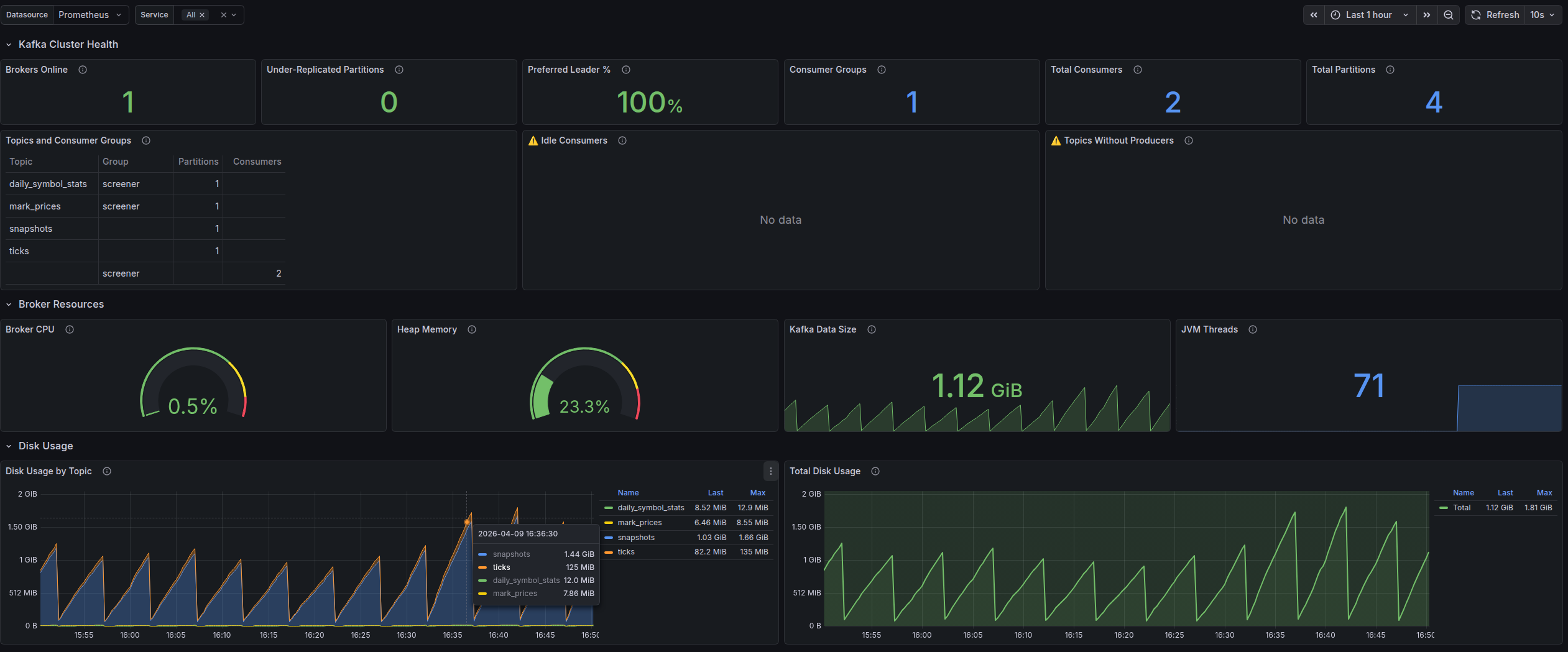
The reliability of metrics depends not just on the tool, but on how it's used: check frequency, alert configuration, monitoring locations, data retention, and correct interpretation. That's why we use a combination of external synthetic monitoring and analysis at the infrastructure and application levels.
Grafana overview dashboard with key project metrics
UptimeRobot — external availability monitoring

Synthetic checks from multiple geographic locations every 1–5 minutes:

  • HTTP/HTTPS, Ping, port checks, DNS and SSL monitoring
  • Instant notifications on downtime via email, Slack, Telegram
  • Historical uptime data for reporting
  • Public status pages for transparency with end users
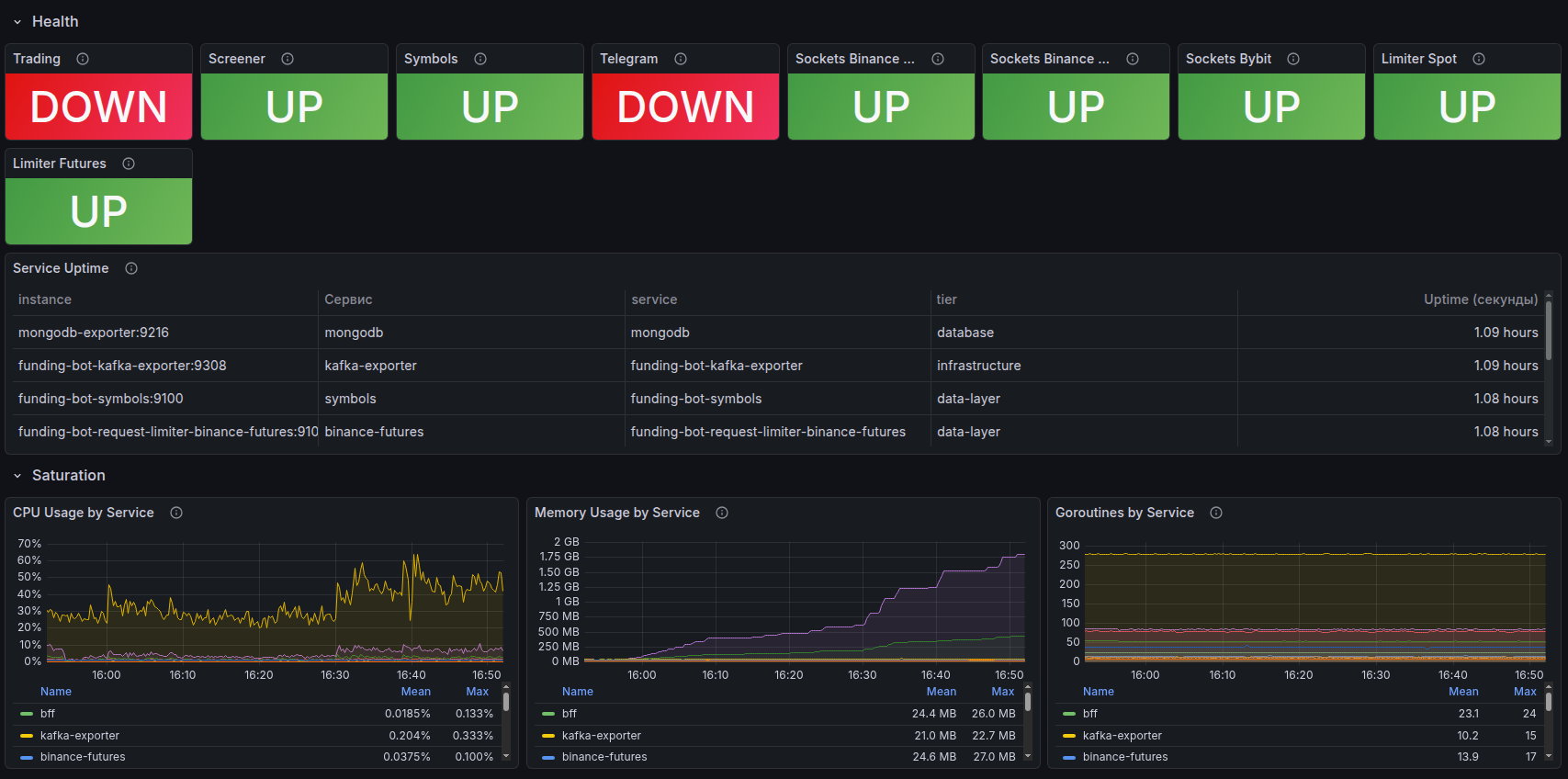
Grafana — service health and uptime monitoring
Grafana — project availability and health status history
Grafana + Prometheus — visualization and analytics

Prometheus collects metrics from servers and applications, Grafana visualizes them on customizable dashboards:

  • Latency (P50, P95, P99), error rate, throughput — in real time
  • Server resource monitoring: CPU, RAM, disk, network
  • Configurable alerts when thresholds are exceeded
  • Historical trends to catch degradation before it becomes an incident
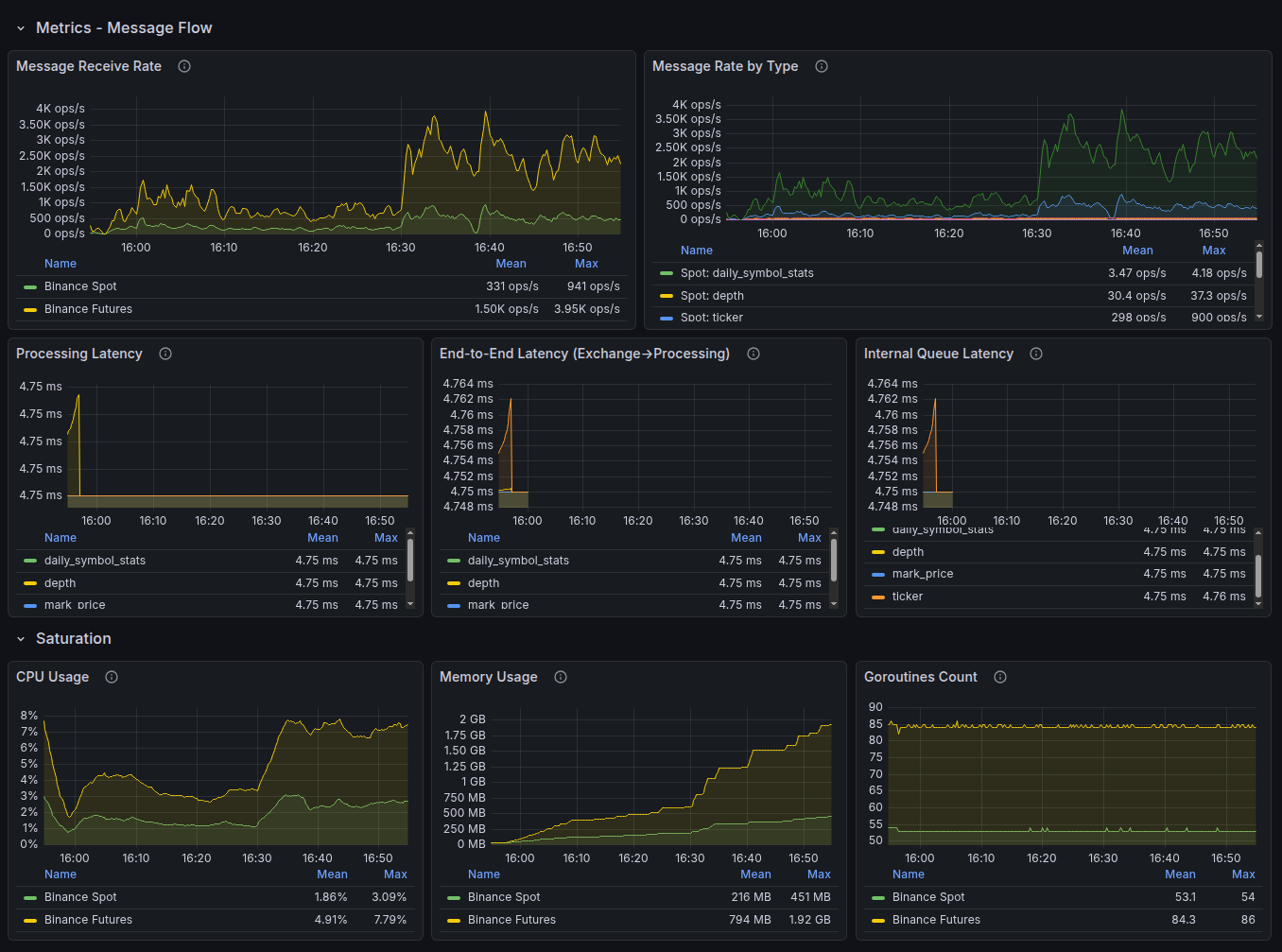
Grafana — latency and error rate dashboard
Latency and error rate dashboard
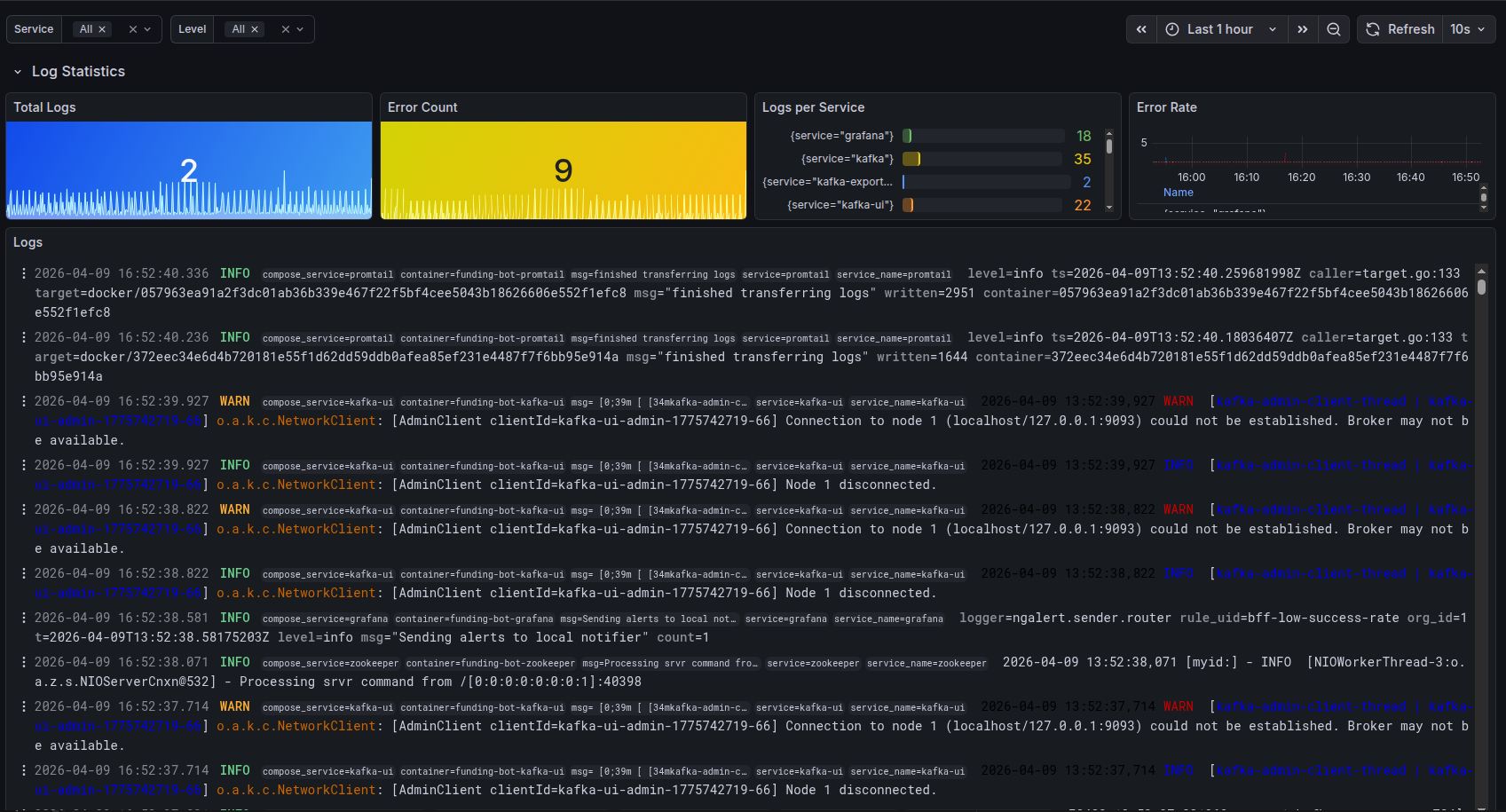
Grafana — aggregated application logs
Aggregated application logs
Laravel Nightwatch — application-level monitoring

Deep instrumentation for Laravel applications, built by the framework's creators:

  • Tracing every request from entry to response
  • Detection of slow SQL queries and queue bottlenecks
  • Real-time exception and error monitoring
  • Tracking background jobs and cron schedules

Note: On some projects, New Relic APM is used as an alternative to Nightwatch — a full-featured performance monitoring platform. The choice of tool depends on the project's architecture and client requirements.
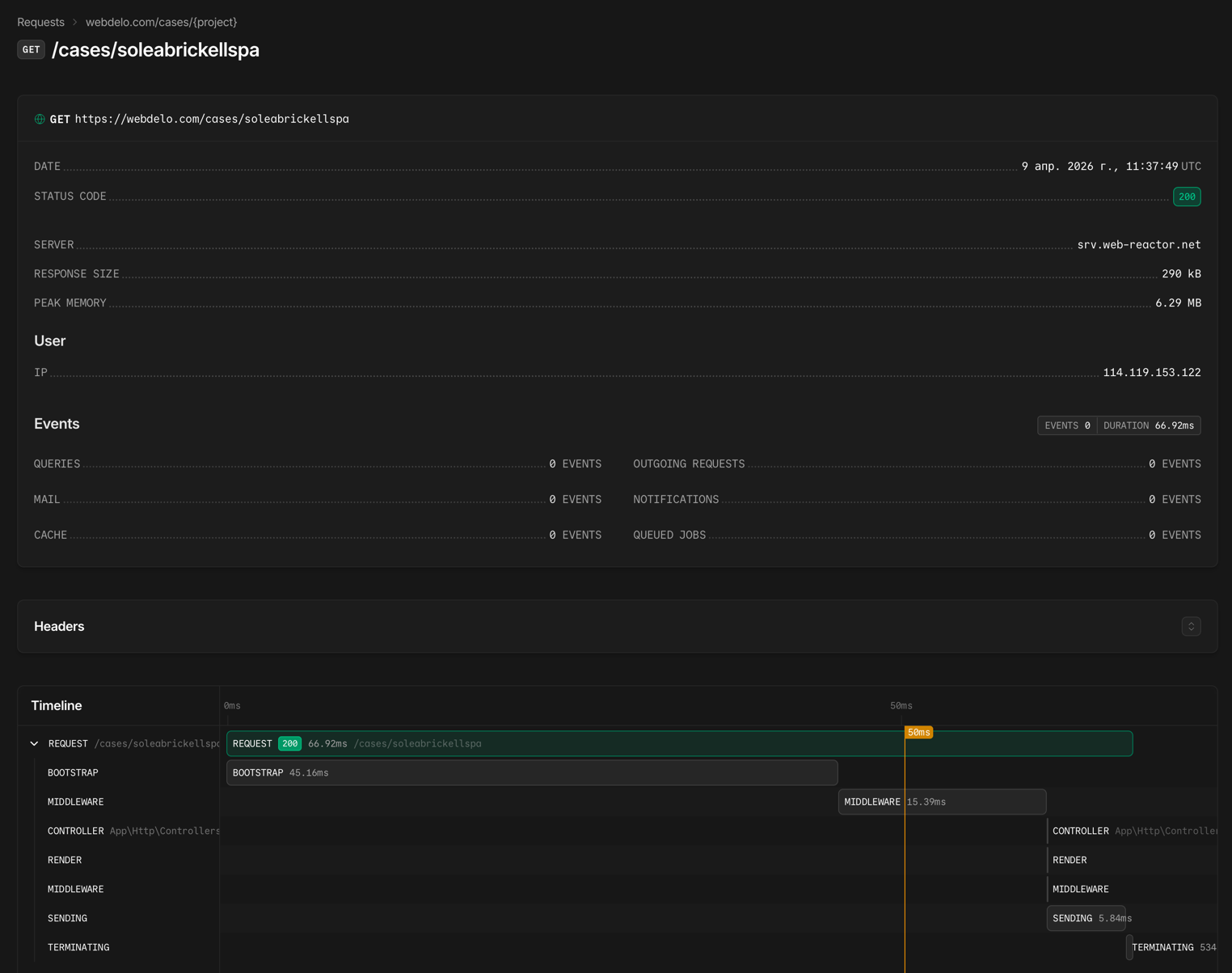
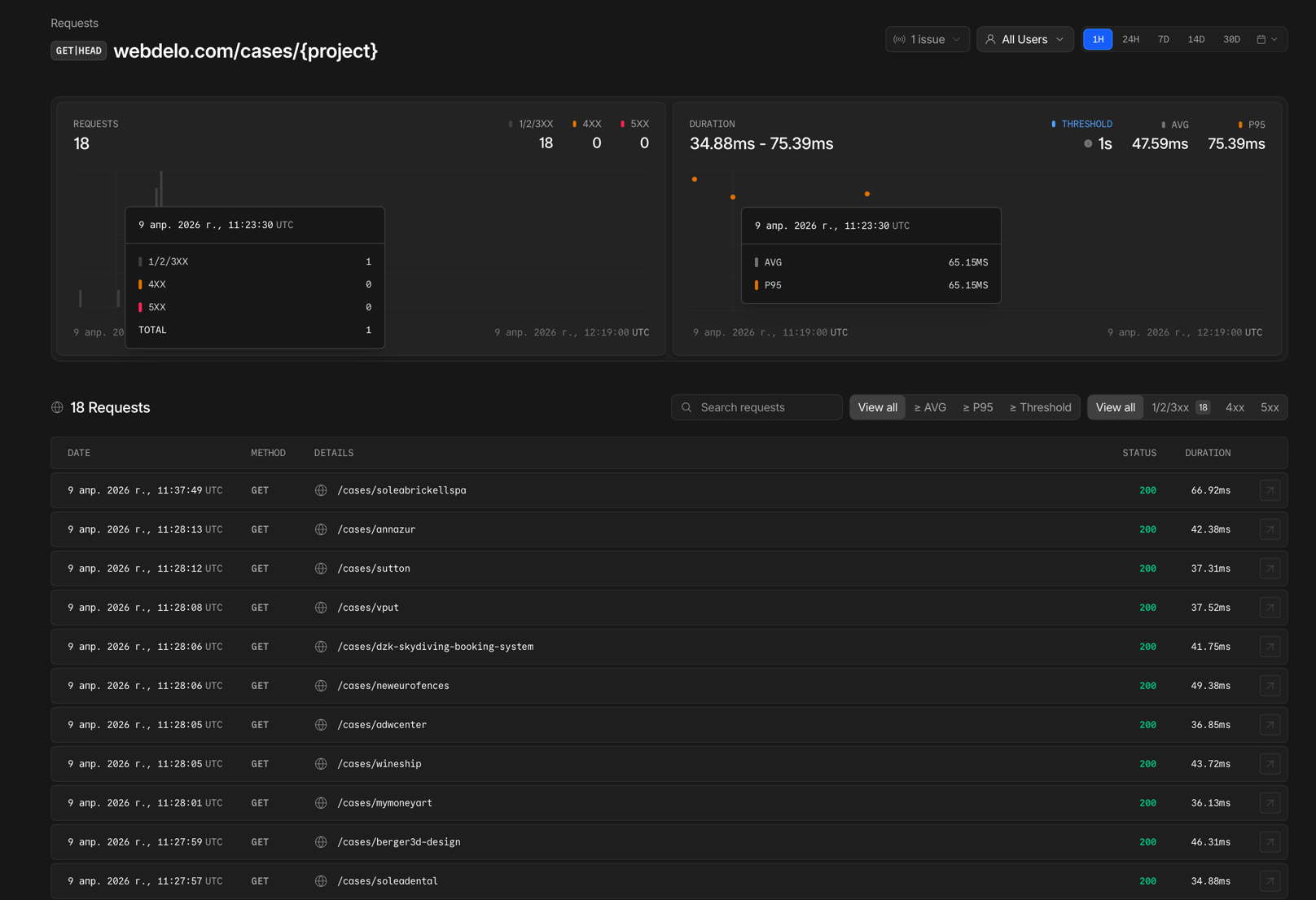
Laravel Nightwatch — individual request trace
Request tracing
Laravel Nightwatch — request list with timestamps
Request list
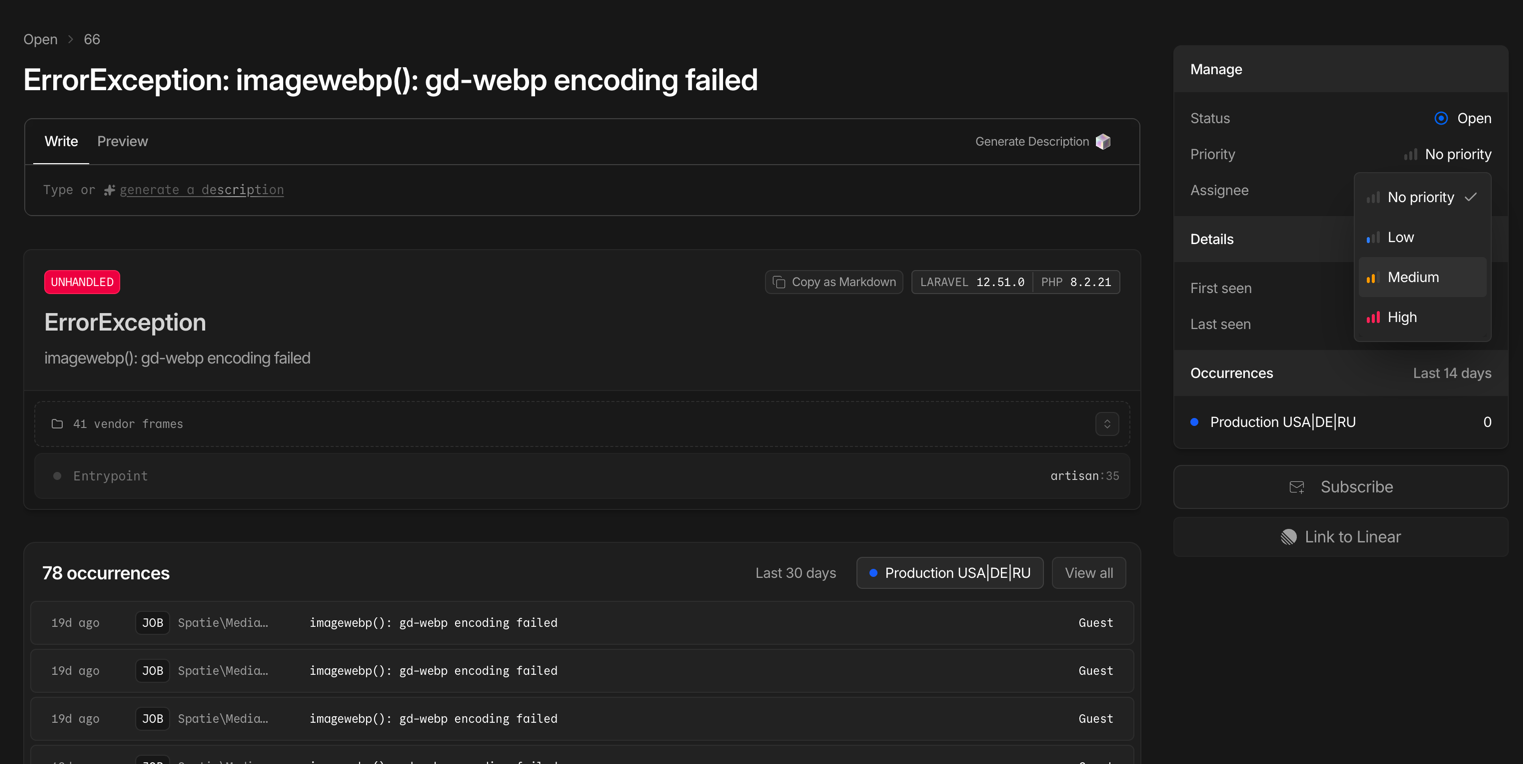
Laravel Nightwatch — exception details with stack trace
Exception with stack trace
Lighthouse CI — Core Web Vitals monitoring

Automated performance audits with every deployment:

  • Runs in the Bitbucket Pipelines CI/CD pipeline
  • Compares metrics against the previous release — regressions are caught immediately
  • LCP, INP, CLS, plus accessibility and SEO audits
  • Blocks deployment on critical performance drops

Methodology

For web applications, we use the RED approach (Rate, Errors, Duration) — the three key signals that are first to react when user experience degrades. For infrastructure metrics, we use the complementary USE approach (Utilization, Saturation, Errors).
From the user's perspective
Not internal server metrics, but the real experience: page load times, action success rates, wait times.
Percentiles, not averages
P95 and P99 show the worst experience real users are having, not the "average across the board."
Continuous, 24/7
Metrics are collected around the clock, not just during business hours.
Quarterly threshold reviews
After every significant incident and whenever the load profile changes.

Error Budget — your budget for acceptable errors

No service runs without hiccups. The Error Budget is an engineering approach that turns this reality into a manageable number: the acceptable amount of downtime or errors within a period that keeps the service within its SLO.
Target Uptime Allowable downtime per month Allowable downtime per year
99.5%~3 hrs 39 min~43 hrs 48 min
99.8%~1 hr 27 min~17 hrs 31 min
99.9%~43 min~8 hrs 46 min
99.95%~22 min~4 hrs 23 min
Budget isn't used up
You can ship updates, deploy new features, and experiment.
Budget is running low
The focus shifts to stability: critical fixes only, more rigorous testing.
Budget is exhausted
Changes are frozen until the buffer is restored. Priority goes to fixing root causes.

Why this matters to you: The Error Budget helps us make decisions based on data, not emotions ("let's not touch anything"). This means your project moves forward as fast as possible at your chosen level of reliability.

Monitoring levels by support plan

The depth of monitoring and the range of tracked SLI depend on your chosen support plan.
Capability Basic Extended Enterprise
Synthetic availability checks (Uptime)
SSL certificate and domain monitoring
Downtime notifications
Lighthouse CI (Core Web Vitals)
Latency monitoring (P50, P95, P99)
Error rate monitoring
Resource monitoring (CPU, RAM, disk)Selective
Application-level APM (Nightwatch / New Relic)Selective
Custom Grafana dashboards
Proactive degradation alerts
Error Budget tracking
SLI reportingOn requestMonthlyWeekly + QBR
Target Uptime (SLO)99.5%99.5–99.8%up to 99.9%*
* Enterprise plan targets are set on a case-by-case basis after onboarding and an architecture review.

Incident severity model

All incidents are classified by their business impact. Each severity level has its own response targets.
Level Description First Response (SLO) Resolution (SLO)
S1 — Critical Full or partial outage, a core business process is blocked, security incident ≤ 20 min (business hours) ≤ 4 hours
S2 — High Impact Significant degradation with workarounds available, impact on SEO or conversion ≤ 1 hour ≤ 8 hours
S3 — Medium Impact Defects with limited business impact ≤ 4 hours Within the sprint
S4 — Low Impact Cosmetic issues, UX improvements ≤ 1 business day Prioritized in the backlog

Transparency and reporting

SLI are only valuable when they're accessible and easy for you to understand. We don't hide metrics — we make them the foundation for decisions we make together.
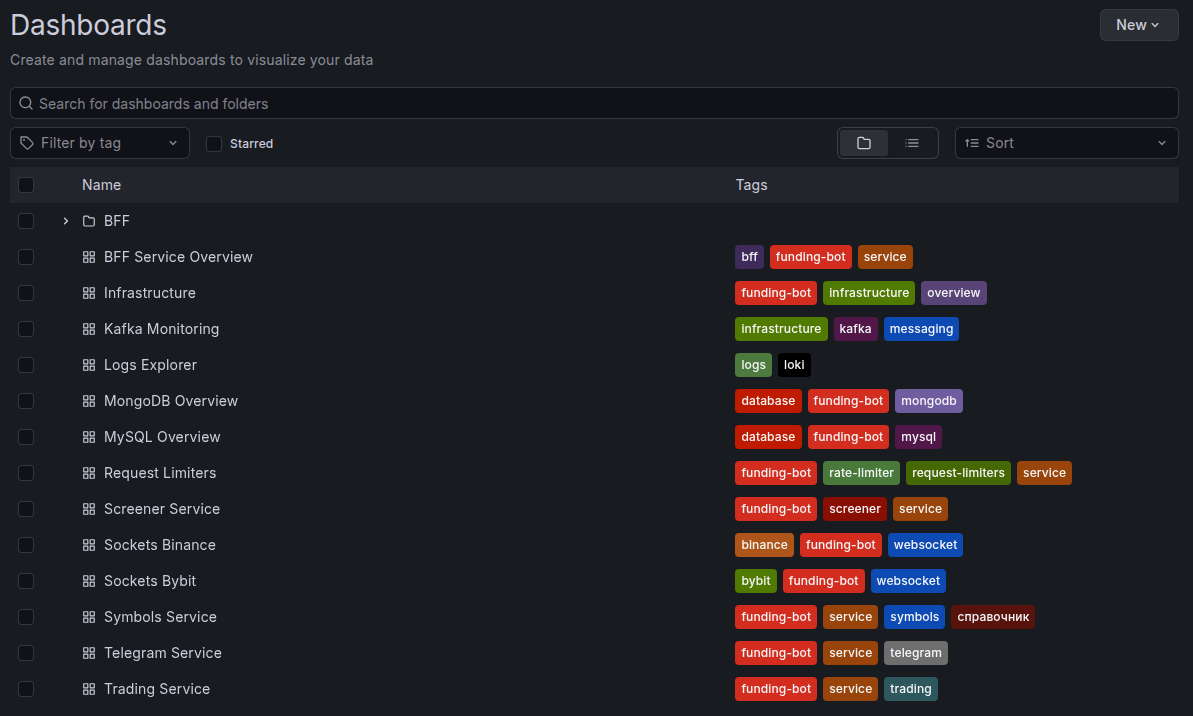
Set of Grafana dashboards for client projects
Grafana dashboard set — an example of what's available on the Enterprise plan

What's included in an SLI report

SectionContents
Uptime for the periodActual availability percentage compared to the target SLO
Latency trendsResponse time dynamics (P50, P95) with anomalies highlighted
Error rateError percentage broken down by type and source
Core Web VitalsLCP, INP, CLS trends and their impact on SEO rankings
Incidents for the periodCount, severity, response time, and time to resolution
Error BudgetHow much budget has been used and how much remains
RecommendationsSpecific steps to improve the numbers

Reporting frequency

PlanSLI reportFormat
BasicOn requestSummary in the ticketing system
ExtendedMonthlyPDF + commentary
EnterpriseWeekly + quarterly QBRDashboard + PDF + call

Our approach to reliability

SLI aren't just numbers in a report. They're the foundation of an engineering culture that shapes our day-to-day decisions.
Restore-first
When an incident hits, the priority is restoring service — not finding the root cause. The investigation starts after the service is back up and running.
No surprises
If something goes wrong, you hear about it from us — not from your own monitoring. Proactive notifications are part of how we operate.
Blameless postmortem
After every significant incident, we run a review without finger-pointing. The goal is systemic improvement, not blame. The outcome: specific actions to prevent a repeat.
Automated monitoring
Everything that can be automated, is automated. Our engineers make decisions — they don't manually check dashboards.
Clear ownership
We're responsible for code, deployment processes, and monitoring. Hosting infrastructure, access credentials, and third-party contracts fall under the client's responsibility. This clear division makes it possible to set realistic SLO targets.

Scope of responsibility and exclusions

A clear division of responsibilities makes SLI meaningful and interpretable. Without it, metrics and targets can easily become misleading.

Our responsibility

Application code, deployments, and CI/CD pipelines
Setting up, maintaining, and evolving the monitoring system
Incident response, root cause analysis, and corrective actions
Core Web Vitals monitoring and optimization recommendations
Error Budget management and SLI reporting

Client responsibility

Hosting infrastructure and DNS, unless transferred to our management
Third-party services and APIs: payment systems, CRM, email providers, and other external dependencies
Managing access credentials, user accounts, and internal security policies
Content, settings, and user actions in the admin panel
Providing data and access needed for diagnostics in a timely manner

What SLI typically don't cover

Force majeure
Major provider outages, data center failures, natural disasters.
Scheduled maintenance
Pre-agreed maintenance windows.
Unauthorized changes
Changes made by the client or third parties without our team's involvement.
External dependencies outside our control
Third-party APIs, CDNs, email and payment services.

The specific scope of responsibility and list of exclusions are defined in the contract and may vary depending on the project architecture and chosen support plan.

Frequently asked questions

What's the difference between SLI and SLA?
SLA describes processes and formal commitments to the client. SLI are the concrete measurable metrics: availability, speed, errors, stability. SLI serve as the technical foundation for the SLA.
Can I see my project's metrics in real time?
Yes. The format depends on your support plan and project setup. Some projects receive regular reports; Enterprise support includes dedicated dashboards and expanded metric visualization.
What happens when an SLO is breached?
We document the breach, notify the client, conduct an incident review, and define corrective actions. If your project has an SLA with service credits or other commitments, the next steps follow the terms of that agreement.
How are the SLO targets determined for my project?
After onboarding, we assess your architecture, infrastructure, incident history, load profile, and business criticality. The values on this page illustrate our standard approach and don't automatically apply as guarantees for every project.
Do you guarantee 100% uptime?
No. Zero downtime is not achievable in real-world systems. Instead of making unrealistic promises, we use measurable targets, track the Error Budget, and manage risk based on data.
What monitoring tools do you use?
The core stack depends on the project but typically includes UptimeRobot for external availability checks, Grafana and Prometheus for metrics and visualization, Laravel Nightwatch or New Relic for APM, and Lighthouse CI for performance monitoring and Core Web Vitals.
What is an Error Budget and why does it matter?
The Error Budget shows how much downtime or how many errors are acceptable within the chosen SLO. It helps balance reliability with the pace of change: as long as the budget isn't used up, the product can evolve quickly; once it's exhausted, the focus shifts to stabilization.
terminology

Glossary

*
APM (Application Performance Monitoring) — a category of tools that instrument application code to trace requests, detect slow queries, surface exceptions, and profile resource usage from inside the application. Examples: Laravel Nightwatch, New Relic.
*
Blameless postmortem — a structured, blameless review conducted after a significant incident. Focuses on timeline, root cause, contributing factors, and concrete action items to prevent recurrence.
*
CDN (Content Delivery Network) — a distributed network of servers that delivers static assets to users from the geographically nearest node, reducing latency.
*
CI/CD (Continuous Integration / Continuous Delivery) — an automated pipeline that builds, tests, and deploys code on every commit. CI catches regressions early; CD pushes validated changes to production reliably and repeatably.
*
CLS (Cumulative Layout Shift) — a Core Web Vitals metric that quantifies unexpected visual movement of page elements during load. "Good" threshold: ≤ 0.1.
*
Core Web Vitals — a set of real-user experience metrics defined by Google — LCP, INP, and CLS — used as a search-ranking signal and a proxy for perceived page quality.
*
CPU (Central Processing Unit) — the primary computational component of a server. High CPU load is one of the key signals of performance degradation.
*
Deployment Success Rate — the percentage of deployments that complete without causing service degradation or outage. Benchmark: ≥ 99%.
*
DNS (Domain Name System) — the system that resolves human-readable domain names into server IP addresses. DNS failures make a site unreachable even when the server itself is healthy.
*
Error Budget — the allowable amount of service degradation within a measurement period (typically monthly or quarterly). When the budget is exhausted, feature work stops and the team shifts focus to reliability restoration.
*
Error Rate — the percentage of requests that result in a server-side error (typically HTTP 5xx responses). Benchmark: < 0.1%.
*
First Response Time — the elapsed time from ticket creation to the first substantive reply from the support team. Benchmark for S1: ≤ 20 minutes during business hours.
*
INP (Interaction to Next Paint) — a Core Web Vitals metric measuring page responsiveness — the delay from a user interaction to the next visual update. "Good" threshold: ≤ 200 ms.
*
Latency — the time elapsed between a client sending a request and receiving the first byte of a response. Typically expressed as percentiles (P50, P95, P99) rather than averages.
*
LCP (Largest Contentful Paint) — a Core Web Vitals metric indicating when the largest visible content element finishes rendering. "Good" threshold: ≤ 2.5 s.
*
P50 / P95 / P99 (Percentiles) — statistical measures of latency distribution. P95 = 95% of requests completed within this time. Percentiles expose tail latency that averages hide, reflecting the experience of the slowest real users.
*
QBR (Quarterly Business Review) — a formal meeting held every quarter between the service provider and the client to review performance data, SLI/SLO results, incidents, and plans for the coming quarter.
*
RAM (Random Access Memory) — a server's working memory. High RAM consumption (above 85%) can cause application slowdowns or crash-loops.
*
RCA (Root Cause Analysis) — a systematic investigation aimed at identifying the underlying cause of an incident, not just its symptoms.
*
RED (Rate, Errors, Duration) — a monitoring methodology focused on three request-level signals most sensitive to user-facing degradation. Rate = request throughput, Errors = failed requests, Duration = latency.
*
Restore-first — an incident response principle: restore service availability first, investigate root cause second.
*
Saturation — the degree to which a resource (CPU, RAM, disk, network) is being pushed toward its capacity limit. High saturation predicts future latency spikes and outages before explicit errors appear.
*
SEO (Search Engine Optimization) — the practice of improving a site's visibility in search engine results. Core Web Vitals directly influence SEO rankings.
*
SLA (Service Level Agreement) — a formal contractual commitment between provider and client specifying guarantees, accountability mechanisms, and remedies if targets are not met.
*
SLI (Service Level Indicator) — a quantitative metric that captures a specific dimension of service quality as experienced by users (e.g., uptime %, P95 latency, error rate). The raw measurement layer.
*
SLO (Service Level Objective) — an internal target for an SLI (e.g., "P95 API latency < 300 ms"). SLOs define the quality bar that the team monitors and is held accountable to, forming the basis for SLA commitments.
*
SOW (Statement of Work) — a contractual document that defines the specific deliverables, timelines, and scope of work for a project or support engagement, including concrete SLO targets.
*
SQL (Structured Query Language) — the standard language for querying and manipulating relational databases. Slow SQL queries are a frequent root cause of application performance degradation.
*
SSL (Secure Sockets Layer) — the predecessor protocol to TLS, widely used as shorthand for HTTPS certificate-based encryption. Monitoring SSL expiry prevents certificate-related outages (alert threshold: ≥ 30 days before expiry).
*
Throughput — the number of requests a service processes per unit of time (e.g., requests per second). One of the three RED signals.
*
TTMR (Time to Mitigation / Restore) — the elapsed time from incident detection to full service restoration. Benchmark: ≤ 4 hrs for S1, ≤ 8 hrs for S2.
*
Uptime — the fraction of time a service is reachable and responding correctly, expressed as a percentage. Calculated as successful synthetic checks divided by total checks. Benchmark: ≥ 99.5%.
*
USE (Utilization, Saturation, Errors) — a monitoring methodology for infrastructure resources. Complements RED by identifying whether hardware constraints — not application logic — are the bottleneck.