Lost Website Leads: Causes, CRM Audit and Lead Tracking
A customer sees "Thank you," yet the inquiry never reaches the CRM. We break down five stages, eight common failures, server-to-CRM reconciliation, first-response SLAs and a reliable delivery architecture.

Why leads go missing even when the website works
A customer fills out a form and sees "Thank you," but the inquiry never appears in the CRM, and no sales rep knows about it. The result is lost website leads: everything appears to work, but contact with the customer has already been lost. You need to check the entire inquiry journey, from the server receiving the data to the sales rep's first response.
This article looks at inquiries customers have already submitted. Website traffic and page conversion rates are outside its scope. Even a well-built corporate website can fail to deliver leads correctly if no one monitors the integration and subsequent handling.
At Webdelo, we treat lead delivery as a shared process across marketing, IT, and sales. Developers are responsible for saving and transferring data. The head of sales is responsible for assignment and customer contact. Reconciling records between stages helps pinpoint a break without using the latest email to decide who is to blame.
Where leads get lost: five stages and eight common errors
An inquiry passes through five stages: the form, the server, data transfer, the CRM, and the sales rep's first response. Each stage needs a verifiable outcome. A submission message confirms only the event the developer connected it to.
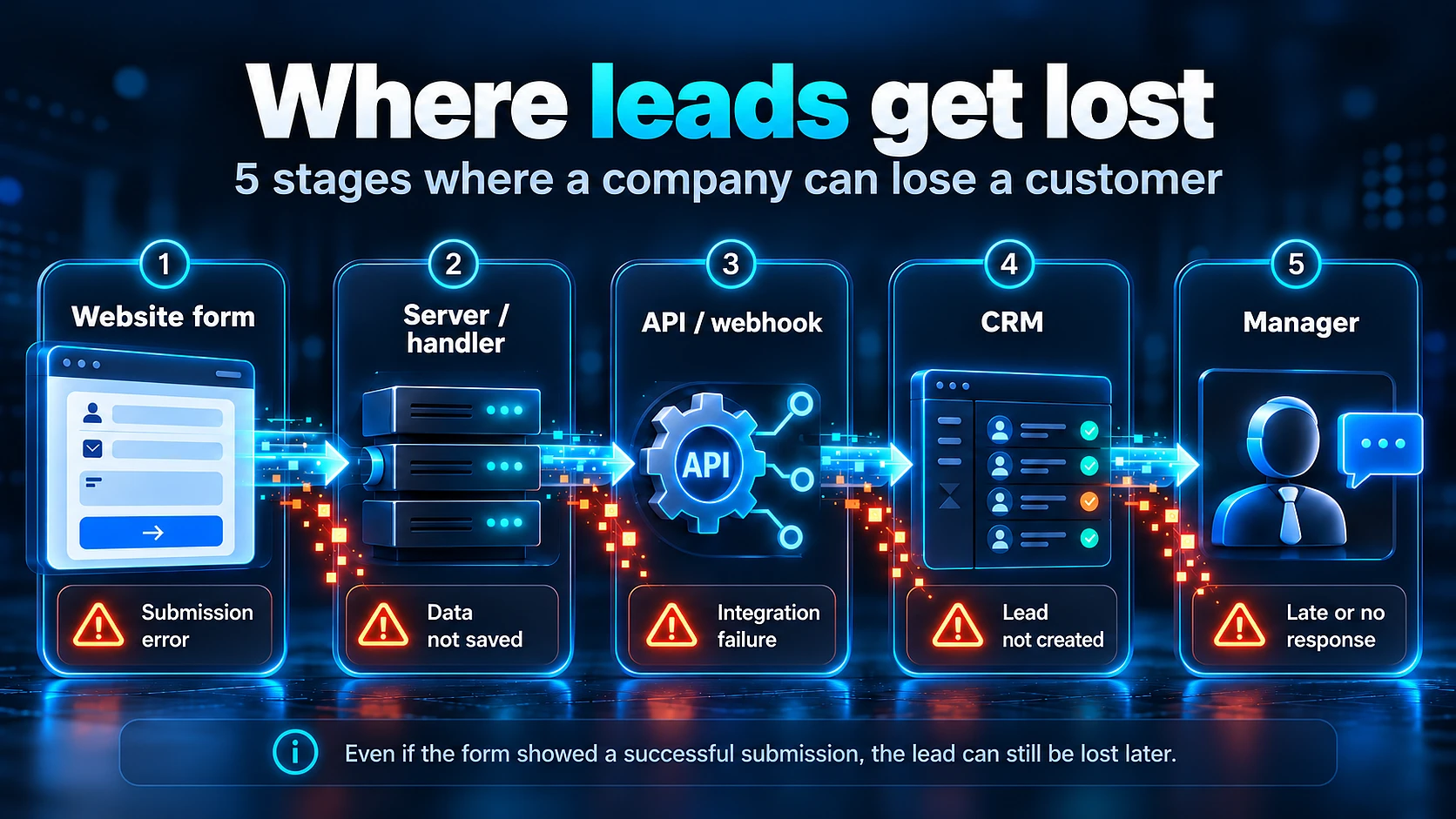
Five stages of the inquiry journey
- Form. Checks required fields and sends the data. Displays "Thank you" after server confirmation.
- Server. Validates incoming data and saves the inquiry. Assigns a unique identifier for later reconciliation.
- Transfer. The integration sends data through an API, the CRM's programming interface. Another option is a webhook, an automated HTTP request triggered by an event, or an email.
- CRM. Creates a record or correctly links the inquiry to an existing one. Saves the fields and assigns an owner.
- First response. The sales rep receives a notification and contacts the customer. The system records the action and its time.
The same route is needed when an ecommerce website receives a request for a wholesale order or help selecting equipment. The inquiry must retain the request details so the sales rep understands what the buyer needs.
Eight common errors
| Cause of failure | Symptom | What to check and fix |
|---|---|---|
| The integration broke after an update or migration | New inquiries stopped appearing in the CRM from a particular date | Check request URLs, access credentials, and server settings. Include a test submission in release checks |
| Emails are blocked or sent to spam | The server sends notifications, but the recipient cannot see them | Check delivery and SPF, DKIM, and DMARC, which govern sender authentication and how the domain's emails are handled |
| The mailbox has no active owner | Emails arrive, but no one reads them | Assign an owner and check access. Remove former employees' addresses from the settings |
| Some fields are not transferred | The record contains a name but no phone number or request details | Check the mapping between form fields and CRM fields, along with how required values are handled |
| Resubmissions create duplicates | A single customer attempt to contact the company creates multiple records | Use a submission identifier and protection against duplicate processing |
| The inquiry is merged incorrectly or left in "unprocessed" | The data ends up in someone else's deal or outside the active work queue | Check merge rules, the pipeline, and how unassigned inquiries are handled |
| No owner is available | The record has no owner or is assigned to an absent employee | Update assignment rules and arrange coverage for absences |
| No after-hours rule exists | Evening and weekend inquiries receive no response | Arrange on-call coverage or an autoresponse stating when contact will happen, and monitor the queue |
When designing a CRM, we connect record creation with rules for handling it. A database entry alone does not mean anyone will respond to the customer.
How to find missing inquiries when leads do not reach the CRM
You find losses by reconciling events: the server accepted the inquiry, the CRM registered it, and the system assigned a sales rep. An independent inquiry log on the website side provides the starting list for verification. Inquiry identifiers show exactly which records failed to reach the next stage.
First, agree on what counts as a lead. Label the following categories separately:
- New sales inquiries.
- Requests from existing customers.
- Repeat submissions of the same inquiry.
- Spam and irrelevant requests.
- Inquiries from suppliers and partners.
Without shared rules, marketing may count every submission while sales counts only new deals. In that case, a difference between reports does not prove a technical loss.
For example, analytics shows 30 goal completions, but the server saved 20 inquiries. Check the tracking: the event may have fired on a click or more than once. A goal should record a confirmed submission, not a button click.
If the server saved 30 inquiries but the CRM registered only 20, check data transfer and record creation rules. First, rule out queue delays and inquiries correctly added to existing records. Compare the same set of inquiries over the same period, not separate monthly reports.
The log should store the inquiry identifier, receipt time, source form, and delivery status. Contact details are needed for recovery, but access to them must be restricted. Our data security practices provide context for this storage and access control.
We recommend sending test inquiries from every form every two weeks and after each release. The log lets you find and resend a saved inquiry if the integration fails.
What lost leads cost: estimating potential revenue
You can estimate potential revenue at risk using the number of leads, the loss rate, the sales conversion rate, and the average order value. In a hypothetical scenario with 500 leads per month, the result is $25,000. This estimates sales opportunities, not confirmed losses.
Formula: number of leads × loss rate × sales conversion rate × average order value.
- With 500 leads and a 10% loss rate, 50 inquiries never reach processing: 500 × 10% = 50.
- At an assumed conversion rate of 20%, those inquiries could have generated 10 sales: 50 × 20% = 10.
- With an average order value of $2,500, potential monthly revenue at risk is 50 × 20% × $2,500 = $25,000.
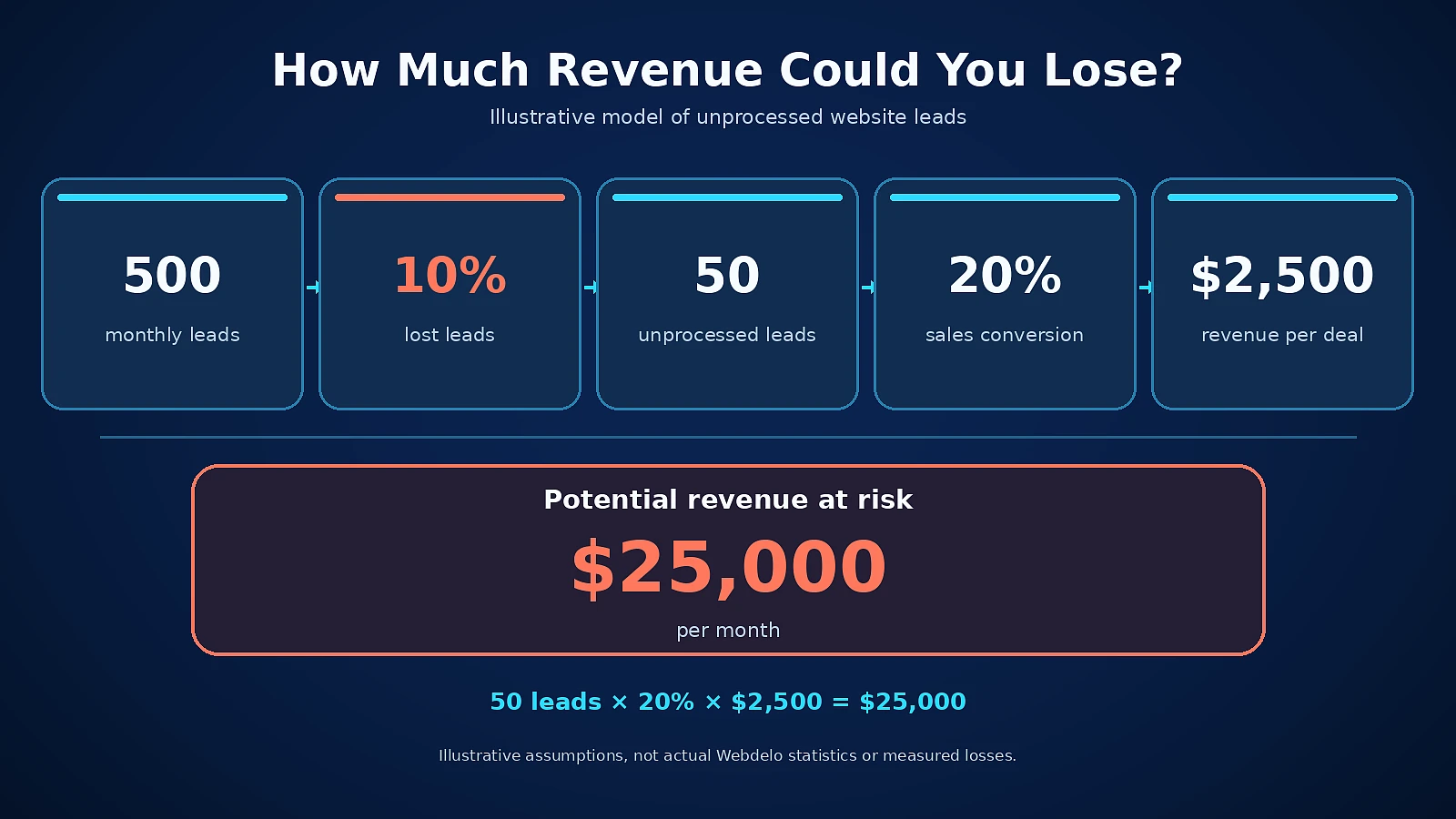
All values in this example are hypothetical. The amount is not actual profit and does not account for order fulfillment costs. The calculation also assumes that lost inquiries could have converted at the same rate as comparable inquiries that were processed.
For your own estimate, first determine the loss rate through reconciliation. Use conversion rates from similar sources and inquiry types that have completed the sales cycle. This lets you compare the cost of fixes with a grounded risk scenario.
A step-by-step audit of the inquiry journey
We audit in the order data travels: form, server, transfer, CRM, notifications, sales reps, and monitoring. At each step, we check the outcome and how errors are detected. This order helps avoid spending time on notifications when the record itself is not yet being created.
Steps 1-2: form and server receipt
List every submission point, including pop-up forms and mobile versions. Send a test inquiry with a unique marker from each one. Check the normal flow and what happens during a network error.
Find the request by its identifier in the server logs, which record server events. Then check the saved record: a successful HTTP response without a stored record is not enough. "Thank you" should appear only after storage is confirmed.
Steps 3-4: transfer and the CRM record
Check the API or webhook response and the integration error log. An "accepted" response may mean the task has entered a queue. You therefore need another check: the inquiry has actually been registered in the CRM.
- The name and phone number are saved without loss or incorrect conversion.
- The source and UTM parameters identifying the advertising campaign are linked to the inquiry.
- The record is in the correct pipeline.
- The new inquiry has not been merged with someone else's deal.
- The CRM identifier is linked to the original inquiry in the website log.
Integration checks are also part of RegionSoft's broader approach to CRM audits. To find lost inquiries, we supplement them with end-to-end reconciliation of individual records.
Steps 5-7: notifications, sales reps, and monitoring
Make sure an owner is assigned and can access the record. Check that they receive the notification and that the first contact is recorded. Then simulate a controlled integration failure and confirm that the alert reaches someone who can act on it.
Define access permissions and procedures for handling data exports before diagnostics begin. Protecting customer data when working with IT contractors is especially important when the audit involves real inquiries.
Include the audit findings in regular maintenance. When discussing what website maintenance includes, explicitly document checks for forms, integrations, and notifications.
Reliable CRM integration: delivery and confirmation
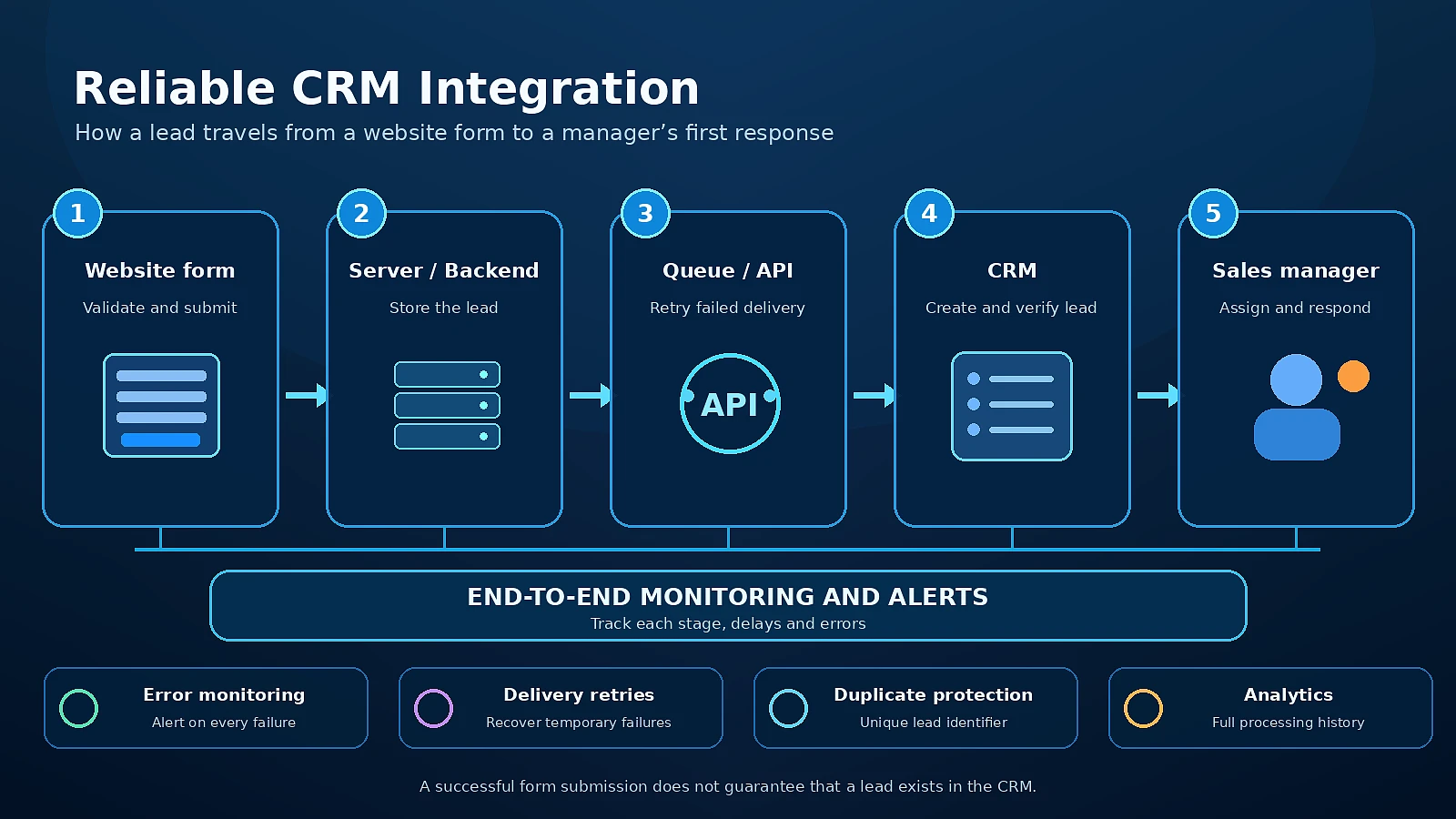
A reliable setup first saves the inquiry on the server, then sends it to the CRM through a queue with retries. If the CRM is temporarily unavailable, the inquiry remains pending delivery. The customer confirmation means the company has saved the request, while transfer status is monitored separately.
For controlled delivery, we recommend a server-side layer between the form and the CRM. A direct browser request or a single email without backup storage makes recovery after a failure more difficult.
The architecture includes several components:
- Inquiry log. Stores the inquiry and its delivery history independently of the CRM.
- Queue. Separates form receipt from the external system's response speed.
- Retry. Resends after a temporary error, with pauses between attempts.
- Idempotency key. A unique key for each submission prevents duplicate record creation when a request is retried.
- Error log. Stores the failure reason and inquiry identifier without unnecessary personal data.
- Alerts. Notify the owner about undelivered inquiries and exhausted retries.
We also check the gap between saving an inquiry and adding it to the queue. If the process stops at that point, the record may remain unsent. One safeguard is to save the inquiry and its delivery task in a single transaction, meaning one indivisible operation.
Retries need rules too. If the CRM is temporarily unavailable, the request can be retried. If a required field is invalid, the data needs correction. If the CRM created the record but its response was lost, the integration must check the result using the inquiry identifier before retrying.
A dedicated amoCRM integration service is described in Dmitri Cercel's profile. This approach makes data transfer a separate part of the system with its own error monitoring.
Webdelo DevOps and Infrastructure covers the operational side of these solutions. For the inquiry journey, it is important to monitor the age of the oldest queued task and any undelivered inquiries, not just server availability.
Webdelo case studies: BolgarskiyDom and Bonadomus
For BolgarskiyDom, we worked on inquiry handling and CRM automation, including a dedicated amoCRM integration architecture. For Bonadomus, the task included transferring inquiries with property context. These projects illustrate two aspects of processing: delivering data and making it useful to the sales rep.
BolgarskiyDom: CRM automation
In the BolgarskiyDom project, automated inquiry handling is connected to CRM integration. The dedicated amoCRM architecture allows data exchange to be treated as a separate technical task.
Auditing this kind of solution requires clear responsibility boundaries: where the inquiry is saved and which component owns the next delivery attempt. This makes it possible to verify a failure at a specific transition.
Bonadomus: property context in the inquiry
In the Bonadomus project, inquiries reach the CRM with property context. The sales rep can see which property the request concerns and prepare a relevant response.
That is why we also examine record content when checking delivery. A phone number without the property of interest preserves the ability to contact the person, but loses part of their request.
First-response speed and sales team SLA
An inquiry in the CRM can remain unprocessed if no one is responsible for the first contact. A sales team SLA defines agreed rules: who responds, by when, and who receives an escalation if the response is overdue. The company chooses timeframes based on working hours and the nature of its inquiries.
Start with clear statuses:
- New inquiry. The request is registered and waiting for a sales rep to accept it.
- In progress. The sales rep has accepted the request and is taking the next step.
- Waiting for customer. A response has been sent, and the next contact date is recorded.
- Qualified. The request has been confirmed to meet the sales qualification criteria.
- Closed. The outcome and reason for closure are recorded.
For each status, define the event that triggers a transition and the allowed waiting time. An overdue inquiry should create a task for a specific manager or backup employee. Otherwise, the status changes only after someone manually reviews a report.
For example, an inquiry received at 11:00 p.m. on Saturday may receive no human response until Monday. If there is no on-call coverage, the autoresponse should clearly state when a person will respond. The automatic acknowledgment itself should be tracked separately from the sales rep's first contact.
A technical SLA governs a different part of the process: responding to a system failure. Support and incident-response commitments help distinguish these obligations from sales procedures. Neither set of rules guarantees revenue growth on its own.
Lead tracking: delivery, assignment, response, and conversion
Lead tracking relies on five metrics: server receipt, CRM registration, assignment, first response, and SLA breaches. Together, they show where delays occur. Meaningful comparisons require consistent inquiry identifiers and counting rules.
| Metric | What it measures | Where to get the data | Warning sign |
|---|---|---|---|
| Server accepted | Number of unique inquiries accepted and saved by the server | Website inquiry log | A test submission does not create a saved record |
| CRM created | Number of inquiries with confirmed CRM registration | Integration responses and CRM records linked to original identifiers | Accepted inquiries remain unregistered beyond the allowed delivery time |
| Assignment rate | Share of registered inquiries with an available owner | Assignment history and active employee list | Inquiries are unassigned or assigned to absent employees |
| First response | Time from inquiry receipt to the first recorded human response | Receipt time, correspondence, and phone system events | The number of unanswered inquiries is growing, or waiting time exceeds the agreed limit |
| SLA breaches | Number and share of inquiries that miss the agreed deadline | CRM and business calendar rules | Overdue inquiries recur or remain without escalation |
If a repeat inquiry is added to an existing deal, the CRM created metric must count that inquiry's registration. Counting only new records will create a false discrepancy with the server.
For lead response time, choose the calendar in advance: business hours or total elapsed time. Alongside the average, it is useful to see a list of unanswered inquiries. They may be excluded from the average entirely, even though they need attention first.
"A website's effectiveness cannot be measured only by the number of forms submitted. It is important to know how many inquiries actually reached the CRM, how many were accepted by sales reps, and how many received a timely response. Without monitoring the entire journey, a company may overestimate its marketing results."
Andrei Jumatii, Founder, Marketing Director, Webdelo
Calculate sales conversion using server-accepted inquiries classified according to agreed rules. Use inquiries from the same period and allow them to complete the sales cycle. Counting from button clicks mixes on-page behavior with actual customer requests.
Inbound lead management: automation, notifications, and monitoring
Automating inbound lead management removes manual copying and immediately assigns an inquiry to a sales rep. Monitoring checks delivery, while escalation helps ensure overdue inquiries receive attention. Every alert should lead to a clear action.
Lead routing, or inquiry assignment, can follow a round-robin sequence or employee workload. Different business areas may use rules based on region, product, or source. Every rule needs a fallback route in case no suitable sales rep is available.
A group chat does not replace assignment: everyone may expect a colleague to take the request. A workable setup is simpler: notify the owner, then escalate to their manager if the deadline is missed. Sending the same message to several channels at once adds noise.
Define separate monitoring conditions:
- The server is accepting inquiries, but no new CRM registrations appear.
- The webhook or API returns errors.
- The number of undelivered inquiries or their waiting time is growing.
- A test inquiry fails to complete the entire journey.
- New inquiries are assigned to inactive employees.
Assess an absence of records over a typical period alongside incoming volume. Zero inquiries at night may be normal, but zero records while forms continue to arrive requires investigation. When an employee leaves or takes time off, update routing before new inquiries arrive.
When a company operates across regions, digital support for entering new markets should account for the inquiry language and the sales team's time zone. These details affect assignment and the contact timeframe promised to the customer.
Audit checklist: 15 checks
These fifteen checks cover the inquiry journey from the form to the team's response. Run through the full list after a release and at least quarterly, alongside regular test submissions. Assign an owner to fix each unmet item.
Form and server
- A test inquiry has been submitted from every form, including mobile and pop-up forms.
- "Thank you" appears only after the server has confirmed receipt and storage of the data.
- The inquiry is saved with a unique identifier in a log independent of the CRM.
- Repeated clicks and retried requests do not create duplicates of one submission.
- If email is used, SPF, DKIM, DMARC, delivery, and an active mailbox owner have been checked.
Integration and CRM
- The inquiry is registered in the correct CRM pipeline.
- The name, phone number, request details, source, and available UTM parameters are transferred in full.
- A new customer is not merged with someone else's deal, and inquiries are not left unattended in "unprocessed."
- Integration errors are logged, and temporary failures trigger retries.
- Every server-accepted inquiry is matched to a CRM record or has an explainable pending status.
Sales process
- An owner is assigned automatically according to an agreed rule.
- Routing excludes former and temporarily absent employees.
- Response deadlines and overdue escalation procedures are defined.
- A separate rule is in place for after-hours inquiries.
- An alert for interrupted inquiry delivery is configured and tested.
Webdelo CRM integration and lead management audit
At Webdelo, we check the entire chain: the form, server-side processing, API or webhook, CRM, notifications, sales rep actions, and monitoring. The audit aims to establish where inquiry delivery or handling breaks down. We connect recommendations to the identified failure and its impact on the team's work.
The audit includes:
- Test inquiries from an agreed list of forms.
- Reconciliation of saved server events with CRM registrations.
- Checks of field completeness and record merge rules.
- Checks of assignment, notifications, and escalation.
- Review of delivery retries and recovery after errors.
- Recommendations on architecture and fix priorities.
The company's engineering function is represented by Webdelo CTO Andrew Popov. When discussing the audit, we agree on the technical scope and required access.
To get started, prepare a list of forms, the name of your CRM, and an example of an inquiry that could not be found or processed on time. If there is no server log yet, the first step is to define which events need to be recorded.
Request a lead management audit.
What matters in lead tracking
"Thank you" on the screen does not prove that an inquiry reached a sales rep. The evidence is a traceable journey: a saved inquiry, CRM registration, an available owner, and a recorded first contact.
Start by reconciling the server log with the CRM. Then fix the delivery gaps you find and establish handling rules. This order gives managers a verifiable view of how inquiries are handled and a basis for decisions about further automation.
Frequently Asked Questions
Why do website leads not reach the CRM even though the customer sees "Thank you"?
The "Thank you" message only confirms the event the developer tied it to, not that the inquiry was registered in the CRM. Common causes include an integration that broke after an update or migration, fields the CRM does not accept, and inquiries merged into the wrong deal or left in an unsorted queue. If notifications go by email, messages may land in spam or reach a mailbox that nobody owns anymore.
How should you test the forms on your website?
List every submission point, including pop-up forms and mobile versions, and send a test inquiry with a unique marker from each one. Follow it through the entire journey: the server log entry, the CRM record, owner assignment, and the notification. Also check what happens when the network fails. We recommend doing this every two weeks and after every release.
How can you detect lost leads and find out where they went missing?
You need an inquiry log on the website side that is independent of the CRM and gives each inquiry a unique ID. Use these IDs to reconcile the same set of inquiries over the same period: what the server accepted, what the CRM registered, and who was assigned. Before reconciling, agree on what counts as an inquiry and tag duplicates, spam, and requests from existing customers separately, or report differences may be misleading.
What should you do if an inquiry reaches the CRM but no sales rep responds in time?
Agree on a sales team SLA: who handles the first contact, within what time frame, and who receives overdue inquiries. Assign owners automatically, remove departed or absent employees from routing, and set a separate rule for after-hours inquiries, such as an on-call person or an auto-reply with a clear contact time. Track the auto-reply separately from the sales rep's first response.
How do you estimate how much revenue lost leads may put at risk?
Use this formula: number of inquiries × loss rate × sales conversion × average deal size. In a hypothetical example, 500 inquiries × 10% = 50 lost inquiries, and 50 × 20% × $2,500 = $25,000 in potential monthly revenue at risk. This is an estimate of sales opportunities, not actual profit or proven losses. Take the loss rate from your reconciliation and the conversion rate from similar inquiries with a completed sales cycle.
How do you set up monitoring to catch lead delivery failures early?
Set up separate alerts: the server accepts inquiries but no new CRM records appear; the API or webhook returns errors; the number of undelivered inquiries or the age of the oldest queued job grows; a test inquiry fails to complete the journey; inquiries are assigned to inactive employees. Assess a lack of new records together with incoming volume. Each alert should go to a person who can take action.
What CRM integration architecture helps prevent losing leads during failures?
A reliable setup first saves the inquiry on the server, then sends it to the CRM through a queue with retries. An idempotency key prevents a retry from creating a duplicate, an error log records the cause of each failure, and alerts flag undelivered inquiries. If the CRM is temporarily unavailable, the inquiry waits for delivery instead of disappearing.