Website Migration SEO: How to Recover Lost Traffic and Rankings After a Redesign
Organic leads fell after a redesign? This guide shows how to tell real search losses from tracking or form failures, which checks to run in the first 24 hours, and why fixes alone do not guarantee rankings return.

Start by Separating Lost Visibility, Missing Data, and Lost Leads
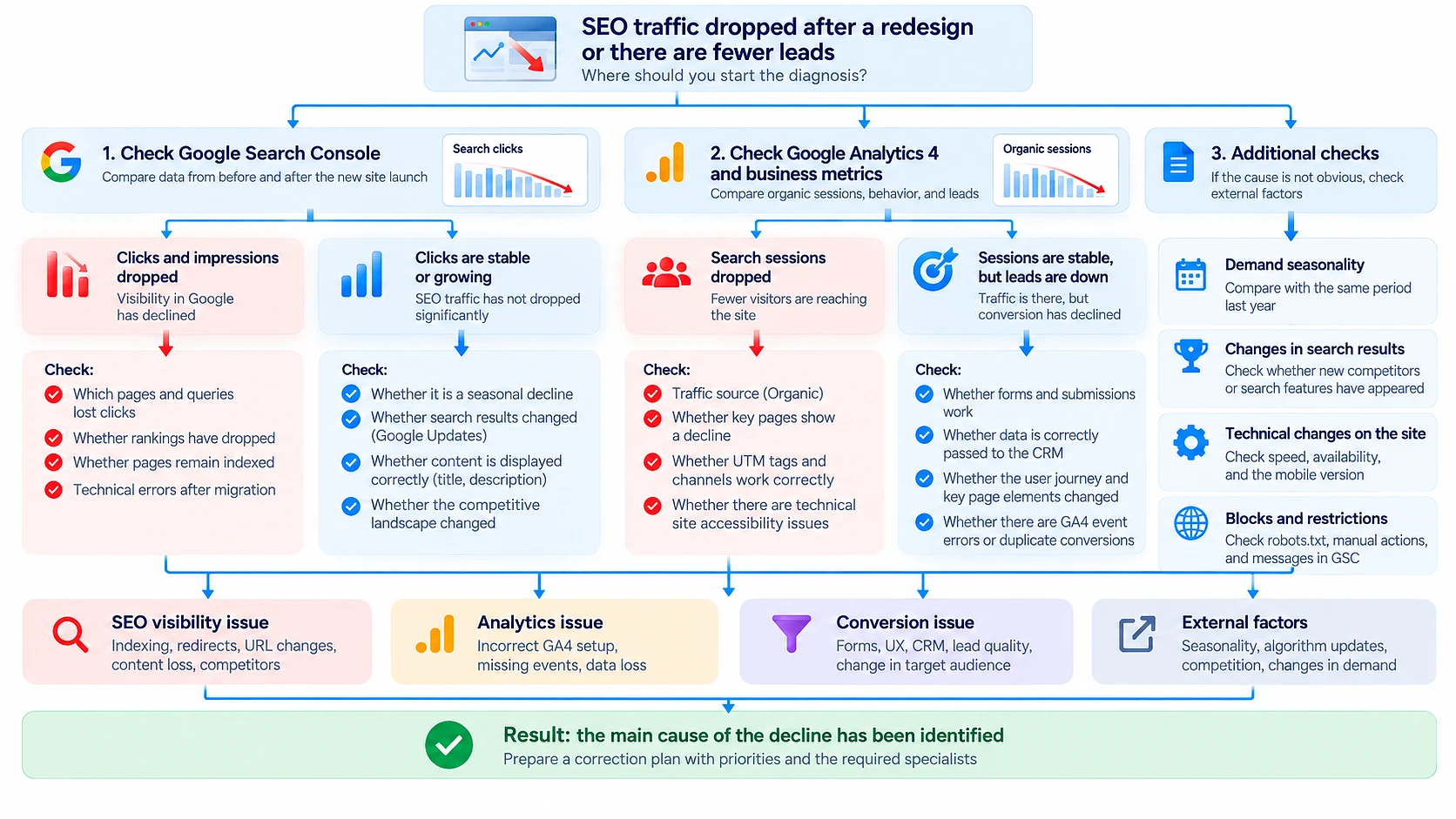
When organic leads fall after a redesign, website migration SEO recovery starts with identifying what changed: search visibility, tracking, or conversion into leads. Each problem needs a different fix. At Webdelo, we compare Search Console, analytics, and CRM data before recommending technical changes.
This guide covers the first-day checks, common migration mistakes, and a recovery sequence your marketing and development teams can work through together. Fixing errors does not guarantee that rankings, traffic, or sales will return. Your team controls the corrections, while Google controls when it recrawls and reprocesses the affected pages.
Why SEO Traffic Drops After a Redesign or Migration
A redesign can disrupt the connection between old URLs and their replacements, remove valuable content, or prevent Google from accessing pages. An apparent SEO traffic drop after redesign can also come from missing analytics tags. If search visits remain stable but inquiries disappear, investigate conversion and lead delivery.
- Search visibility: missing redirects, removed content, broken internal links, or indexing restrictions can affect discovery and rankings.
- Measurement: missing GA4 tags, changed consent settings, or missing key events can make recorded traffic and conversions fall.
- Conversion: a broken form, unclear call to action, or failed CRM connection can reduce recorded leads even when visitors still arrive.
For example, a form may display a success message without creating a CRM record. That calls for an integration check, not a rewrite of the page's search content. Conversely, a former service page returning a 404 needs a URL and content review.
Normal Ranking Fluctuations vs. Critical Migration Issues
Temporary ranking fluctuations can occur while Google processes a site move. A site-wide impression collapse, widespread unexpected 404 errors, or important pages leaving the index warrants immediate investigation. Do not assume these symptoms will resolve by waiting.
Google's guide to debugging search traffic drops covers technical problems, security issues, manual actions, ranking updates, and changes in search interest. A drop close to launch does not establish that the migration caused it.
| Symptom | Interpretation | Action |
|---|---|---|
| Gradual movement on some queries | Possible recrawl and ranking fluctuation | Monitor affected queries and landing pages in Search Console. |
| Site-wide impression collapse | Possible access, indexing, or server incident | Check robots.txt, noindex directives, and server errors immediately. |
| Drop concentrated in specific sections | Possible redirect gaps or content changes | Compare old and new URLs and content in those sections. |
| GA4 sessions fall while Search Console clicks remain stable | Likely measurement problem | Check tags, consent behavior, and reporting configuration. |
| Search clicks remain stable while leads fall | Possible conversion or lead-delivery failure | Test forms and CRM delivery, then review landing-page behavior. |
| Decline follows a seasonal or market trend | Possible change in demand | Compare year-over-year results and broader search interest. |
Compare equal periods before and after launch in Search Console's Performance report. Separate page groups and queries to establish whether the decline affects the whole site or a particular template. Check the Manual actions and Security issues reports as well.
What to Check in the First 24 Hours
First, establish which system shows the loss. Then check site-wide indexing blockers, server failures, and redirects from important old URLs. Test forms immediately alongside these checks, because a delivery failure can lose inquiries while the SEO investigation continues.
| Tool or check | Diagnostic | Priority |
|---|---|---|
| Google Search Console | Review clicks, impressions, page indexing, and crawl problems. Inspect representative affected URLs. | Critical |
| GA4 | Verify tags on each new template, consent behavior, and lead-related key events. | High |
| Redirects | Check that moved old URLs return 301 or 308 redirects to relevant replacements. | Critical |
| Noindex | Check page source and HTTP headers for staging directives that prohibit indexing. | Critical |
| Robots.txt | Confirm important production pages are accessible to Googlebot. | Critical |
| XML sitemaps | List the intended new canonical URLs and submit the sitemap in Search Console. | High |
| Server errors | Review logs and Search Console for 5xx responses, timeouts, and availability problems. | Critical |
| Forms | Submit a test inquiry and confirm it reaches the correct CRM record and owner. | Critical |
We start with these basic blockers because one production setting can affect every page using a template. A robots.txt rule prevents crawling, while a noindex directive tells a crawler not to index a page. Google must be able to crawl a page to see that its noindex directive has been removed.
Preserve the launch timestamp, current settings, and relevant logs before changing them. Assign an incident owner to coordinate fixes and record what changed, so separate teams do not overwrite each other's work.
10 Website Migration SEO Mistakes That Hurt Rankings
Migration problems frequently involve URL mapping, indexing directives, and content removed without a replacement plan. These errors can interrupt access to pages or send conflicting signals about which URLs should appear in search.
- Incomplete URL mapping. Important old pages have no documented destination, leaving visitors and crawlers at unexpected dead ends.
- Unsuitable redirects for a permanent move. Server-side 301 or 308 redirects communicate permanence directly. A 302 signals a temporary move, while JavaScript redirects require additional processing.
- Redirect chains and loops. Chains add unnecessary hops. Loops prevent the destination from loading.
- Every old URL redirects to the homepage. Irrelevant destinations can confuse visitors and may be treated as soft 404s, meaning Google sees them as error pages despite their response.
- Staging noindex directives remain live. A template-level directive can exclude an entire section from search.
- Robots.txt blocks production pages. Google cannot crawl the content needed to understand the move.
- Canonical tags identify the wrong URLs. A canonical tag indicates the preferred version of a page. Pointing it to an obsolete URL sends a conflicting signal.
- Hreflang references break. Hreflang identifies language or regional alternatives. Old destinations and missing reciprocal references can disrupt that relationship.
- Useful content disappears. A cleaner layout may remove the explanations that previously answered searchers' questions.
- Internal links and sitemaps retain old URLs. Crawlers and visitors continue reaching obsolete addresses instead of the intended destinations.
We avoid blanket homepage redirects because they hide unresolved mapping decisions. Use a relevant replacement when one exists. If content has genuinely been removed without an equivalent, an appropriate 404 or 410 response is clearer than an unrelated destination.
How to Audit Redirects and Restore SEO Signals
A redirect audit verifies that each valuable moved URL leads directly to its most relevant replacement through a permanent server-side redirect. The destination must work and be eligible for indexing. Google still needs to crawl and process the relationship.
Build the old URL inventory from archived sitemaps, Search Console exports, analytics, and backlink records. Include pages with commercial value even if their traffic was modest. Google's site-move documentation provides the reference workflow for URL mapping, permanent redirects, and post-move monitoring.
For each moved URL, verify a 301 or 308 response, a single redirect hop, and a relevant destination. Check that the destination returns 200, permits indexing, and uses a self-referencing canonical when it is the intended canonical page. A redirect that ends at another error or a blocked page remains an unresolved problem.
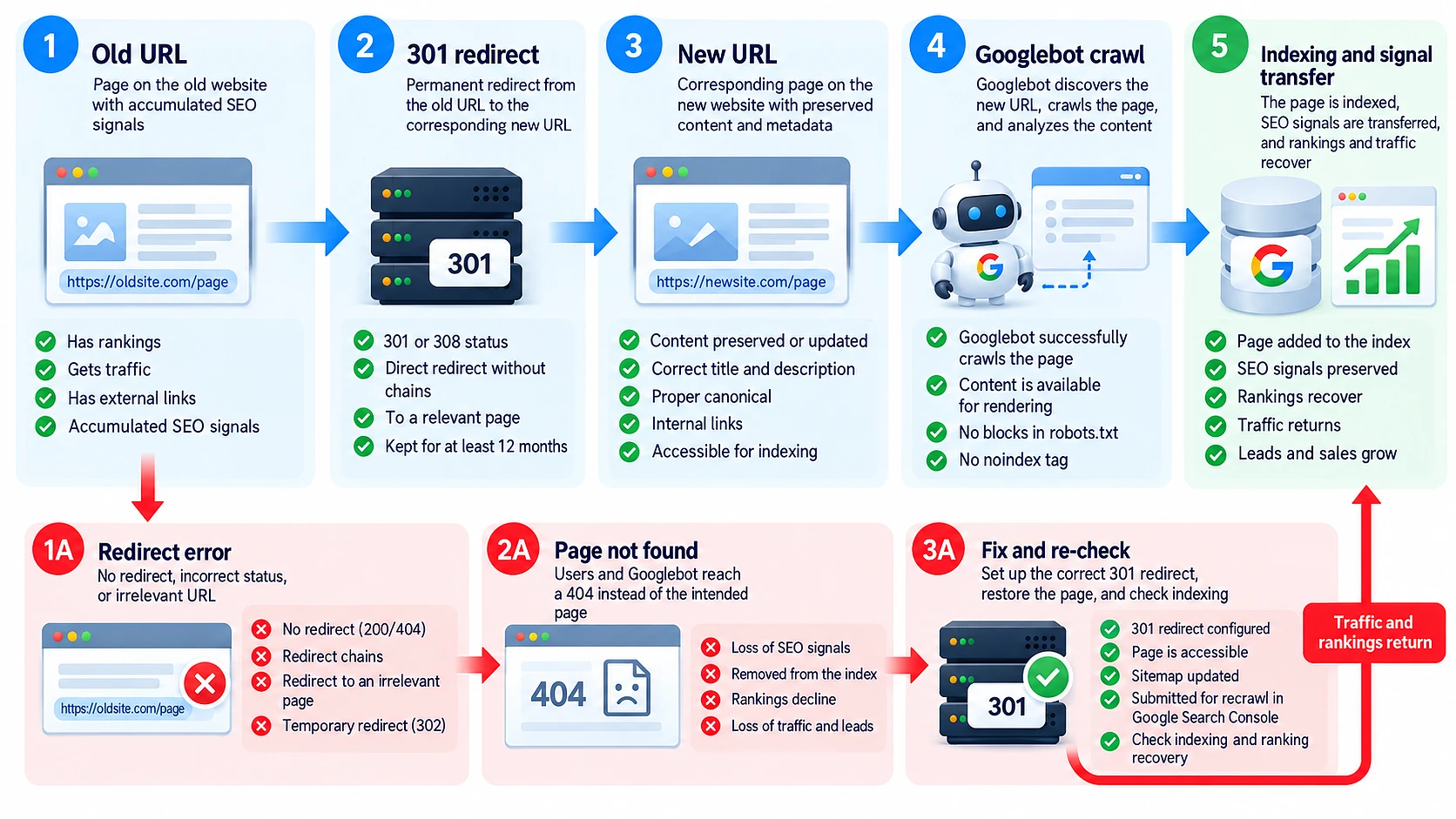
Update internal links, sitemaps, canonical tags, and hreflang references to use the new URLs consistently. For an eligible domain move, use Search Console's Change of Address tool as part of the migration workflow. These actions help Google interpret the move but do not guarantee restoration of previous rankings.
How to Measure Lost Organic Traffic and Leads
Measure the incident across search visibility, on-site activity, and business outcomes. Search Console shows Google Search impressions and clicks, GA4 records measured visits and behavior, and the CRM shows received leads. Cross-checking these sources helps distinguish missing demand from missing data.
- Use comparable periods. Compare equal-length windows with matching weekdays, and review the equivalent period last year for seasonality.
- Segment the loss. Group old URLs with their replacements, then compare service sections, queries, devices, and markets.
- Measure business impact. Review qualified organic leads and their landing pages where attribution is available, rather than treating every form event as a sales opportunity.
Search Console clicks and GA4 sessions will not match exactly because the systems measure different things. Compare trends using consistent filters, and account for reporting delays. A confirmed Search Console decline can establish search loss even when analytics tracking is broken.
If search clicks remain stable but recorded sessions fall, investigate measurement first. If both remain stable while CRM leads decline, trace submissions through the form and integration, then examine conversion behavior and lead quality.
7 Steps to Recover Rankings After Site Migration
To recover rankings after site migration, prioritize access and indexing before lower-impact refinements. The sequence below gives the incident owner a practical recovery order. Assign parallel work on broken forms or tracking whenever those failures are already confirmed.
- Confirm the affected layer. Compare Search Console, GA4, and CRM trends around launch. Record which page groups and business outcomes changed.
- Remove indexing and access blockers. Correct unintended noindex directives, robots.txt restrictions, and server failures. Verify the production response after deployment.
- Repair the redirect map. Add relevant, single-hop 301 or 308 redirects for moved URLs. Test the complete map rather than a few homepage examples.
- Restore content and supporting signals. Reinstate useful material lost during redesign. Align canonical tags, hreflang references, and internal links with the intended new pages.
- Repair measurement and lead delivery. Validate GA4 collection under the intended consent settings. Confirm that form submissions reach the CRM and responsible sales team.
- Support Google's discovery of changes. Submit updated sitemaps and request indexing for selected important URLs in Search Console. Requests do not guarantee indexing or a processing deadline.
- Monitor by page group. Track indexing, clicks, and qualified leads against the baseline. Investigate unresolved groups instead of repeatedly changing the whole site.
Give every recovery task an owner, a verification test, and a recorded deployment time. This makes it possible to distinguish a fix that failed technically from one that is live but has not yet been reprocessed by Google.
Who's Responsible for Lost SEO Traffic?
Operational responsibility depends on who agreed to specify, implement, and verify each migration requirement. The contract and acceptance records help establish those roles. An SEO investigation can document failures and ownership gaps, but it cannot determine legal liability.
| Issue | Team's verification responsibility | Evidence to review |
|---|---|---|
| Missing redirects | The agreed URL-mapping owner and redirect implementer | Specification, approved redirect map, test results, release log |
| Staging noindex or robots.txt restrictions remain | The release owner responsible for production acceptance | Deployment checklist, configuration changes, release log |
| Important content disappears | The content owner and project lead approving the new structure | Approved sitemap, content inventory, revision history |
| Tracking stops working | The analytics owner and implementation team | Tagging plan, acceptance records, configuration history |
| Forms or CRM delivery fail | The developer and CRM owner within their agreed scope | End-to-end test records, integration logs, contract scope |
If migration SEO was absent from the agreed scope, that indicates a planning gap rather than proving fault by one party. Separate urgent restoration from any dispute about payment. Legal questions require review by a qualified lawyer.
Limit audit access to what each specialist needs, especially when investigating CRM delivery. Our guidance on protecting customer data when working with IT contractors is relevant when granting temporary access to lead records and integration systems.
How Long Does SEO Recovery Take?
Recovery has two separate timelines: technical correction and Google's processing of the corrected site. Your team can estimate implementation after inspecting the problem. It cannot promise when Google will recrawl pages or how their rankings will change.
| Problem | Fix | Time variables |
|---|---|---|
| Robots.txt or noindex restriction | Remove the unintended restriction and verify crawl access. | Technical correction depends on deployment access and configuration. Google's response depends on recrawling and reprocessing. |
| Missing redirects | Implement and test mapped 301 or 308 redirects. | Technical correction depends on URL volume and server setup. Google must revisit old URLs and process their destinations. |
| Lost content | Restore or improve the relevant material. | Technical and editorial work depends on available archives and content resources. Search re-evaluation has no predictable completion date. |
| Tracking failure | Repair tags, consent integration, or event collection. | Correction depends on implementation and testing access. New collection can be validated after deployment, but missing historical events cannot simply be recreated. |
Some pages may not regain their former positions, especially if their content, competing pages, or search demand changed. Report completed technical fixes separately from observed search recovery so leadership sees progress without mistaking deployment for restoration.
How to Prevent Traffic Loss in Future Redesigns
A website migration SEO checklist works when each requirement has an owner and an acceptance test. Treat URL continuity, indexing access, and lead delivery as release requirements. Keep monitoring active after deployment, when crawlers and real visitors begin using the new site.
- Before launch: save reporting baselines, inventory valuable URLs, approve the redirect map, and test the planned behavior on staging.
- At launch: verify production indexing settings, redirects, analytics collection, and form-to-CRM delivery. Publish the updated sitemap.
- After launch: monitor indexing errors, search performance, and qualified leads by page group. Assign owners to investigate deviations over the following weeks.
Include these acceptance criteria in the web development scope before implementation starts. Documenting site migration and SEO responsibilities together reduces ambiguity during release approval.
Ongoing monitoring also needs a defined support owner. Clarifying what website maintenance includes helps establish whether indexing checks, analytics validation, and integration tests belong to routine support or a separate engagement.
How Webdelo Audits Failed Website Migrations
Webdelo's migration review separates visibility, measurement, and conversion failures before prioritizing changes. We combine a technical SEO audit after migration with form and CRM checks. The objective is an evidence-backed recovery plan, not an assumption that another redesign is needed.
"After a website redesign, the first step is to establish what exactly has changed: search visibility, visit tracking, or conversion into leads. Only after comparing data from Google Search Console, analytics, and the CRM can you determine the cause of the drop and build a well-grounded recovery plan. Fixing technical errors is necessary, but on its own it does not guarantee that previous rankings will return."
Our SEO website audit provides the technical investigation behind that plan. For a migration incident, the review connects observed symptoms to affected URLs and specific implementation failures.
- Data cross-check: establish what changed in search performance, analytics collection, and received leads.
- Technical review: inspect redirects, indexation, canonical tags, hreflang, and server responses.
- Conversion verification: trace test submissions from the browser through CRM delivery.
- Prioritized recovery plan: rank findings by business impact and implementation effort, with owners and verification criteria.
Webdelo has built B2B software since 2006 and provides technical and international SEO services alongside product development and support. This combination helps connect search findings to the templates, deployment settings, and integrations that require correction.
Request an independent SEO migration audit and prioritized recovery plan from Webdelo. Share the launch date and affected page groups so the review can focus on the incident and its business impact.
Build Recovery Around Evidence and Verified Fixes
A post-redesign decline needs diagnosis before a recovery commitment. Establish whether the failure affects search visibility, measurement, or lead conversion, then give the highest-impact corrections clear owners and acceptance tests.
Track technical completion separately from Google's recrawling and ranking changes. A verified fix is meaningful progress, but redirects and other corrections cannot guarantee a return to previous traffic, rankings, or sales.
Frequently Asked Questions
Why did my rankings drop after a website migration, and what does a complete traffic loss mean?
Rankings usually drop after a migration because of missing or wrong redirects, removed content, broken internal links, wrong canonical tags or indexing restrictions. A near-total loss across the whole site often points to a site-wide blocker, such as a staging noindex directive, a robots.txt rule blocking production pages or server errors. Check Search Console first: if impressions and clicks are stable but GA4 shows zero visits, the problem is probably tracking, not search.
Is full recovery of rankings and traffic possible after a failed migration?
Recovery is possible in many cases, but nobody can honestly guarantee it. Your team controls the technical fixes, while Google decides when it recrawls and reprocesses the pages and how it ranks them. Some pages may not regain their former positions, especially if their content, competing pages or search demand have changed. Report completed fixes separately from observed search recovery.
How do I check whether my 301 redirects work correctly after a migration?
Build a list of old URLs from archived sitemaps, Search Console exports, analytics and backlink records, then test each one with a crawler or HTTP checker. Each moved URL should return a 301 or 308 in a single hop to a relevant replacement, not to the homepage. The destination must return 200, allow indexing and carry a self-referencing canonical. Working redirects help Google understand the move but do not guarantee previous rankings.
Why are my new pages not indexed after a redesign?
Common causes are a noindex directive left over from staging, robots.txt rules blocking production pages, server errors, canonical tags pointing to old URLs and sitemaps still listing obsolete addresses. Inspect representative URLs in Search Console and check both the page source and HTTP headers. After fixing the issue, submit an updated sitemap and request indexing for key pages, keeping in mind that requests do not guarantee indexing or a deadline.
Should we roll back to the old website if traffic dropped after launch?
A rollback should not be the automatic first reaction. Diagnose first whether the loss affects search visibility, tracking or lead conversion, because many incidents come from a few fixable settings such as noindex, robots.txt or missing redirects. Reverting the site changes URLs and signals again, so it is a decision to weigh with your SEO and development teams based on evidence, not panic.
Who pays for fixing SEO traffic loss after a redesign?
It depends on who agreed to specify, implement and verify each migration requirement, which is shown by the contract, specification, approved redirect map, test results and release log. If migration SEO was never part of the agreed scope, that indicates a planning gap rather than proof of one party's fault. Separate urgent restoration from any payment dispute, and have legal questions reviewed by a qualified lawyer.
When should a business order an independent migration audit?
Consider an independent audit when organic leads keep falling after launch and your team cannot locate the cause, when Search Console, GA4 and CRM data contradict each other, or when the original contractor's work is in question. An independent review cross-checks the data, inspects redirects, indexing, canonicals, hreflang and form-to-CRM delivery, and produces a prioritized recovery plan with owners. The goal is evidence-backed fixes, not automatically another redesign.