Black Friday Website Performance: Is Your Ecommerce Store Ready for Peak Traffic?
Uptime and a green PageSpeed score don't prove your store can take orders at peak. See how to map checkout and integration risks, model BFCM traffic, read p95/p99 results and decide what to fix before launch.

Peak Readiness Starts With the Purchase Path
Black Friday website performance depends on whether customers can complete purchases at the traffic levels your campaigns bring. Useful website performance testing follows that entire journey, including payment and order hand-off. Uptime and a green PageSpeed score do not answer that question.
Black Friday is also one of the largest online sales days of the year. According to Adobe's 2025 holiday shopping data, US consumers spent $11.8 billion online on Black Friday 2025, up 9.1% year over year. That figure describes the size of the market, not the cost of outages.
At Webdelo, we treat load testing as a diagnostic step within ecommerce development, modernization and optimization. Test results show which engineering work a store needs: removing checkout bottlenecks, improving integrations or making the platform easier to operate under pressure.
For Black Friday-Cyber Monday (BFCM), the technical investment decision is practical: what must change before peak, what needs a fallback, and what belongs on the longer-term modernization roadmap?
Why "The Site Is Up" Doesn't Mean Orders Go Through
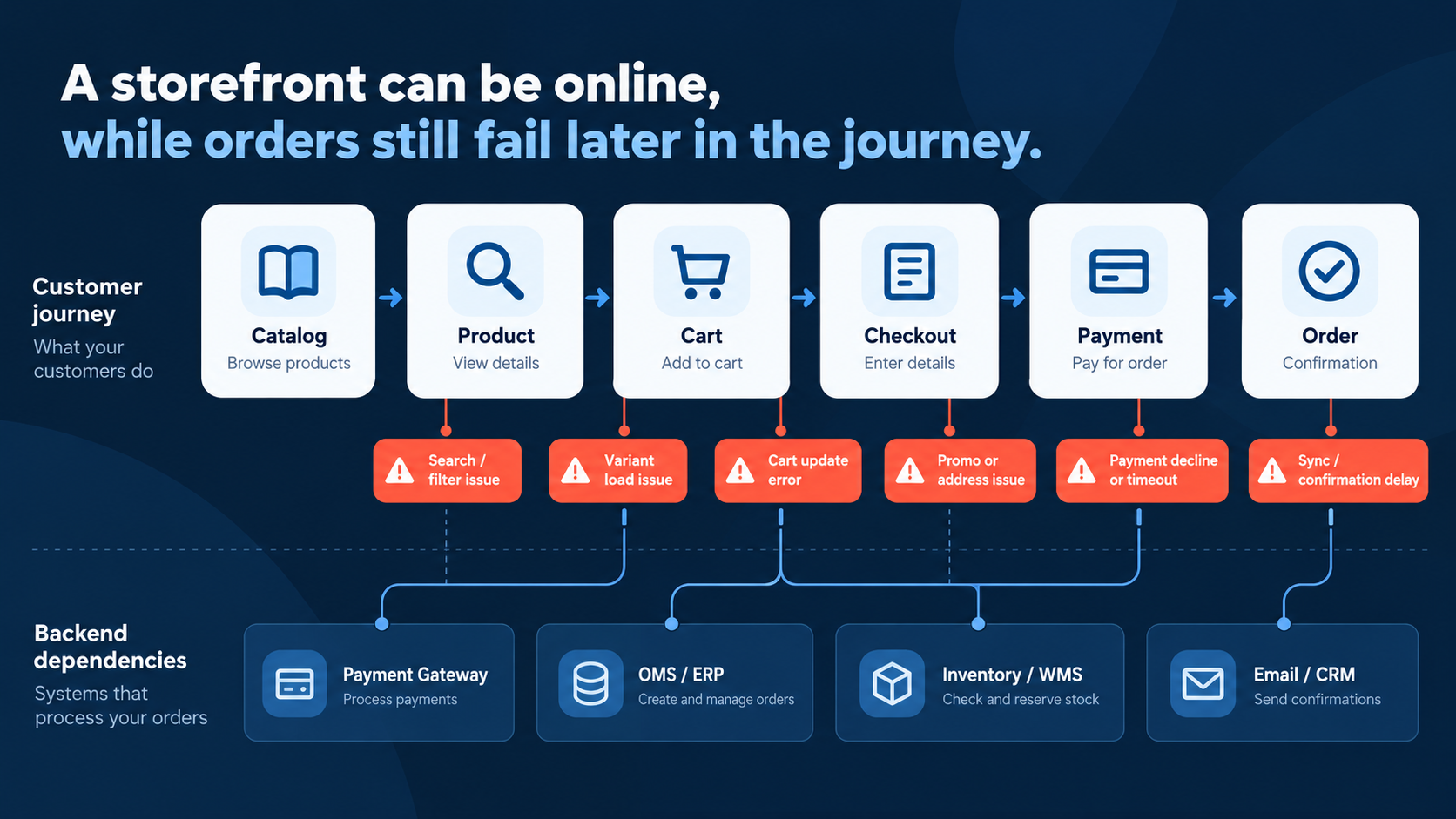
A store can serve its homepage while customers cannot finish purchases. Black Friday traffic puts pressure on dynamic operations such as cart updates and payment requests. Basic uptime monitoring can report a healthy site while these operations fail.
Consider a checkout page that returns HTTP 200 OK, the response code for a successful web request. Its shipping-rate request then times out, leaving the customer unable to continue. The page is available, but the purchase path is broken.
Failures can occur throughout that path:
- Catalog and discovery: slow product queries, expensive filters and search timeouts prevent product selection.
- Cart and promotions: competing updates lock carts, while coupon rules repeatedly recalculate totals.
- Checkout and payment: tax calculations, shipping quotes or payment requests exceed their time limits.
- Inventory: simultaneous purchases compete to reserve the same remaining stock.
- Order processing: queues accumulate work, delaying confirmation or delivery to the systems that fulfill orders.
For the business, these failures interrupt the traffic it has already invested in attracting. We therefore assess readiness through completed business transactions, including valid payment state and a durable order record.
Map Technical Risks Across Storefront, Checkout and Integrations
Start with a dependency map showing what each purchase step needs, who operates it and whether its failure blocks an order. This makes testing and monitoring specific. It also identifies where your team can fix a problem directly and where a provider agreement or fallback is needed.
Include the services behind the visible storefront:
- DNS, which directs visitors to the store, plus the content delivery network (CDN) and edge security.
- Hosting regions, load balancers and customer login services.
- Payment gateways, fraud checks, tax calculations and shipping-rate APIs.
- Enterprise resource planning (ERP), order management (OMS) and warehouse management (WMS) systems.
- Third-party scripts for analytics, reviews, chat and personalization.
Mark each dependency as purchase-critical or non-critical. A failed reviews widget should be removable without disrupting checkout. A shipping-rate service needs an approved fallback if its failure would prevent every order.
Hosted/SaaS vs. Custom Platforms: Who Controls What?
The platform determines the available engineering options. On hosted services such as Shopify or BigCommerce, the provider operates the core infrastructure. Self-hosted platforms place more responsibility on the merchant and its engineering partners.
| Control zone | Hosted/SaaS | Self-hosted/custom |
|---|---|---|
| Core infrastructure | Provider manages platform capacity. Confirm limits and testing policies. | Team manages hosting, scaling and deployment configuration, subject to hosting agreements. |
| Database and cache | Core internals are generally outside merchant control. Custom services remain your responsibility. | Team can tune queries, indexes, caching and connection pools. |
| Theme and frontend | Optimize theme code, assets and supported extensions. | Control rendering, assets and application behavior across the storefront. |
| Apps and scripts | Audit installed apps, tags and their provider dependencies. | Audit plugins, tags and custom modules, including server-side overhead. |
| Discount and checkout logic | Work within platform capabilities, extension rules and plan limits. | Change business logic directly, with regression testing. |
| Integrations and external APIs | Manage your integration services and respect platform API limits. | Manage integration architecture, queues and provider limits. |
For Shopify merchants, Shopify's BFCM checklist includes checking page speed, checkout and discounts before a traffic surge. These checks help identify merchant-controlled work. They do not imply that merchants should add servers to Shopify's core platform.
A self-hosted WooCommerce store may need database tuning and an object cache such as Redis, which stores reusable application data. A headless store adds separately operated frontend and API components. Its GraphQL responses may combine data with different freshness requirements, so caching needs explicit rules for shared catalog data and customer-specific information.
Build an Ecommerce Load Testing Plan Around Real Shopping Journeys
Ecommerce load testing should reproduce shopping behavior at the load expected from your campaigns. Use production-like infrastructure and synthetic data to establish a baseline, expose bottlenecks and check recovery. The test must validate purchase outcomes as well as response times.
Script a complete journey:
- Select a product or category.
- Search and apply filters.
- Add products to the cart.
- Apply a coupon and verify totals.
- Complete checkout through an isolated payment test path.
- Verify confirmation, inventory behavior and order hand-off.
Mix this with sessions that browse without buying. Sending every simulated visitor through checkout creates a different workload from a typical store.
Grafana k6's website testing guidance distinguishes browser-based frontend checks from protocol-based backend tests. Protocol tests generate concurrent requests efficiently. Browser tests exercise rendering and interaction, while a hybrid approach combines the two.
Model Peak Traffic Without Confusing Requests, Sessions and Users
Use last season's peak-hour logs and analytics as a starting point. Adjust the model for this year's campaign schedule and expected changes in shopping behavior. An email release or timed promotion can create a sharper arrival pattern than the daily traffic total suggests.
- Requests per second (RPS) measures request volume over time. Separate it by critical endpoint.
- Sessions represent shopping visits. One session can generate many requests.
- Concurrent users represents users active at the same time. Session length and pauses between actions affect this number.
A target such as "10,000 users" is incomplete without arrival timing and behavior. Define browsing pauses, cart sizes and coupon usage. Include realistic cache behavior rather than repeatedly requesting one already-cached product.
Checkout may account for fewer requests than browsing while requiring more work per request. Weight scenarios by observed behavior, then add focused checkout performance testing for promotion-heavy and inventory-sensitive paths.
Choose Tests by the Decision They Support
- Load test: can expected peak traffic complete critical journeys within agreed limits?
- Spike test: can the store handle a sudden promotion-driven surge before scaling or queue processing catches up?
- Stress test: where does capacity run out, and does failure preserve order correctness?
- Soak test: does sustained traffic gradually exhaust memory, connections or queue capacity?
The distinction between load testing vs stress testing matters to the launch decision. Expected peak must pass. A stress test intentionally goes beyond that level to reveal the failure boundary and recovery behavior.
Set Safe Boundaries Before Running Tests
A production-like environment makes results useful, but its differences from production must be documented. AWS's load-testing planning guidance highlights environment fidelity and load-generator limitations. A small staging database or an overloaded test generator can produce misleading conclusions.
- Use synthetic customers and isolated product, inventory and coupon records with realistic data characteristics.
- Use payment sandboxes or mocks. Route order exports to test destinations, never live ERP or OMS workflows.
- Agree traffic volumes and test windows with platform and external-service providers.
- Set stop criteria for errors, resource exhaustion and unexpected effects on shared services.
- Monitor the application and load generators throughout the run.
Production testing requires explicit authorization and tightly controlled scope. If a provider will not permit load testing, simulate its documented limits, delays and failure responses. That validates your integration's behavior without establishing the provider's actual peak capacity.
Which Shopping Scenarios to Test Before Peak Traffic
Use load tests to check complete shopping actions and hand-offs to external systems, not just storefront availability. The scenarios below connect practical checks to metrics and potential problems. They are examples, not results from Webdelo client projects.
| Scenario | What to measure | What the test may reveal |
|---|---|---|
| Search with filters | p95 response time, timeout rate | Slow search and delays with complex filters |
| Concurrent add-to-cart actions | Successful cart updates, p99 response time | Lost updates and failures under concurrent requests |
| Applying a discount code | Correct totals, recalculation time | Incorrect discounts and slow cart updates |
| Checkout using a payment sandbox | Successful test transactions, technical error rate | Timeouts, repeated requests and incomplete orders |
| Order hand-off to ERP/OMS | Delivery success, age of the oldest queued order | Synchronization delays and growing order backlogs |
Agree thresholds for each metric before testing, based on the store's architecture, expected traffic and business requirements. Record observed results, actual risks and remediation actions separately.
Load Test Results vs. Core Web Vitals: Measure Both
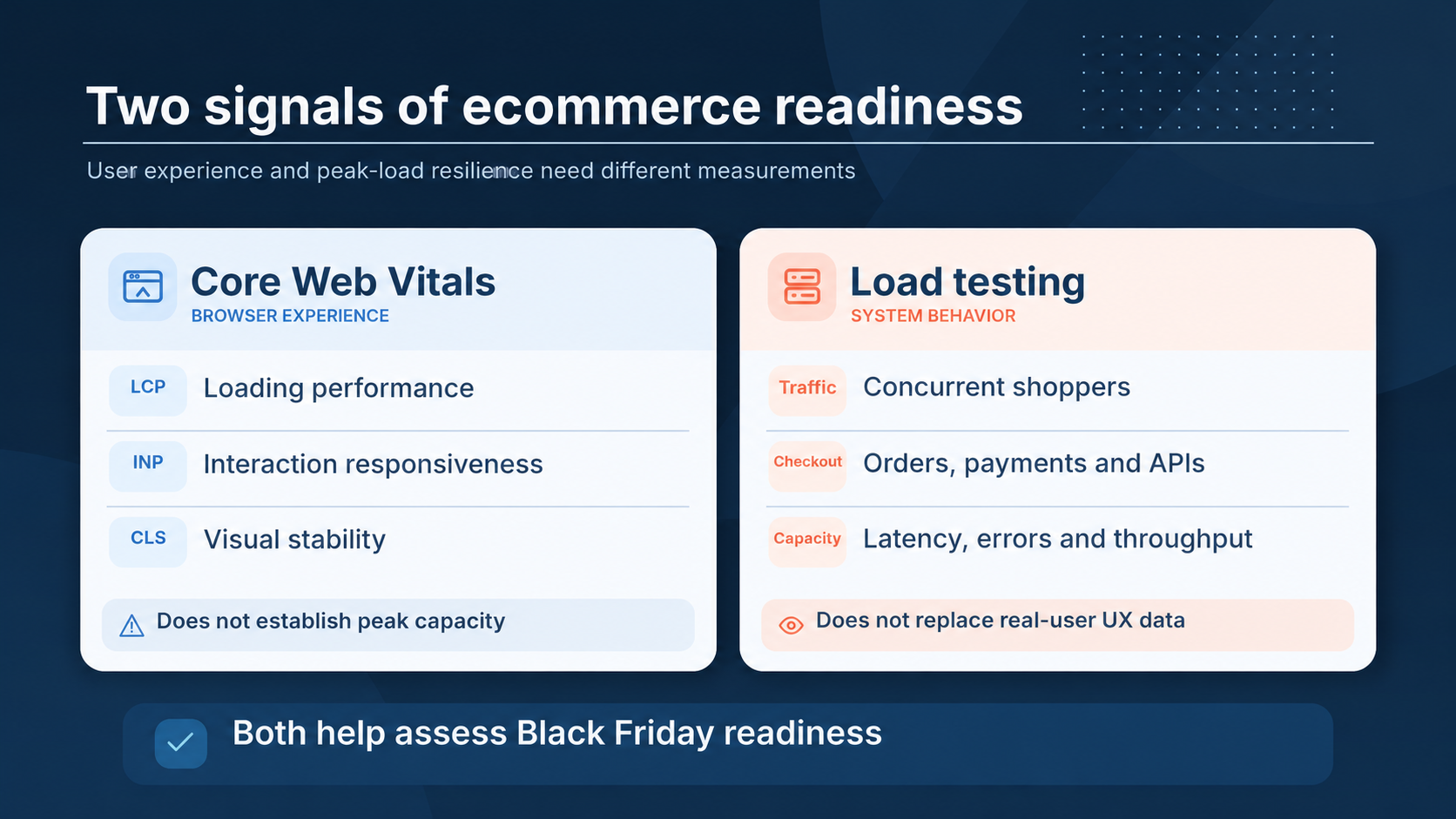
Load tests show whether transactions succeed under concurrent traffic. Core Web Vitals describe loading, responsiveness and visual stability in the browser. A usable store needs both a responsive customer experience and reliable processing behind it.
Google defines Core Web Vitals as Largest Contentful Paint (LCP), Interaction to Next Paint (INP) and Cumulative Layout Shift (CLS). They describe when main content appears, how promptly interactions receive a visual response and how much the page unexpectedly shifts.
| Signal | Source | What it establishes | Decision it supports |
|---|---|---|---|
| Completed business transactions | Load-test assertions and order records | Whether valid purchase attempts reach the expected end state | Whether checkout is ready for expected peak |
| p95/p99 latency, errors and throughput | Load tests and application telemetry | Slow-end response behavior and successfully processed volume | Which endpoints need attention |
| Database, cache and queue health | Infrastructure and application monitoring | Resource pressure, cache effectiveness and accumulated work | Whether capacity or processing is constrained |
| Core Web Vitals by device | Real user monitoring and available field data | Customer experience across actual visits | Which mobile and frontend issues affect shoppers |
| Controlled page diagnostics | PageSpeed Insights lab analysis and browser tests | Reproducible loading and interaction problems | Which frontend changes to investigate |
| Critical-journey availability | Scheduled synthetic monitoring | Whether scripted purchase steps currently work | When to investigate a live regression |
The p95 latency is the response time at or below which 95% of measured requests finish. The p99 exposes the slower tail. Review both per critical operation rather than averaging search and checkout together.
Agree transaction and latency thresholds before testing. Define what counts as a valid purchase attempt, and distinguish expected payment declines from technical failures. For asynchronous order exports, verify eventual delivery and queue recovery as well as checkout completion.
PageSpeed Insights can include field data alongside lab diagnostics, but it does not simulate concurrent shoppers. Track mobile experience as traffic rises, especially where third-party scripts compete for browser processing time.
Turn Bottlenecks Into Ecommerce Website Performance Optimization
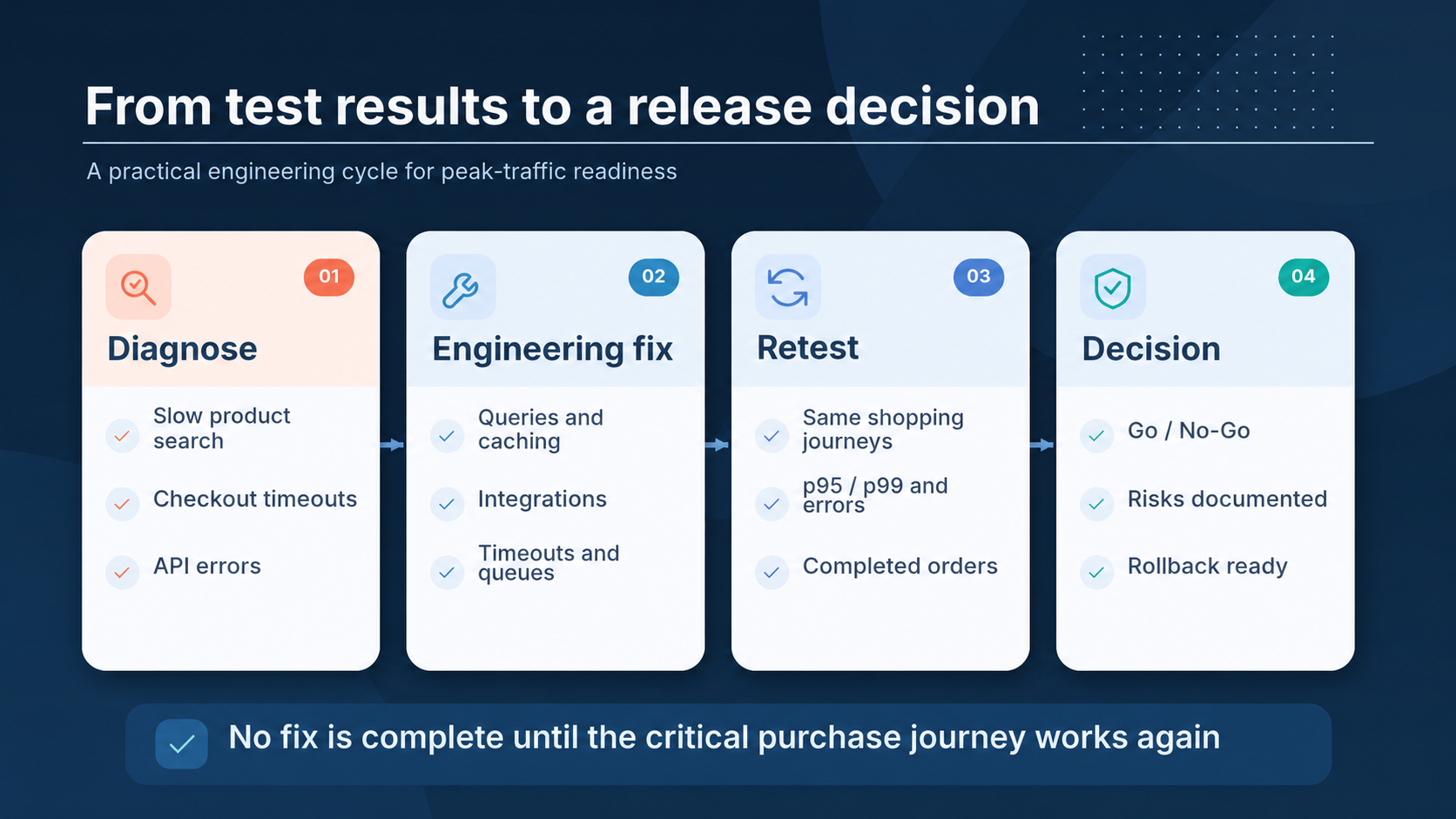
Prioritize engineering fixes by purchase impact and root cause. Compare slow operations under normal and peak traffic, implement a targeted change, then rerun the same scenario. Additional capacity helps when capacity is the constraint, but it cannot resolve incorrect order handling or a blocking external dependency.
Before upgrading to larger servers, find the bottleneck. A slow query may consume more resources on every replica. A payment timeout may remain unchanged regardless of how much storefront capacity is added.
Rank endpoints by total processing time as well as individual latency. Frequently called operations can dominate resource use even when each request looks acceptable. Other operations become slow only when concurrent requests compete for the same data.
Prioritize Fixes Across the Stack
- Backend and data: tune SQL and indexes, reduce repeated queries, cache reusable data and check connection-pool settings.
- Storefront: reduce unnecessary scripts and tags, optimize images and cache suitable catalog content at the CDN.
- Integrations: apply timeouts, controlled retries and approved fallbacks. Queue work that does not need to block checkout.
- Capacity: adjust worker counts or scaling after checking downstream database and provider limits.
- Checkout UX: preserve entered data after errors and explain pending payment states clearly.
- Architecture: separate tightly coupled operations when targeted changes cannot remove the constraint.
Keep customer-specific carts and checkout responses out of shared public caches. For retryable order operations, use idempotency controls: repeating the same request must not create another order or charge.
Connect Every Diagnosis to a Fix and Retest
| Problem | How to diagnose | Possible engineering fix | How to retest |
|---|---|---|---|
| Slow filtered search | Inspect query plans, slow-query logs and cache misses. | Add suitable indexes, restructure queries or revise search caching. | Repeat the same filter mix with realistic catalog size and cache states. |
| Cart lock contention | Trace lock waits and overlapping updates to the same cart. | Shorten transactions and revise concurrency handling. | Replay overlapping updates and verify final cart contents. |
| Coupon recalculation delays | Profile rule evaluation and repeated data reads. | Reduce duplicate computation and cache safe rule data. | Repeat coupon-heavy traffic and verify totals and eligibility. |
| Payment gateway timeouts | Separate gateway latency from local processing and retry behavior. | Use bounded timeouts, idempotent retries and payment-status reconciliation. | Simulate delays and ambiguous responses without real charges. |
| OMS export backlog | Measure processing rate, retry volume and oldest message age. | Use durable queues, deduplication and workers that respect provider limits. | Repeat peak order traffic, then verify backlog drains without lost or duplicate exports. |
| Third-party scripts delaying interactions | Inspect browser traces and mobile INP alongside script activity. | Remove, defer or isolate non-critical scripts. | Repeat affected browser interactions and watch field measurements after release. |
Close a fix only after the same scenario passes at the same load with correct business outcomes. Retest adjacent steps too: accelerating checkout can expose a previously hidden order-processing bottleneck.
Public Example: How Shopify Prepared for BFCM 2025
Shopify Engineering has published a description of its BFCM 2025 readiness program. Throughout the year, the team ran exercises that simulated 150% of the previous year's BFCM load. From April through October, it also ran five major scale tests at forecasted traffic levels.
The tests revealed constraints such as too few Kafka partitions in data pipelines, high memory usage in the API layer and connection timeouts that needed tuning to prevent connection-pool exhaustion. The team fixed these issues and revalidated the changes in later tests. The same sequence works for a store of any size: test, engineering changes, retest.
Combine Website Performance Monitoring With Deployment Safety
During BFCM, monitoring must show customer-facing failures and give a named owner enough information to act. Combine synthetic journey checks with real user monitoring and backend telemetry. Limit unnecessary changes so the tested system remains representative of the live store.
Synthetic checks run scripted interactions on a schedule. Real user monitoring captures actual visitor experience. Configure checkout probes to avoid real payments and fulfillment orders.
- Before the change freeze: complete critical fixes, retests and a rollback rehearsal.
- During the freeze: restrict non-essential code and configuration changes, including apps, tags and checkout extensions.
- For urgent changes: use an agreed approval path, a rollback trigger and a named decision-maker.
- During incidents: route alerts by purchase impact and use documented escalation paths.
- For degraded operation: prepare safe actions such as disabling a non-critical widget.
Confirm that last season's incident actions were completed. Maintain a current on-call roster and align support and incident-response commitments with the agreed scope, coverage hours and provider responsibilities.
A Black Friday Ecommerce Checklist for Go/No-Go Decisions
Approve peak readiness when critical journeys meet agreed thresholds at expected traffic and recovery measures are tested. An unresolved payment or stock-reservation failure is a blocker. A non-critical feature can remain a documented risk when its failure does not obstruct purchases.
- Dependencies: purchase-critical services have owners and approved failure behavior.
- Load model: traffic volume, arrival patterns and journey mix reflect campaign expectations.
- Test evidence: load and spike tests pass, while stress tests establish understood failure and recovery boundaries.
- Order correctness: valid test purchases produce the expected payment, stock and order states.
- Performance: p95/p99 latency, technical errors and throughput meet agreed limits.
- Resources: databases, caches and queues have measured headroom and recover after the surge.
- Integrations: provider limits are documented and unavailable-provider behavior is tested.
- Mobile experience: critical interactions remain usable with the intended scripts enabled.
- Operations: alerts, rollback procedures and on-call escalation have been exercised.
Record the decision with unresolved risks, owners and conditions for reconsideration. A known breaking point above expected peak can inform capacity planning. A failing critical journey at expected peak requires a fix or a tested fallback before approval.
When Recurring Bottlenecks Call for Platform Modernization
Recurring failures in the same purchase steps suggest a structural constraint. Use test and incident evidence to decide whether targeted refactoring is enough or broader modernization is justified. Plan that work outside the peak change window.
Signals worth investigating include:
- Capacity increases repeatedly postpone the same bottleneck.
- Synchronous ERP or OMS calls make checkout depend on back-office availability.
- Checkout changes are difficult to isolate, test or roll back.
- Hosted-platform limits prevent required business logic.
- A custom stack lacks clear ownership or a reliable scaling process.
Options range from refactoring expensive operations to moving integrations onto queues and events. Replatforming or a headless storefront may be appropriate, but each introduces its own operating responsibilities. Choose the smallest change that resolves the documented constraint and supports the product roadmap.
Budget for continued verification after launch. Understanding what website maintenance includes helps separate routine upkeep from the engineering investment needed to improve architecture and checkout reliability.
Make Readiness an Evidence-Based Engineering Decision
A store is ready for peak traffic when the full purchase path works at expected load, orders are processed correctly and the store stays usable on mobile devices.
Base the launch decision on realistic tests, verified fixes and rehearsed recovery procedures. Constraints that recur every season belong in the next development cycle rather than in another round of last-minute patches.
Working With Webdelo on Ecommerce Development and Optimization
Webdelo develops, modernizes and optimizes ecommerce platforms across the product lifecycle. The scope can cover storefront performance, checkout reliability, architecture, integrations and ongoing improvements. Load testing informs that work as a diagnostic method.
For hosted stores, the engineering scope centers on merchant-controlled components and connected services. Custom and self-hosted platforms may also need database, infrastructure and deployment changes. Priorities depend on the purchase risks, business requirements and available control.
Bring your platform details, critical integrations and peak-traffic expectations so the scope of work can be defined around your business. Discuss development and optimization of your ecommerce website with Webdelo.
Frequently Asked Questions
When should an ecommerce team start technical preparation for Black Friday?
Work back from your change freeze, not from Black Friday itself. Leave enough time to run the first tests, fix what they reveal, retest the same scenarios and rehearse a rollback before the freeze starts. Larger changes such as moving integrations onto queues or replatforming belong outside the peak change window, so plan them as a separate project.
Can you load test a Shopify or other hosted ecommerce store?
Only within the provider's testing policy, which you should check before you send any traffic. On hosted platforms the provider runs the core infrastructure, so testing is most useful for the parts the merchant controls: theme code, installed apps and scripts, discount logic, custom services and integrations. When a provider does not allow direct load, simulate its documented limits and failure responses to check how your own integration behaves.
Will a CDN alone protect an online store from Black Friday traffic?
No. A CDN offloads public, cacheable content such as images, static assets and suitable catalog pages. Carts, checkout, coupon calculation, stock reservation and payment calls are dynamic and customer-specific, so they still reach your application and external services. A CDN reduces pressure on the storefront, but checkout reliability depends on the backend and its integrations.
Is it safe to run load tests on a live production store?
Load testing a live store requires explicit approval, bounded traffic, an agreed time window and stop criteria because it can affect real customers and external providers. Where possible, use a separate production-like environment with synthetic data and payment sandboxes. Document differences in capacity, data volume, caching, configuration and integrations; these determine how well the results represent production. Production testing also requires a risk assessment, safeguards and a recovery plan.
Who should own the go/no-go decision for peak traffic readiness?
The decision works best as a shared call with one named decision-maker, usually from ecommerce or technical leadership. Engineering brings the test evidence, operations confirms monitoring and on-call readiness, and integration owners confirm provider limits and fallbacks. Record the outcome together with the unresolved risks, their owners and the conditions under which the decision would be reconsidered.
How do you justify investing in ecommerce performance work before Black Friday?
Frame the investment around purchase risk rather than speed scores: which failures would block orders at the traffic your campaigns are paying to attract. Rank fixes by their effect on completed transactions, and separate quick fixes needed before peak from structural changes for the roadmap. No test can guarantee sales growth or full uptime, but evidence from tests lets you spend on real bottlenecks instead of oversized servers.