Cart Abandonment: 12 Checkout Problems and How to Fix Them
We break down 12 reasons shoppers leave checkout, from surprise fees and forced registration to payment failures. Learn to locate the drop-off step in GA4 and separate abandonment from lost paid orders.

Why shoppers do not complete orders in online stores
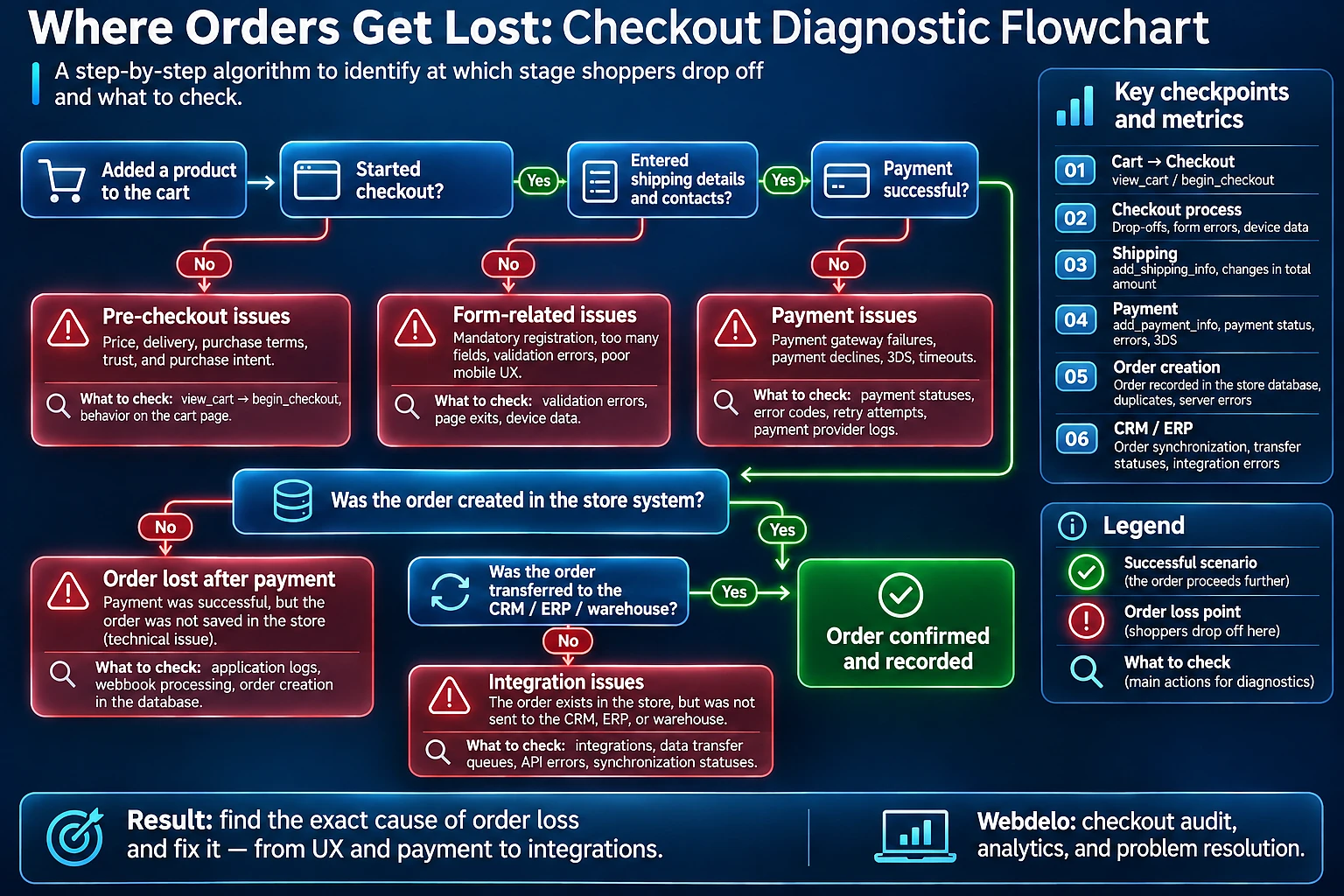
If your online shopping cart (корзина интернет-магазина) contains items but the purchase is incomplete, we first check the checkout process. Unexpected costs or a payment failure may stop the shopper. A successful payment followed by a failed order transfer to the CRM is a separate technical problem, not cart abandonment.
Adding an item shows interest, but it does not mean someone is ready to buy. When evaluating an ecommerce website, we distinguish between visitors who are still filling their carts and shoppers who have started checkout. For the second group, checking for obstacles in the final steps is especially important.
At Webdelo, we examine the entire journey through order processing. This approach helps distinguish a difficult form from an analytics error and avoids changing advertising based on a mistaken diagnosis.
Online shopping cart abandonment: how to estimate losses
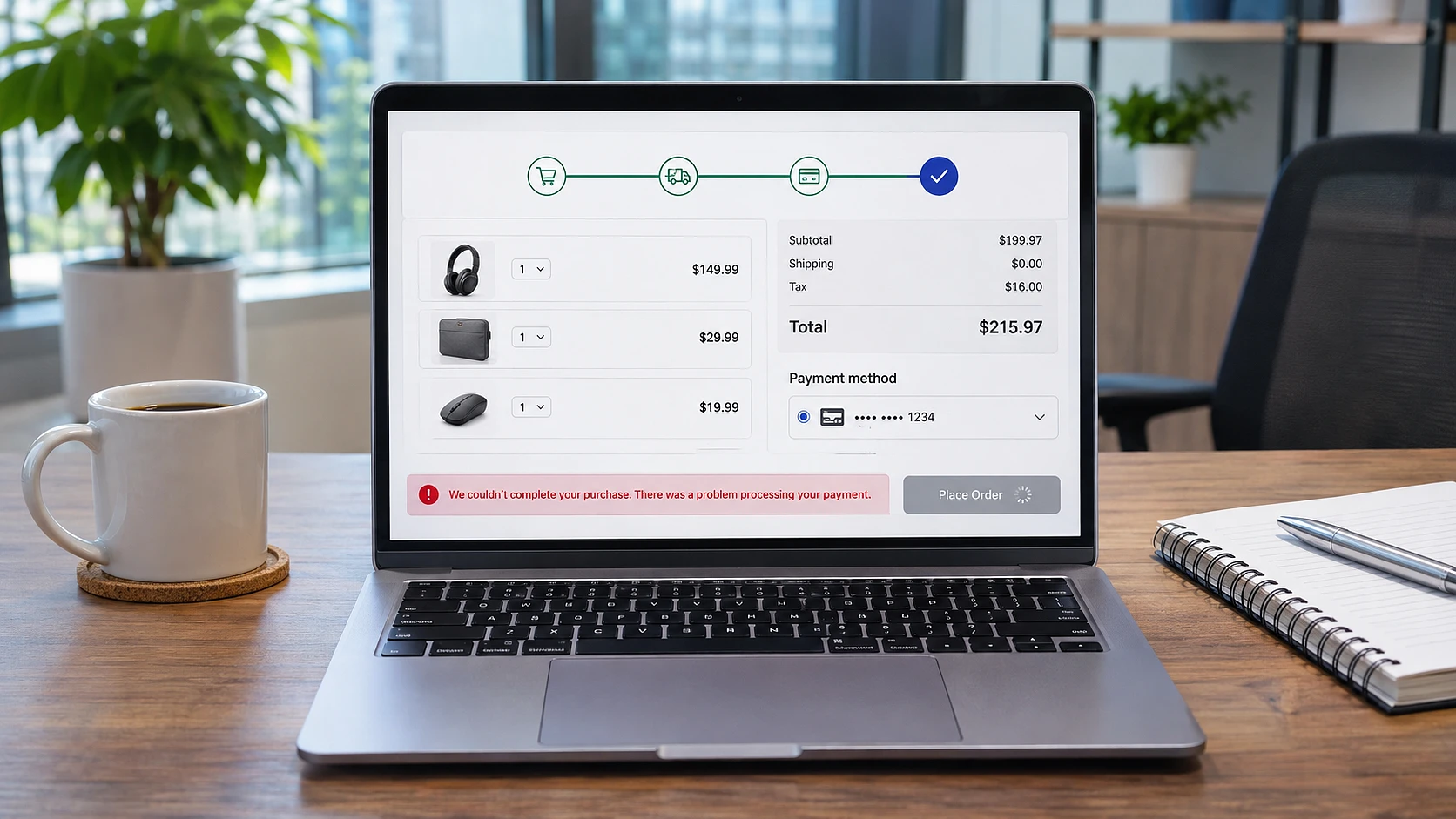
The cart abandonment rate measures incomplete purchases, while the checkout abandonment rate measures incomplete checkout attempts. Use your store's data and consistent counting rules. A monetary estimate shows revenue at risk, not an amount you can guarantee to recover.
Cart abandonment rate: formula and data sources
For a session-based calculation, the formula is: cart abandonment rate = (1 - sessions with a purchase after adding an item / sessions with an item added) × 100%. For checkout abandonment, the denominator is sessions where checkout started. The numerator within the fraction is sessions from that group that ended in a purchase.
Do not divide the number of transactions by the number of users: these are different units of measurement. For purchases completed after shoppers return several days later, tracking unique carts is more useful. Decide in advance how long to wait for completion. Otherwise, recent carts will be counted as abandoned too soon.
Cross-check GA4 data against your order management system and payment provider. If your store accepts payment on delivery, a confirmed order without an online payment is not abandoned.
Cart abandonment vs. checkout abandonment: what is the difference?
- Cart abandonment: an item was added, but the purchase was not completed. Checkout may never have started.
- Checkout abandonment: the shopper started checkout and stopped before completing the purchase. Here, we check the specific step where they left.
- Post-payment failure: the payment is confirmed, but the order is missing from the CRM or enterprise resource planning system, or ERP. We track these cases separately.
Revenue at risk: an illustrative calculation
Revenue at risk = number of abandoned checkouts × average order value. A hypothetical example, not project data: 40 incomplete checkouts with an average order value of RUB 5,000 give an estimate of RUB 200,000. This indicates the scale of the problem, not a forecast of additional sales.
If you know the value of each abandoned cart, it is better to add those values directly. Shoppers may return on their own or decide not to buy for reasons outside the store's control.
The checkout funnel: how to find where customers drop off
The checkout funnel shows how shoppers move from viewing their cart to making a purchase. A drop between consecutive events helps identify an area to investigate, but it does not explain the cause on its own. We compare GA4 events with behavior on the device and actual order statuses.
GA4 events for the checkout funnel
We use the following events for diagnosis:
view_cart- viewing the cart. If shoppers leave before the next step, check the order total and whether the checkout button is accessible.begin_checkout- starting checkout. Abandonment after this point may relate to registration or the first form fields.add_shipping_info- submitting shipping information. We check where shoppers see shipping costs and choose an available delivery or pickup option.add_payment_info- submitting payment information. After this, we analyze the handoff to the payment provider and the outcome of the payment attempt.purchase- the purchase event in analytics. We check that it matches a real order and is not duplicated.
Events must match actual actions in the interface. For example, leaving before add_shipping_info may mean the shopper could not select a pickup location. Leaving after this event calls for checking the next screen, not automatically assuming a shipping problem.
Mobile checkout in reports
We compare progression through checkout by device type and browser. If a drop appears only on phones, we reproduce that step on the relevant device. We also test the return from a banking app separately.
Reconciling payments, analytics, and CRM data
For reconciliation, we link the cart ID to the payment attempt and order number. Checkout.com describes transaction-level reporting and reconciliation APIs. This data lets us verify payment outcomes independently of browser analytics.
The purchase event does not confirm that money was collected. It means the website sent an event. Payment authorization must also be distinguished from the final capture of funds. If the crm stores the link between an order and its transaction, individual discrepancies can be investigated.
Twelve problems: how to spot obstacles to purchase
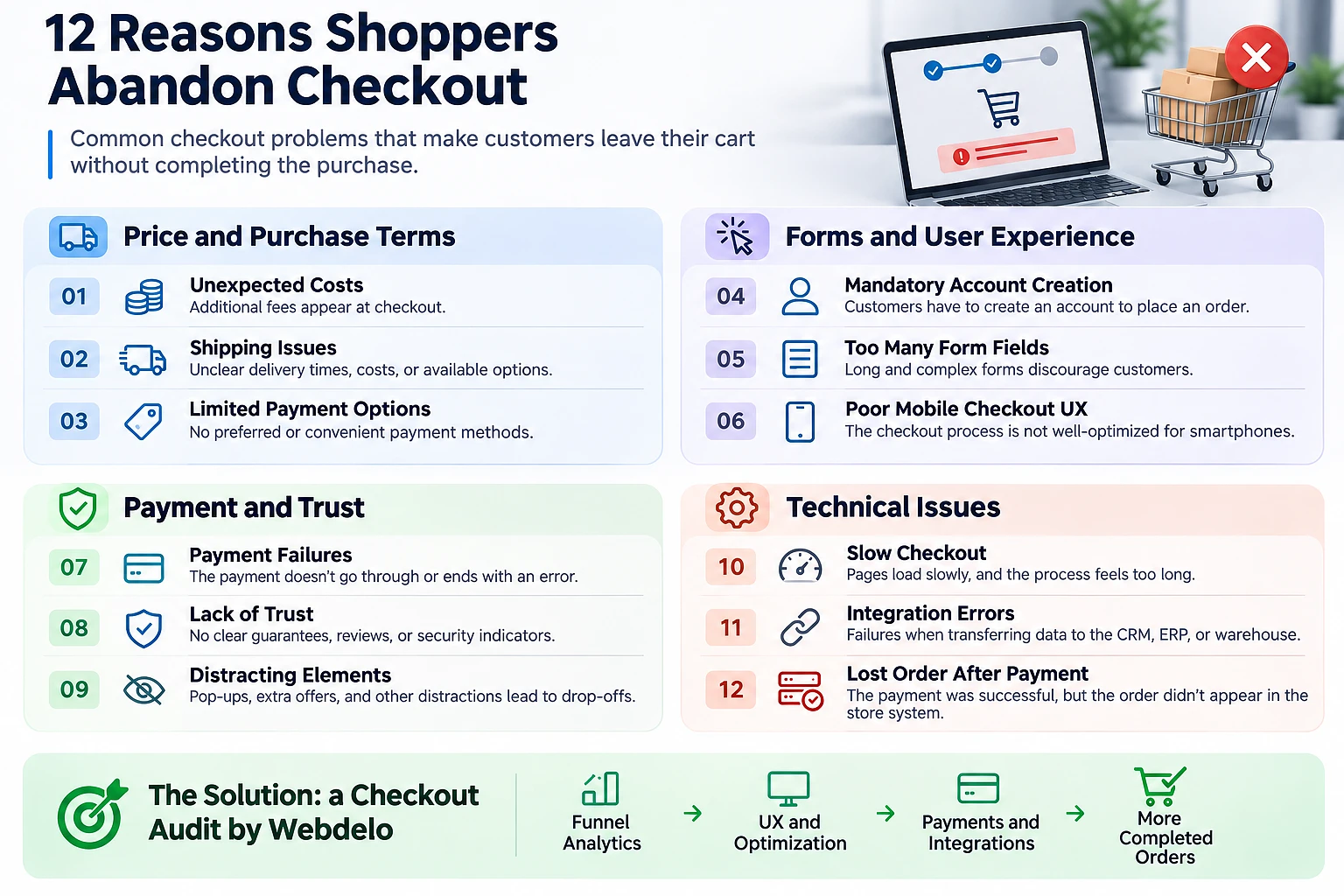
Reasons for cart abandonment need to be investigated through observable symptoms and data from the relevant step. Below, we connect each problem with a check and a possible fix. The twelfth item concerns processing an order that has already been paid for and is not included in the abandonment rate.
1. Unexpected costs at checkout
The shopper sees a new total just before payment and reconsiders the purchase. We check for abandonment after the full cost appears and review how shipping is calculated. We suggest showing known costs early and address-dependent costs as soon as the address is entered.
2. Mandatory registration instead of guest checkout
Instead of completing a purchase, the shopper faces an account creation form. Abandonment on the registration screen is a signal, especially among new visitors. We recommend guest checkout with an invitation to create an account after purchase, unless the business process requires an account.
3. Too many checkout fields
The form asks for information without making its purpose clear to the shopper. We look at completion time and the fields where users stop checking out. For every required field, we establish who needs the data to fulfill the order and remove the rest.
4. Validation errors and lost form data
After seeing "Invalid address," the shopper does not know what to fix, and going back clears the form. We check for repeated errors and whether entered data is preserved. The message should identify the specific field and explain the accepted format.
5. Difficult mobile checkout
The keyboard covers the button, and the phone number field opens an alphabetic keyboard. We compare mobile abandonment with how the page actually appears, including the on-screen keyboard. We fix inaccessible controls and input field types.
6. Slow checkout and long loading times
After selecting shipping, the interface takes too long to respond, and the shopper clicks the button again. We measure request times and compare them with abandonment at that step. We first address delays in the specific service and show a clear status while the shopper waits.
7. Online store payment errors
The shopper encounters a bank decline or cannot complete an additional payment verification step, such as 3D Secure. We review statuses and decline reasons in the provider's documentation and check technical failures separately. We recommend a safe retry that preserves the order and checks the previous payment.
8. Too few payment methods
At the final step, the shopper cannot find their preferred payment method. We review support requests and abandonment by country, accounting for method availability in each market. We add in-demand options after checking the provider's terms and the refund process.
9. Shipping problems at checkout
The shopper does not know when the order will arrive or cannot select a suitable pickup location. We check address search errors and unavailable shipping in specific regions. We show available options with their prices and delivery times before the payment step.
10. Lack of trust at payment
An unfamiliar payment domain or missing return terms can create doubts before paying. Analytics helps locate the drop-off point, while support requests and user testing help clarify the reason. We make the seller's identity and purchase terms clear and explain the redirect to the payment partner's page.
11. Promo codes, pop-ups, and unnecessary steps
A prominent promo code field encourages shoppers to search for a discount, while a pop-up covers the form. We check abandonment after interaction with these elements. We remove obstructive pop-ups from checkout and test a compact, expandable promo code field.
12. Integration errors after checkout
The shopper has paid and received confirmation, but staff cannot see the order. ESW documentation describes a separate order confirmation notification and asynchronous processing. With this approach, the confirmation page may open before server-side processing is complete.
We look for paid transactions without a linked order in the CRM or ERP. Fixing this requires notification retries and duplicate prevention during reprocessing. We track these cases as failures to process paid orders, not as abandoned carts.
Checkout optimization: which problems affect conversion
Checkout optimization starts with confirmed obstacles, not a complete redesign. Payment failures or lost paid orders need immediate attention. We rank other tasks by how many shoppers they affect and how difficult they are to fix.
The table provides initial diagnostic priorities. These change after reviewing the data: even a minor form error becomes critical if it blocks all orders.
| Problem | Shopper symptom | Data signal | Priority | Solution |
|---|---|---|---|---|
| Unexpected costs | The order total increases | Abandonment after recalculation | High | Disclose costs earlier |
| Mandatory registration | An account is required to buy | Abandonment at registration | High | Add guest checkout |
| Unnecessary fields | The form takes too long | Shoppers stop filling it out | Medium | Remove unnecessary data requests |
| Errors and lost form data | Information must be entered again | Repeated field errors | High | Preserve input and clarify messages |
| Mobile usability issues | A button or field is inaccessible | A drop on specific devices | High | Fix the mobile form |
| Slow loading | An action gets no response | Request delays before abandonment | High | Eliminate the source of the delay |
| Payment failures | Payment does not complete | Technical errors and declines | High | Investigate causes and test retries |
| Too few payment methods | No suitable method is available | Abandonment by market and support requests | Medium | Add an in-demand method |
| Unclear shipping options | A delivery or pickup option cannot be selected | Address or shipping rate selection errors | High | Check options and calculations |
| Lack of trust | Doubts before payment | Questions in tests and support requests | Medium | Clarify the seller's identity and terms |
| Promo codes and pop-ups | Distraction from the purchase | Abandonment after interaction | Medium | Remove obstacles and test presentation |
| Post-payment failure | A paid order is not processed | Payment exists, but no order appears in the CRM | High | Retry the transfer without duplicates |
Quick fixes
We start with changes that have few technical dependencies, such as clearer error messages or disabling an obstructive pop-up. Before removing a required field, we check whether the delivery service or back-office system needs it.
Changes that require development
Guest checkout and new payment methods affect order business logic. For these tasks, we define error and recovery states in advance. Resubmitting a request should complete the original operation, not create a second order or payment.
How to measure the impact of changes
We compare progression through the fixed step and the number of completed orders. We account for changes in traffic sources and promotional terms. An increase in purchase events without confirmation in the order management system does not count as an optimization result.
Checkout audit: UX, analytics, and technical integrations
A checkout audit combines checks of interface usability, measurement accuracy, and order processing. We examine these layers together: a missing analytics event can look like a lost sale. The result should be a list of reproducible problems with evidence and priorities.
Checkout UX audit
We go through a purchase on desktop and mobile, including returning to the previous step. If the reason for abandonment is unclear, we observe people from the target audience completing the task. We record a specific obstacle rather than a general judgment such as "the interface is difficult to use."
Checking funnel events
We compare user actions with the events sent. We check the purchase amount, currency, and transaction ID. Reopening the confirmation page must not increase the purchase count.
Technical identifiers are usually enough for analysis, without the contents of customer profiles. Protecting customer data when working with IT contractors starts with limited access and agreement on what data is shared. Payment details and personal information must not appear in analytics events.
Testing payments, shipping, and CRM
Testing a payment integration is part of implementing it: the Visa Acceptance Unified Checkout guide includes a separate step for it. Our audit includes scenarios that affect money and order fulfillment:
- A successful purchase with every supported payment and shipping method.
- A declined or interrupted payment followed by a retry.
- A delayed provider response and late payment confirmation.
- A repeated server notification for the same operation.
- A paid order appearing in the CRM or ERP with the correct amount and items.
If a shopper adds an item to the cart but does not complete the order, do not immediately assume that advertising or pricing is the problem. First, check the entire checkout journey: from shipping costs and form usability to successful payment and order transfer to the CRM. Even a small error at the final stage can cause recurring lost sales.
How to reduce cart abandonment: an optimization plan
Reducing cart abandonment requires testing individual hypotheses, not changing the entire form at once. For each task, we define the target funnel step and success criteria. We introduce purchase reminders separately from fixes so we can understand each action's contribution.
Guest checkout
When introducing checkout without registration, we preserve the shopper's ability to check order status and request a return. We test the scenario where an email address is already linked to an account: it must not unexpectedly block the purchase.
Payments and shipping without surprises
We check combinations of payment and delivery options. For example, a payment method may be available for courier delivery but not for the selected pickup location. This restriction should appear during selection, without losing information already entered.
Abandoned cart recovery
A reminder should lead to an up-to-date cart with available products and current prices. Before sending it, we check whether the shopper has already completed the purchase and follow applicable messaging requirements. If the payment status is unclear, we establish the outcome first to avoid prompting the shopper to pay again.
A/B testing changes
In an A/B test, we compare the original and modified versions across comparable groups of shoppers. We set the primary metric and observation period in advance, taking traffic volume into account. We fix clear technical errors without an experiment and test uncertain interface choices one at a time.
A step-by-step plan to improve checkout conversion
This illustrative 30-day plan sets out the sequence: measurement, interface, integrations, and results validation. It is a guide for organizing work, not a timeline guarantee. We fix critical payment and order transfer failures immediately, regardless of the current stage.
Week 1: measurement
We agree on the definition of a completed purchase and check GA4 events. This stage produces a baseline funnel with segments and a list of discrepancies between analytics and actual orders.
Week 2: UX
We reproduce obstacles at the most problematic steps and fix confirmed interface errors. For each change, we retain a test scenario to prevent the problem from returning after the next update.
Week 3: integrations
We test payment scenarios and order transfers to back-office systems. The result is a log of test operations with final statuses and a list of failures with alerts configured for the people responsible.
Week 4: validation
We repeat test purchases and compare post-fix data with the baseline funnel. If there are not enough observations, we extend the measurement period. Unresolved tasks receive an owner and acceptance criteria.
For ongoing oversight, it is important to define what website maintenance includes in advance. Post-update checks and error monitoring should have an agreed scope, rather than depend on a customer complaint.
How Webdelo helps improve online store conversion
Webdelo checks checkout from shopper actions through data transfer to the CRM or ERP. After the audit, you receive a plan of fixes with explanations of causes and priorities. We estimate the expected impact using your store's data, without promising a specific increase.
The plan includes:
- Descriptions of confirmed problems and steps to reproduce them.
- Discrepancies in analytics events and order statuses.
- A separate list of failures after successful payment.
- Development tasks and criteria for verifying fixes.
Request a checkout audit for your online store. We will start by checking measurement accuracy and the steps where shoppers cannot complete their purchases.
Frequently Asked Questions
How do you calculate the cart abandonment rate of an online store?
A session-based formula is the simplest: cart abandonment rate = (1 - sessions with a purchase after adding to cart / sessions with an add to cart) × 100%. For checkout abandonment, use sessions where checkout began as the denominator. Do not divide transactions by users, because they are different units of measurement. Reconcile GA4 data with your order system and payment provider and keep the counting rules consistent.
Why do shoppers abandon their carts without completing the order?
Common reasons include unexpected costs before payment, mandatory registration, overly long forms, unclear validation errors, and lost form data. Shoppers are also stopped by a difficult mobile checkout, slow loading, payment failures, too few payment methods, unclear shipping options, lack of trust, and distracting pop-ups. The funnel step where shoppers drop off, and a check of that step, shows which reason applies to your store.
How can an online store reduce cart abandonment?
Start with measurement rather than a redesign: find the step with the biggest drop and reproduce the obstacle. Fix obvious technical errors right away and test debatable interface changes one at a time with A/B tests. Launch abandoned cart reminders separately from the fixes, and before sending them check that the shopper has not already ordered and has no pending payment.
Should an online store offer guest checkout?
If an account is not required by your business process, guest checkout removes a barrier where new visitors often leave. You can offer account creation after the purchase. When implementing it, make sure shoppers can still check their order status and request a return. Also test the case of an email address already linked to an account, so it does not unexpectedly block the purchase.
What should you do when customer payments fail at checkout?
Analyze decline statuses and reasons using your payment provider's documentation, and check technical failures separately, such as an incomplete 3D Secure check. Offer a safe retry that keeps the order and verifies the previous payment, so the shopper is not charged twice. A GA4 purchase event does not confirm that money was captured, so verify payment results with provider data. If a payment succeeded but the order is missing from the CRM, that is a processing failure, not cart abandonment.
Which GA4 events do you need to analyze the checkout funnel?
A basic funnel uses the events view_cart, begin_checkout, add_shipping_info, add_payment_info, and purchase. A drop between neighboring events shows which step to investigate, but it does not explain why shoppers leave. Compare transitions by device and browser, and reconcile the purchase event with real orders and provider transactions.
What does a checkout audit for an online store include?
A checkout audit combines three layers: usability on desktop and mobile, the accuracy of analytics events, and tests of payments, shipping, and order transfer to the CRM or ERP. It also covers payment declines, delayed provider responses, repeated notifications, and duplicate purchases. The result is a list of reproducible problems with evidence and priorities. Webdelo performs this audit and delivers a fix plan without promising specific growth.