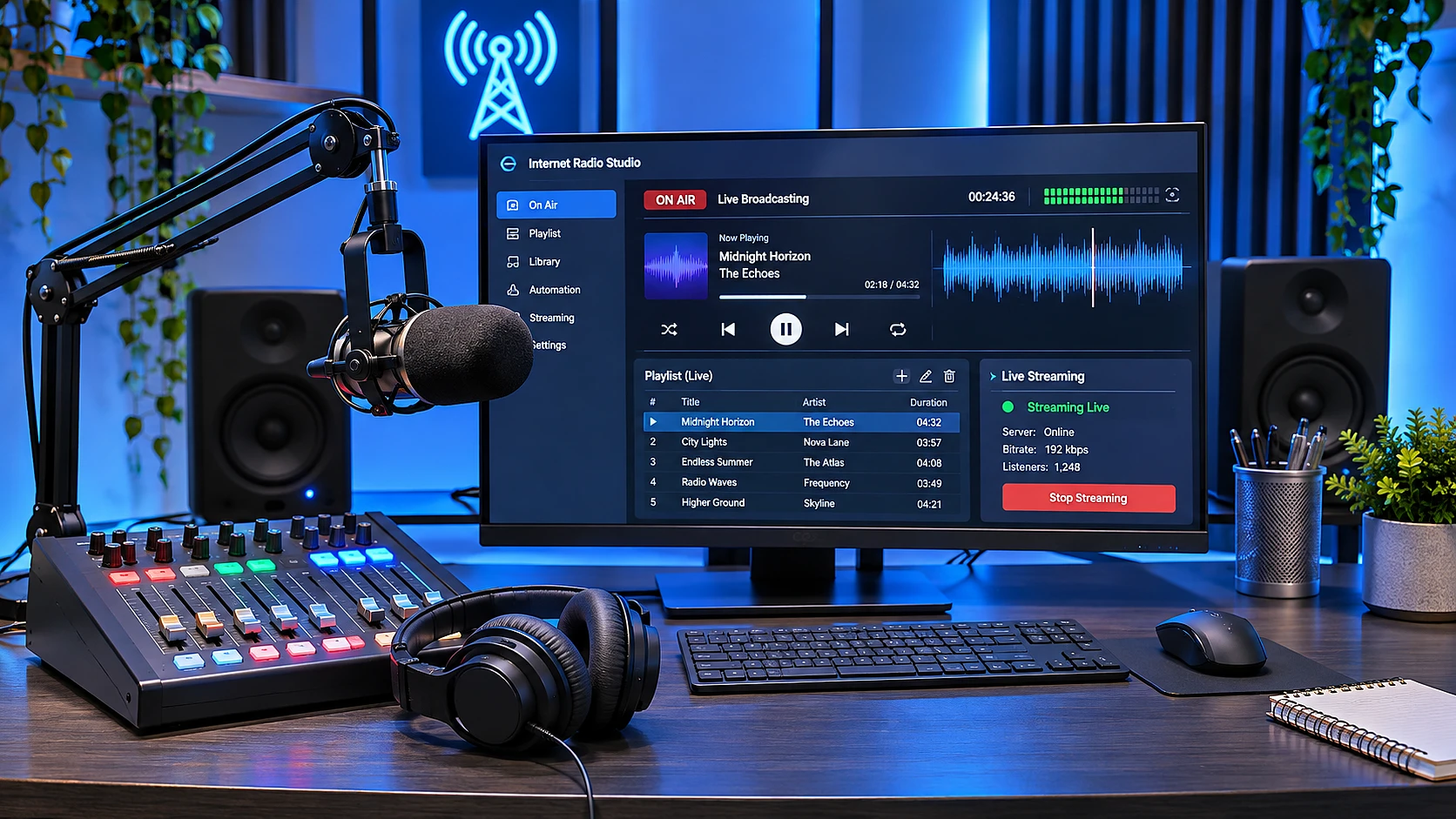
How to Start an Internet Radio Station: A Complete Setup Guide
Seven steps to launch an internet radio station, from concept and content to hosting, 24/7 automation and stream testing. Includes equipment and cost tables, music rights basics and a launch checklist.

From Station Idea to Reliable Broadcasting
You do not need to be an engineer to learn how to start an internet radio station. Begin with your concept and content, then choose broadcasting software and a server or a ready-made radio platform. Before launch, set up your schedule, fallback playback, and stream checks. Clarify music rights before you go on air.
At Webdelo, we develop and support complex digital products. That is why we view a radio station as a system that needs clear operating procedures and someone responsible for handling failures. The company's technical team is led by Webdelo CTO Andrew Popov.
Below, we cover seven launch steps, equipment, and costs. We also share the public address of the SoundAds project on a Webdelo subdomain. Its technology, budget, and audience figures have not been disclosed, so they cannot serve as benchmarks for your station.
What Is Internet Radio, and What Is It Used For?
Internet radio is a continuous audio stream that listeners receive over the internet through a browser, app, or another player. A station can broadcast music, recorded programs, and live performances. This format suits personal projects, interest-based communities, and businesses.
How Internet Radio Differs from FM Broadcasting
An FM station transmits a signal using radio waves within its coverage area. Internet radio delivers audio through a server and a network, so it does not need an FM transmitter or a radio frequency. Listener access depends on their internet connection, the service's technical restrictions, and the territories where broadcasting is permitted.
An internet station's capacity is limited by server bandwidth and its hosting plan. You can create multiple streams for different audiences without additional radio frequencies. Each stream still needs its own settings and sufficient network capacity.
How Audio Reaches the Air
- Automated broadcasting. Software plays prepared files on a schedule.
- Live broadcasting. A host sends audio from a microphone or studio equipment.
- Rebroadcasting. The station relays an existing third-party stream with the necessary permissions.
You can combine these methods. For example, software plays music during the day, a host conducts an interview in the evening, and the station then returns automatically to the playlist.
Personal, Community, and Business Uses
- A personal radio station helps a blogger or host build a regular program.
- A themed station brings a community together around particular music or content.
- A corporate radio station broadcasts internal programs to employees or students.
- A station for a chain of venues provides background music across locations.
If a company has an ecommerce website, it can place the radio station on a separate page where visitors choose whether to start the player. Automatic audio on shopping pages can get in the visitor's way. First, establish what value the broadcast offers your audience.
Seven Steps to Launch Your Station
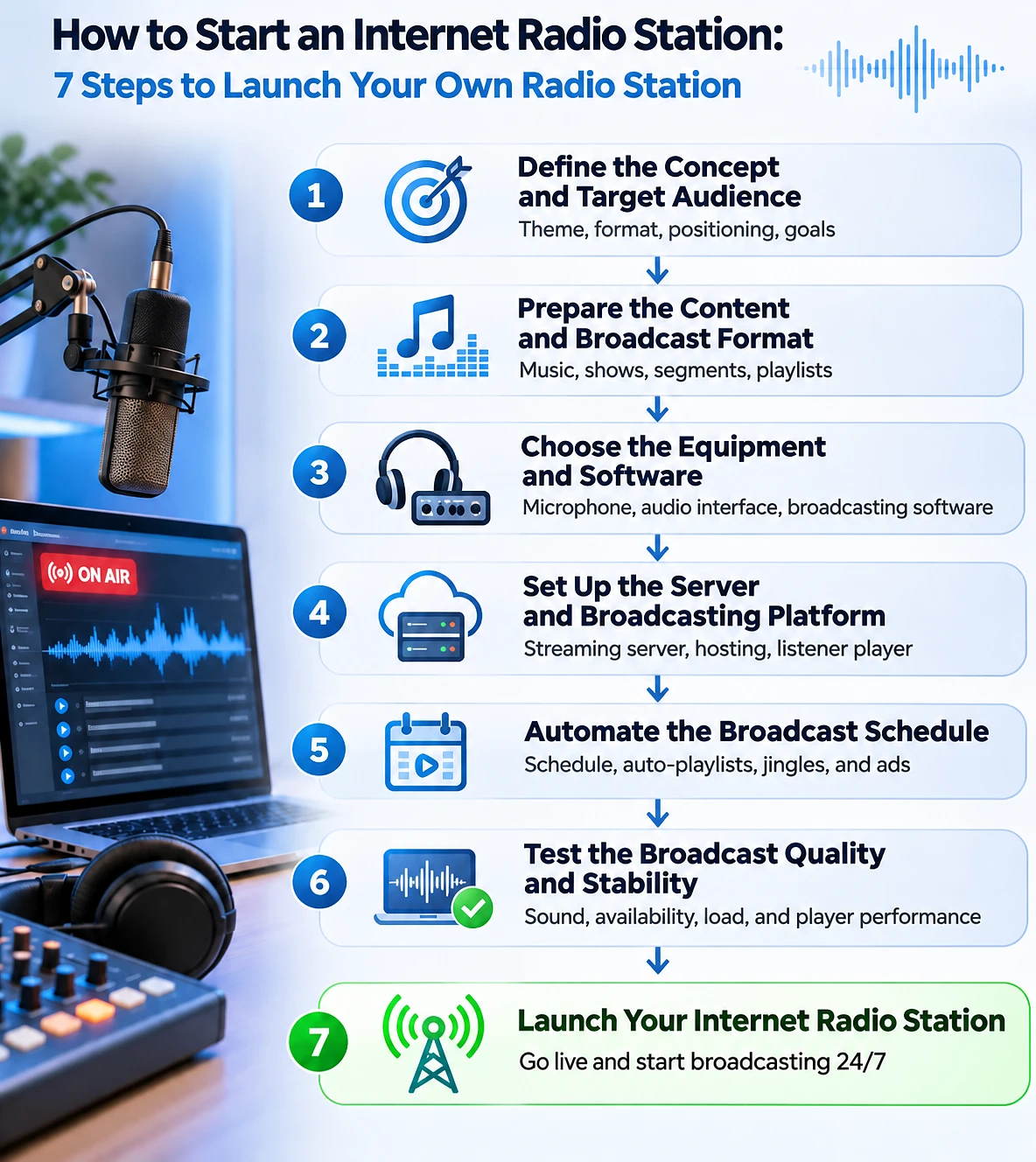
Launching an internet radio station involves seven steps: define the concept, prepare content, choose equipment and software, configure a server, set up automation, test broadcasting, and open access to listeners. We recommend choosing technology after agreeing on the format. This makes the station's requirements clear before you buy anything.
Steps 1-2: Concept, Audience, and Content
Step 1. Describe your future station on one page. Specify who will listen and in what setting. Background listening in a coffee shop and original interviews call for different programs and ways to manage audio.
Before choosing a platform, answer these basic questions:
- What need does the station meet for listeners?
- What music and spoken-word formats will the programming include?
- Will there be live broadcasts and invited guests?
- Do you need restricted access or separate streams?
- Who will prepare content and manage the schedule?
Choose a name after defining the concept and checking for potential legal conflicts. It will appear in the domain name and station branding. Changing the name after launch will mean updating these points of contact.
Step 2. Gather content for a trial broadcast schedule. Prepare music, programs, and short audio jingles. Listen to the entire program: good individual recordings do not necessarily make a cohesive broadcast.
Steps 3-4: Equipment, Software, and Server
Step 3. Choose tools for preparing and transmitting audio. An automated station does not need a microphone. For interviews, you will need to check speech quality, guest connections, and the ability to monitor the final audio through headphones.
Step 4. Choose where the station will run. A ready-made radio hosting service handles some administration tasks. Your own server gives you more control over the system, but requires a specialist to configure and maintain it.
These steps should produce a clear division of responsibilities. Everyone should know where recordings are stored, which software assembles the broadcast, and who maintains the server.
Steps 5-7: Automation, Testing, and Launch
Step 5. Configure the schedule and source switching. Decide what plays between programs and what happens when a host disconnects. Prepare a fallback playlist.
Step 6. Run a test broadcast. Check the audio, player functionality, and how the station behaves during failures. Test both normal broadcasting and transitions between modes.
Step 7. Give your audience access. Publish a direct link or a page with a player. Start with a small group of listeners so you can resolve problems before a wider announcement.
What Equipment Do You Need for Internet Radio?
For a basic launch, you need a computer to prepare content and cloud radio hosting with automated broadcasting. A microphone is needed for speech, while a separate audio interface connects compatible audio equipment. A studio setup makes sense for regular live programs.
What Do You Need to Create an Internet Radio Station?
| Component | Basic Launch | Professional Station |
|---|---|---|
| Microphone | USB microphone, or none for fully automated broadcasting | Studio microphone |
| Audio interface | As needed | External interface or mixer |
| Computer | Desktop or laptop | Dedicated workstation |
| Broadcasting software | Basic software | Advanced automation |
| Server | Cloud radio hosting | Dedicated or scalable infrastructure |
| Player | Web player | Website, apps, other devices |
With automated cloud broadcasting, your work computer does not need to stay on: the platform plays the files. If you transmit live audio from your computer, switching it off will interrupt that source.
When to Upgrade to Studio Equipment
Multiple hosts and guests make audio management more complex. A mixer lets you adjust sources separately, while headphones help you monitor speech without feedback from speakers. A quiet room is often more useful than an expensive microphone in a room with a strong echo.
A stable network connection is particularly important for distributing an existing stream. Transcoding audio into other formats, on the other hand, increases processor load. Consider these tasks separately when choosing a server.
If you keep equipment on your premises, provide an uninterruptible power supply. A surge protector does not replace a UPS: it will not keep a computer or router running during a power outage.
Software and Platforms for Creating Internet Radio
A station's software setup includes tools for preparing broadcasts and a server that delivers the stream to listeners. You can configure these yourself or get them as part of a cloud platform. Your choice depends on the features you need and your team's readiness to maintain the system.
How Broadcasting Software Differs from a Server
Broadcasting software selects recordings, mixes sources, and produces an audio stream. A streaming server receives that stream and distributes it to listeners. The station name and information about the current recording are transmitted separately from the audio itself.
Icecast and SHOUTcast are examples of server solutions. The official Icecast documentation describes how to install and configure the Icecast streaming server. Check installation, compatibility, and security settings against the documentation for your chosen version.
For automated playback, you can consider combining Liquidsoap and Icecast. The Liquidsoap quick start guide shows how a playlist is sent as an audio stream to an Icecast server. It illustrates how software tools divide responsibilities, rather than providing a ready-made recommendation for every project.
Cloud Radio Hosting or Your Own Server
Cloud radio hosting can combine recording uploads, scheduling, and a player in one dashboard. Before paying, check what the plan includes: not every offering supports live broadcasting or multiple streams. Also find out whether you can export your media library and settings when switching services.
A self-managed server gives you more control over configuration. In return, your team takes responsibility for updates, backups, and troubleshooting. Renting a virtual server does not, by itself, include radio station administration.
During setup, restrict access to the control panel and hosts' credentials. Open only the necessary network ports. For a player on a secure website, make sure the stream can be delivered over HTTPS in a compatible format.
How to Assess Platform Capacity and Features
A basic estimate of listener capacity is the available bandwidth divided by the bitrate of one stream. Bitrate indicates how much data is transmitted per second. A 100 Mbps connection and a 128 kbps stream allow roughly 800 connections in theory.
The practical limit will be lower because of network overhead and other restrictions. A virtual server's available bandwidth may be shared among the provider's customers. Verify your estimate against the plan's terms and a load test.
- Check the concurrent listener limit and what happens if you exceed it.
- Confirm storage capacity and whether stream transcoding is available.
- Check scheduling, live broadcasting, and fallback source support.
- Make sure the platform supports the listening options and data exports you need.
The Station Website and Control Panel Maintenance
If you need a custom interface, Web Development covers the station page and player integration. Hosting the website and stream separately makes it easier to update pages independently of broadcasting. If they share hosting, you will need to account for their combined load.
Both the website and control panel need updates. If your chosen system uses PHP, check current PHP security vulnerabilities and available fixes when reviewing its software environment. Whether a particular issue applies depends on the system's version and configuration.
How to Run an Internet Radio Station Around the Clock
Round-the-clock internet radio requires a schedule, automated playback, monitoring, and a fallback source. Automation manages normal broadcasting. Monitoring detects failures, while the fallback keeps audio playing until the main source is restored.
Playlists and Broadcast Scheduling
AutoDJ is a feature that plays recordings automatically. It builds the broadcast according to predefined rules while no host is connected. The schedule sets the times for programs and music blocks.
Set rules for repeating tracks and artists. Configure the frequency of jingles and announcements separately. Always specify the station's time zone, especially if editors work from different countries.
For live broadcasting, set the source priority and the condition for returning to automated programming. For example, a prepared playlist should start when the host disconnects. Test this transition in advance, including a sudden connection failure.
Monitoring Availability and Audio
A running server does not necessarily mean listeners can hear the program. Monitoring should check both stream reception and the presence of audio. It is useful to run this check from outside the station's infrastructure.
- Alert the responsible person if the stream is unavailable.
- Detect unexpected, prolonged silence.
- Monitor how close you are to the connection limit.
- Check for automated playback errors.
Before launch, agree on support and incident-response commitments. Alerts must reach someone who can restore the broadcast. Response times and responsibilities should be defined for the specific infrastructure.
Broadcast Redundancy and Fallback Playback
A fallback playlist helps when the main source is lost, but cannot protect against an outage of the server it runs on. If that downtime is unacceptable, you will need a separate solution for server redundancy. Its complexity should match the consequences of the station going offline.
For self-managed infrastructure, keep backups of the media library and configuration. Test whether you can restore them, not just whether backup files exist. These tasks fall within Webdelo DevOps and Infrastructure: setting up and maintaining the environment where the product runs.
How Much Does It Cost to Start Your Own Internet Radio Station?
The cost of creating an internet radio station includes preparation and ongoing operation. The recurring budget depends on audience size, the volume of recordings, content licensing terms, and maintenance. You can estimate an exact amount after choosing the format and reliability requirements.
What Makes Up the Cost of Internet Radio?
| Expense | Cost Type |
|---|---|
| Equipment | Initial |
| Software | One-time or recurring |
| Server or hosting | Monthly |
| Website and player | Initial and ongoing maintenance |
| Automation | One-time and recurring |
| Music licenses | According to usage terms |
| Technical support | Recurring |
Budget separately for editorial work: selecting recordings, preparing programs, and updating the schedule. Even fully automated broadcasting needs someone responsible for content.
What Affects the Recurring Budget
For hosting, peak concurrent listeners matter more than total monthly website visits. Additional streams and audio quality options increase resource use. Ask the provider about traffic limits and the process for upgrading to the next plan.
Compare a ready-made platform and your own server by their total operating cost. Lower rental fees may come with additional administrator costs. The estimate should list setup, maintenance, and feature changes separately.
For the station website, it helps to understand what website maintenance includes in advance. Agree on audio stream maintenance separately so it does not fall outside the contract.
What Legal Requirements Should You Consider?
Before launch, check the rights to music and other materials for your chosen territories and uses. Commercial recordings usually require clearance of copyright and related rights. There is no universal license that covers every internet radio station.
Copyright and Related Rights in Music
Copyright covers the musical composition and lyrics. Related rights protect, among other things, the performance and sound recording. Buying a recording or subscribing to a personal listening service does not grant permission to broadcast it.
Check the usage terms for each library:
- Is internet radio broadcasting permitted?
- Which countries and listener categories does the permission cover?
- Is commercial use allowed?
- Are reports on the works played required?
- Is public playback in venues permitted?
An open license also has conditions. Recording your own interview requires agreement on the use of participants' contributions. Permission to rebroadcast another station should be checked separately from the rights to individual musical works.
Broadcast Territory and Station Name
A lawyer will need information about where the station operator is registered and its intended audience. An internal corporate station and a public music station may raise different questions. This section helps you prepare for a review, but does not replace legal advice for your jurisdiction.
Check the name before registering a domain and preparing the branding. In the United States, USPTO resources are used to search registered trademarks. An available domain does not, by itself, establish the right to use a name.
Listener Data and Contractor Access
If a station collects email addresses or offers user accounts, it needs to protect personal data. Define why you collect it and limit employee and contractor access. A public player does not automatically require a detailed listener profile.
Protecting customer data when working with IT contractors is especially important when adding subscriptions and CRM integration.
How to Launch an Internet Radio Station and Test Broadcast Quality
Before a public launch, test the entire chain from the audio source to the listener's player. Testing should cover audio quality, different devices, expected load, and source disconnections. Successful playback on one computer is not enough to establish readiness.
How Internet Radio Works: From Audio Source to Listener
The basic chain is: audio source → broadcasting software → streaming server → internet → listener's player. The source can be a media library, microphone, or stream you have permission to rebroadcast. Checking each link helps identify the cause of a problem.
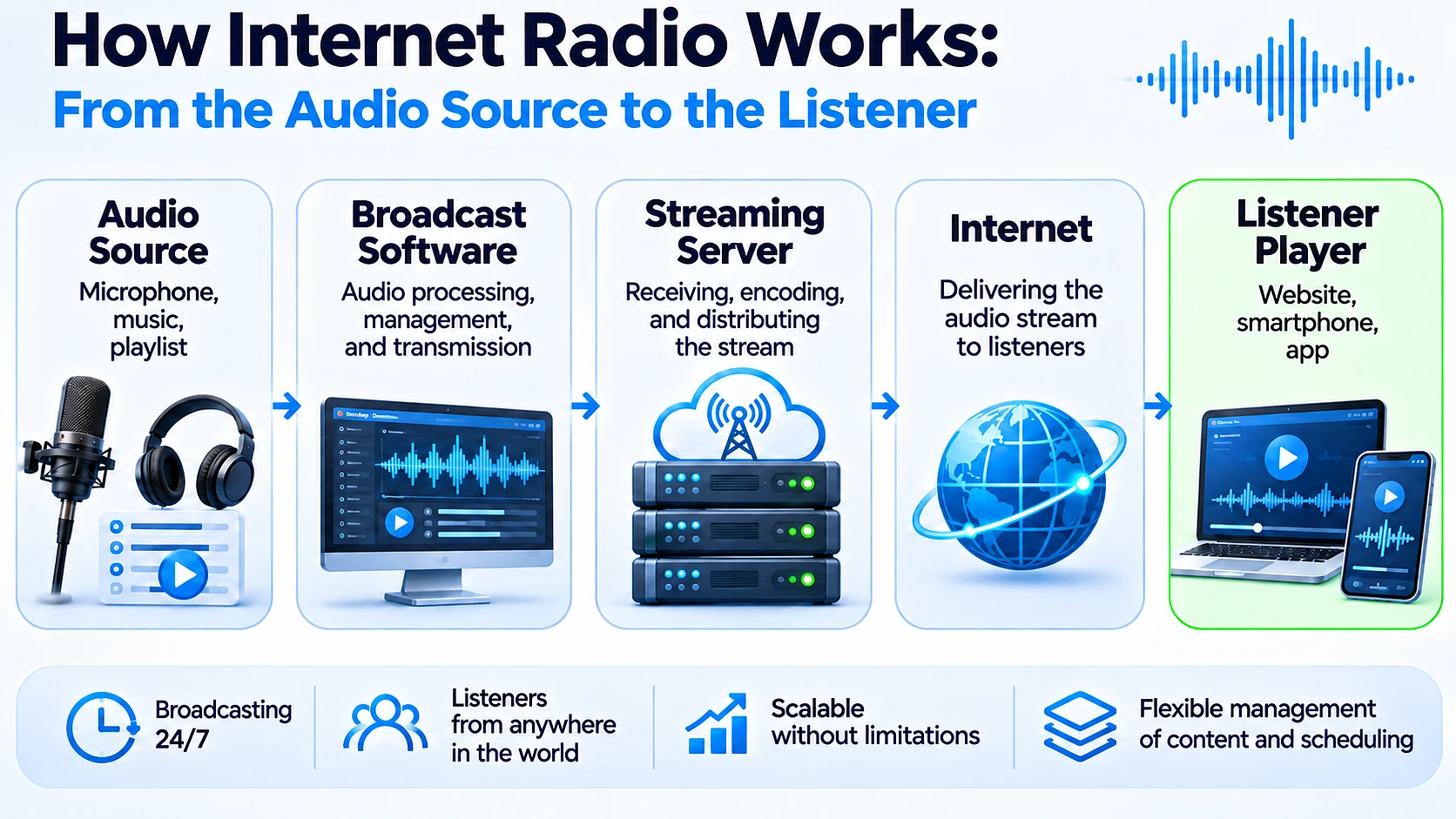
If the software shows a signal but the browser is silent, the problem may be further along the chain. If there is no audio at the software's output, start by checking the source and its settings.
Testing Audio and Stream Stability
- Volume. Listen to music and speech back to back to identify sudden changes.
- Distortion. Check for clipping, which is distortion caused by an excessively high signal level.
- Transitions. Check program endings and switches between playlists.
- Live broadcasting. Connect a host, then test both normal and unexpected disconnections.
- Fallback. Make sure the fallback source starts without manual intervention.
- Load. Coordinate with the provider to test the expected number of connections.
Testing the Player and Opening Access
Test the player in major browsers and on mobile devices. Check user-initiated playback, stopping, and reconnecting after a network outage. If the track title is displayed, make sure it updates correctly.
Test the direct link separately from the embedded player. This helps distinguish website problems from stream problems. Then run a soft launch for a limited audience and collect reports of issues.
Monitoring should already be running on the day of the public launch. Confirm that the responsible person receives a test alert. Document the steps to take if broadcasting stops.
A Webdelo Internet Radio Example: The SoundAds Project
At Webdelo, we do more than explain how to launch internet radio. We have our own working project, SoundAds, which reflects our hands-on experience with internet radio.
For us, the project is more than a way to broadcast audio online. We see internet radio as a digital tool with potential applications in brand development, audience engagement, and business marketing.
We plan to explore how SoundAds can serve Webdelo itself and how an owned audio channel might complement other ways of reaching customers. These are future plans, not claims of proven commercial results.
See the project: SoundAds internet radio.
Could a similar channel benefit your business? Webdelo develops digital solutions and helps companies identify effective ways to attract and retain customers. If you are considering your own online platform or a new communication channel, talk to Webdelo about your goals.
What to Consider When Reviewing This Example
A public page and an internal broadcasting system serve different purposes. Listeners need straightforward access to the broadcast. The station team needs content management and system maintenance, neither of which can be assessed from a public address alone.
Use specific criteria when reviewing your own page: how clearly it presents playback controls, whether it works on a phone, and how it behaves when the connection drops. Plan your budget and server architecture around your own requirements, without borrowing unverified SoundAds characteristics.
Common Mistakes When Launching Internet Radio
The main launch risks involve an unsuitable platform, insufficient prepared content, and a lack of broadcast monitoring. It is better to identify these problems during trial broadcasts. Buying more equipment will not solve them on its own.
Choosing a Platform Without Checking Requirements
Focusing only on price leaves important limitations unnoticed. For example, a platform may play playlists but not support the way you need hosts to connect. Before paying, run one complete cycle of your programming in a test environment.
A self-managed server without a designated administrator creates a separate risk. Decide in advance who will install updates and restore the system. The company must retain access, rather than leaving it solely with the person who configured it.
The Media Library Is Ready, but the Schedule Is Not
A folder of recordings is not yet a station program. Without rotation rules, listeners may hear the same works too often. Without an editorial plan, spoken-word episodes will soon run out.
Test the schedule over a typical listening period for your audience. Employees who hear the station throughout the working day notice repetition more than an occasional website visitor.
Fallback Exists Only in the Settings
Test fallback by disconnecting the main source. A fallback playlist listed in the control panel does not prove it will start. Likewise, a configured alert is useless if the person responsible for broadcasting does not receive it.
A Launch Checklist for Your Own Online Radio Station
A station is ready to launch when content and rights are in place, the technical chain has been tested, and responsibilities have been assigned. Record the review results in a short document. It will provide the basis for handing the station over to routine operation.
Launch Readiness Criteria
- Concept. The station's audience, format, and purpose are defined.
- Name. Potential trademark conflicts have been checked.
- Content. The media library is prepared and its usage terms agreed.
- Programming. Scheduling, rotation, and source transitions are configured.
- Capacity. Peak audience size has been estimated and plan limits checked.
- Access. The direct link and player have been tested on different devices.
- Monitoring. Monitoring detects failures, and alerts reach the responsible person.
- Recovery. Fallback playback and restoration from backups have been tested.
- Management. The company has the necessary access and maintenance instructions.
- Budget. Technical support and ongoing editorial work are accounted for.
What to Leave with the Team After Launch
Keep a broadcasting diagram, a list of services, and contact details for the people responsible. Add instructions for starting a live broadcast and responding to silence. This documentation helps the team maintain the station without constantly relying on the person who handled the initial setup.
Do Not Limit Your Business to One Customer Acquisition Channel
Internet radio is one possible tool for engaging an audience. Webdelo helps companies understand different digital channels, assess their suitability, and build solutions for specific business needs.
If your project targets another country, digital support for entering new markets helps align localization, technical product readiness, and ways of engaging with your audience. The decision to launch a radio station should fit within this broader context.
Discuss with Webdelo which tools can help your business attract and retain customers.
Frequently Asked Questions
Can you create an internet radio station without professional equipment?
Yes. You can start with a computer, broadcasting software, and a streaming server or hosted radio platform. With cloud-based automated broadcasting, files play on the platform side, so your computer does not need to stay on. A microphone and audio interface are useful for live shows.
How do you start an internet radio station from scratch?
Choose a station format, prepare content, select software and equipment, configure streaming, schedule broadcasts, test the stream, and launch your station. Pick technology only after the format is agreed, so requirements are clear before you buy anything. Start with a limited group of listeners to fix issues before a wider announcement.
Do you need your own internet radio server?
Not necessarily. Hosted radio services provide ready-to-use infrastructure, often combining uploads, scheduling, and a player in one panel. A self-managed server offers more control but requires setup, updates, backups, and maintenance. Renting a virtual server alone does not include administering the radio station.
How can you run a 24/7 internet radio station?
Use automated playlists and scheduled programs, monitor stream availability and audio, and configure backup playback for when the main source drops. Note that a fallback playlist cannot help if the server it runs on goes down. If downtime is unacceptable, you also need server-level redundancy.
How much does it cost to start an internet radio station?
Costs depend on equipment, software, hosting, listener capacity, licensing, and automation. Consider both setup expenses and recurring fees, including technical support and editorial work. For hosting, peak concurrent listeners matter more than total monthly site visits.
Do you need a license to operate internet radio?
Requirements depend on the country, music rights, and broadcast content. Commercial music generally requires appropriate copyright and related-rights permissions, and no single license covers every country. Buying a track or a personal streaming subscription does not grant broadcast rights, so check the terms with a lawyer in your jurisdiction.
Where can I see a working internet radio station?
SoundAds, hosted on a Webdelo subdomain at https://soundads.webdelo.com/public/soundads, is an example you can open to view its public radio page. The project's streaming technology, budget, and audience figures are not disclosed. Plan your own station's setup based on your own requirements.