Website Hacked? What to Do in the First 24 Hours
Website hacked? A calm, step-by-step plan for the first 24 hours after a website hack: contain exposure, preserve logs, scope access, close the entry point, rebuild cleanly, and test forms and payments before relaunch.

Start With Containment, Evidence, and a Recovery Plan
Found your website hacked or serving malware? First, contain the attack, preserve logs, and identify the entry point. Relaunch only from a verified clean environment. The first 24 hours are a response window, not a recovery deadline.
Our approach to hacked website recovery puts evidence before cleanup. That evidence helps us find the cause and avoid restoring the same vulnerability alongside the website.
- Isolate the affected site and serve a clean maintenance response with HTTP status 503.
- Preserve logs and snapshots of files and databases.
- Restrict administrative access and suspend suspicious accounts.
- Identify and close the entry point.
- Rotate credentials and other secrets from a trusted device.
- Relaunch after security checks, business tests, and monitoring are ready.
For a corporate website, the investigation must include lead forms and connected systems. Online stores also need checks of checkout scripts and payment routing.
Which Changes Suggest Your Website Has Been Compromised?
Unexpected redirects, unknown administrator accounts, and security warnings are strong reasons to investigate. A compromise can also remain hidden behind normal-looking pages. Check both what visitors see and what has changed on the server.
- Visible changes: defaced pages, unfamiliar pop-ups, or redirects that appear only on mobile devices or visits from search results.
- Search changes: spam pages indexed under your domain or browser and search-engine security warnings.
- Access changes: unknown administrators, new SSH keys, or successful logins from unexpected locations.
- Server changes: modified application files, unfamiliar scheduled tasks, or outgoing spam.
- Business signals: hosting suspension, unusual traffic, or customer reports about strange emails and payment pages.
A website malware scan can identify known malicious code. A clean result does not establish that the site is safe, because a hidden access mechanism, or backdoor, may escape detection.
If a customer reports "my website has been hacked" symptoms on your domain, record the exact URL and circumstances. A redirect that you cannot reproduce from your own browser still deserves investigation.
First Hour: Stop Exposure Without Destroying Evidence
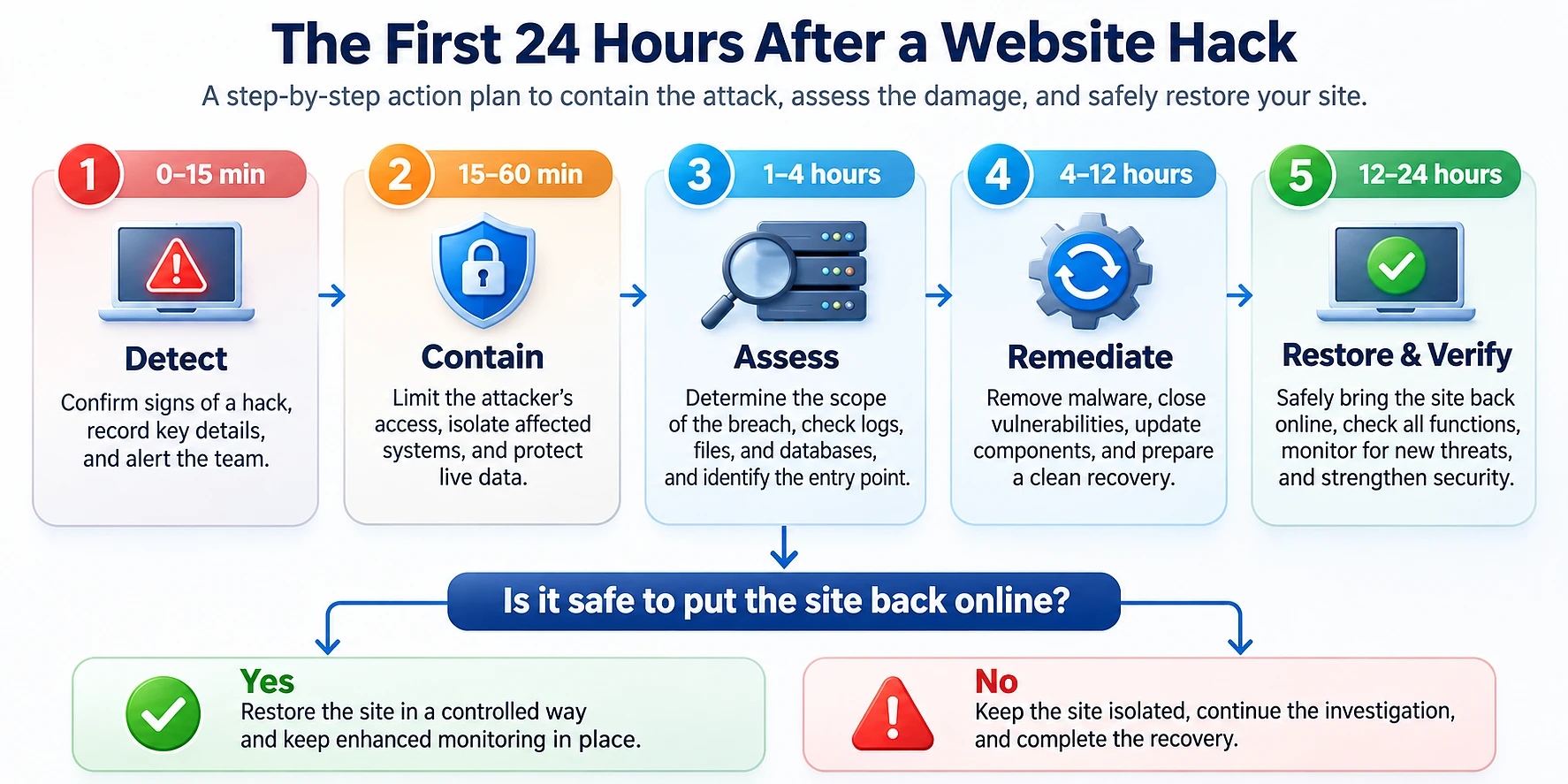
The first hour of website security incident response should limit further damage while preserving the information needed for investigation. Isolate affected systems, restrict access, and save logs before cleanup changes them. Assign one coordinator to maintain the incident timeline and track decisions.
0-15 Minutes: Record and Contain
- Record the discovery. Note who reported the issue, when it appeared, and which URLs were involved. Capture screenshots and use a consistent time zone.
- Protect visitors. Serve a static maintenance page with HTTP status 503 from a trusted proxy or separate environment. Ensure infected pages cannot still be reached directly.
- Contact the hosting provider. Ask for containment assistance, available logs, snapshots, and any evidence of the entry point.
- Isolate the affected system. Block unnecessary network access while preserving a controlled investigation path. Avoid rebooting or reinstalling it before evidence is captured.
The FTC's technical response guidance recommends disconnecting affected equipment from the network without switching it off before forensic review. Powering down can erase evidence held in memory.
Containment arrangements depend on who controls the infrastructure. Our support and incident-response commitments explain the support framework, while project-specific responsibilities and targets belong in the agreed service scope.
15-60 Minutes: Restrict Access and Save Logs
Preserve evidence before deleting suspicious files. Keep original copies in separate, access-controlled storage, and perform analysis on working copies.
- Export web server, application, database, SSH/FTP, and hosting control panel logs.
- Preserve available CDN, firewall, and authentication logs before retention limits remove them.
- Capture a snapshot of the affected files and database. Label it as compromised evidence, not a recovery backup.
- Restrict the admin panel, suspend unknown accounts, and pause unnecessary contractor access.
- Tell support staff where to send customer reports and screenshots.
Document each change, including emergency access revocations. The time windows below are a working guide, not a guarantee that investigation or restoration will finish within one day.
1-4 Hours: Establish What the Attacker Could Access
Scope analysis determines which systems, accounts, and data the attacker reached. Review access history alongside file and configuration changes. Include neighboring sites and integrations, because the affected website may be only one part of the incident.
- Authentication: compare failed and successful logins, session creation, new users, and privilege changes.
- System activity: examine privileged command history, unfamiliar SSH keys, and scheduled tasks such as cron jobs.
- Application changes: inspect recently uploaded files, executable files in upload folders, and altered application code.
- Connected environments: check staging sites, shared databases, deployment systems, and other sites under the same hosting account.
- Attacker activity: look for spam publishing, phishing pages, data exports, or outbound attacks.
For example, an unfamiliar checkout script requires more than a file cleanup. Review when it appeared, which pages loaded it, and whether it sent information to an external host.
Build a timeline that distinguishes confirmed findings from hypotheses. Missing log entries do not prove that no access occurred, especially when logging was disabled or records may have been altered.
4-12 Hours: Close the Entry Point and Prepare a Clean Environment
Recovery preparation combines root cause analysis, a trusted rebuild, backup verification, and credential rotation. Removing visible malware alone leaves uncertainty about hidden access. We favor a clean environment because it gives the team a stronger basis for validating the restored site.
Finding the Root Cause
Investigate the mechanism that allowed access. Typical entry points include:
- Outdated CMS components, plugins, or server software.
- Weak passwords or stolen credentials.
- Vulnerable custom code or unsafe file uploads.
- Exposed administration tools with inadequate access controls.
- Compromised contractor or deployment accounts.
Compare your findings with the hosting provider's evidence. For PHP applications, our analysis of the October 2026 PHP security vulnerabilities provides context for checking runtime exposure. A published vulnerability is a lead to investigate, not proof of how this incident happened.
If the precise entry point remains uncertain, document that uncertainty and remove the suspected access paths through rebuilding and access changes. An unexplained compromise should not receive an automatic approval to relaunch.
Website Malware Removal or a Clean Rebuild?
Website malware removal can stop a known malicious behavior while leaving other changes behind. A clean rebuild replaces the compromised operating environment and application code with trusted versions. Restore reviewed content and business data separately.
Google's foundational hacked-site guidance describes reinstalling from trusted sources and checking backups before restoration. The article dates from 2008, so its recovery principles should be distinguished from its older tool names.
On managed or shared hosting, arrange a fresh environment with the provider rather than attempting an operating-system rebuild yourself. Webdelo DevOps and Infrastructure covers the infrastructure work that can support this recovery path.
How to Restore a Hacked Website From Backup
Choose the backup against the earliest credible evidence of compromise, not the day someone noticed the problem. The latest backup may already contain malicious code.
- Restore the candidate backup into an isolated environment with outbound integrations disabled.
- Compare application files against trusted releases or a reviewed source repository.
- Inspect the database for unknown administrators, injected scripts, and altered settings.
- Review uploaded files and scan for malicious content.
- Apply security updates and close the identified entry point before testing.
A verified older backup may omit legitimate recent orders or submissions. Reconcile those records separately instead of importing the entire compromised database without review.
Rotate Secrets From a Trusted Environment
Stolen credentials remain usable after malware is removed. Revoke known compromised access during containment, then issue replacement credentials from a clean device into the trusted environment. Replacing secrets on a server still controlled by an attacker can expose them again.
- Replace administrator, hosting, email, and deployment credentials.
- Rotate database passwords, SSH keys, and API keys.
- Replace payment, CRM, and other integration tokens.
- Invalidate active sessions and review recovery methods.
- Enable multifactor authentication, or MFA, for administrative access.
Check staff email addresses against known breach records using a service such as Have I Been Pwned. Never submit current passwords or private keys to an unfamiliar checking service.
12-24 Hours: Test Business Functions and Decide Whether to Relaunch
Relaunch requires evidence that the entry point is closed, the deployment is clean, and business functions behave correctly. Credential rotation and active monitoring are also release conditions. If those checks fail, extend containment rather than treating hour 24 as a deadline.
Forms, CRM, and Payment Checks
- Submit test forms and verify their destinations, including hidden email recipients.
- Check CRM connections, email integrations, and webhooks for unexpected endpoints.
- Compare checkout scripts and payment settings with approved configurations.
- Run test orders through payment confirmation and the connected business systems.
- Verify that logs and alerts capture the test activity without exposing sensitive values.
A successful page load is not a sufficient acceptance test. Our Web Development work includes the application and integration logic that these recovery checks need to cover.
Search Warnings and Spam URLs
Check the Security Issues and Manual Actions reports in Google Search Console. Remove attacker-created content at its source, and make deleted spam URLs return an appropriate 404 or 410 response.
Use the Removals tool when temporary hiding from search is needed. It does not delete content from the server or resolve a security issue. Request the relevant review after remediation, and allow time for warning removal and search visibility to recover.
Assign Owners and Completion Criteria
The coordinator should collect technical sign-off before the business owner approves reopening. This table assigns suggested owners and observable completion criteria.
| Period | Action | Responsible | Completion criterion |
|---|---|---|---|
| 0-15 minutes | Record findings and contain exposure | Incident coordinator and hosting provider | Visitors cannot reach affected content, and initial findings are recorded |
| 15-60 minutes | Restrict access and preserve evidence | IT manager and hosting provider | Logs and snapshots are secured, and unnecessary access is suspended |
| 1-4 hours | Investigate scope and access history | Developer and IT manager | Affected systems, findings, and evidence gaps are documented |
| 4-12 hours | Close entry paths and prepare recovery | Developer and hosting provider | A clean deployment and reviewed data are ready, with secrets rotated |
| 12-24 hours | Test and decide on relaunch | IT manager, incident coordinator, and business owner | Security and business checks pass, monitoring is active, and approval is recorded |
Investigate Whether Customer Data Was Accessed or Exposed
A technical exposure review examines whether the attacker could read, export, or intercept customer information. Review database activity and data flows alongside file changes. Record where missing evidence prevents a firm conclusion.
- Inspect available database logs for unusual bulk queries, exports, or unfamiliar accounts.
- Look for database dumps and customer files in publicly accessible directories.
- Review form handlers for changed recipients or additional external requests.
- Inspect checkout scripts for unauthorized collection of entered information.
- Check outbound connections and transfers to unknown destinations.
If customer information is publicly accessible, block access immediately and retain a restricted evidence copy. Request removal of search-engine copies and check for republication elsewhere. Do not delay containment to finish documenting every exposed record.
Review service-provider permissions and verify claimed fixes through tests or logs. Our guide to protecting customer data when working with IT contractors addresses access boundaries relevant to this review.
Incident snapshots can themselves contain sensitive information. Apply restricted access and controlled handling consistent with our data security practices.
Avoid Actions That Hide the Cause or Preserve Attacker Access
Recovery mistakes either destroy evidence or carry the compromise into the restored environment. A site that looks normal can still contain stolen-access paths. Use explicit checks rather than appearance as the measure of success.
- Deleting suspicious files immediately: preserve evidence before modifying them.
- Trusting one scanner or plugin: combine scanning with access, configuration, and code review.
- Restoring the latest backup automatically: verify its contents and timing first.
- Changing passwords on a compromised device: use a trusted workstation and clean destination environment.
- Forgetting integration accounts: include contractors, APIs, deployment tools, and active sessions.
- Stopping monitoring after relaunch: keep alerts focused on the original entry point and signs of renewed access.
Estimate Recovery Costs and Business Disruption Separately
Incident losses include technical recovery work and disruption to sales or operations. Separate confirmed expenses from estimates. This gives the business a useful basis for prioritizing recovery and prevention.
- Technical costs: investigation, rebuilding, data reconciliation, testing, hosting changes, and additional security tooling.
- Commercial impact: missed orders, lost leads, and advertising that continued sending visitors to an unavailable site.
- Operational impact: support workload, manual processing, and staff time diverted from normal work.
- Search impact: reduced organic traffic while warnings or attacker-created pages affect visibility.
Estimate missed sales using comparable trading periods and normal conversion patterns. Distinguish delayed orders from permanently lost orders to avoid double-counting.
For a cross-market launch, also check whether localized campaigns and regional forms remain paused or misrouted. These dependencies belong in digital support for entering new markets and should have named recovery owners.
Compare prevention costs with your incident's actual impact rather than an industry-wide claim. Understanding what website maintenance includes helps separate routine upkeep from emergency investigation and rebuilding.
Prevent Website Hacking by Removing What Enabled the Incident
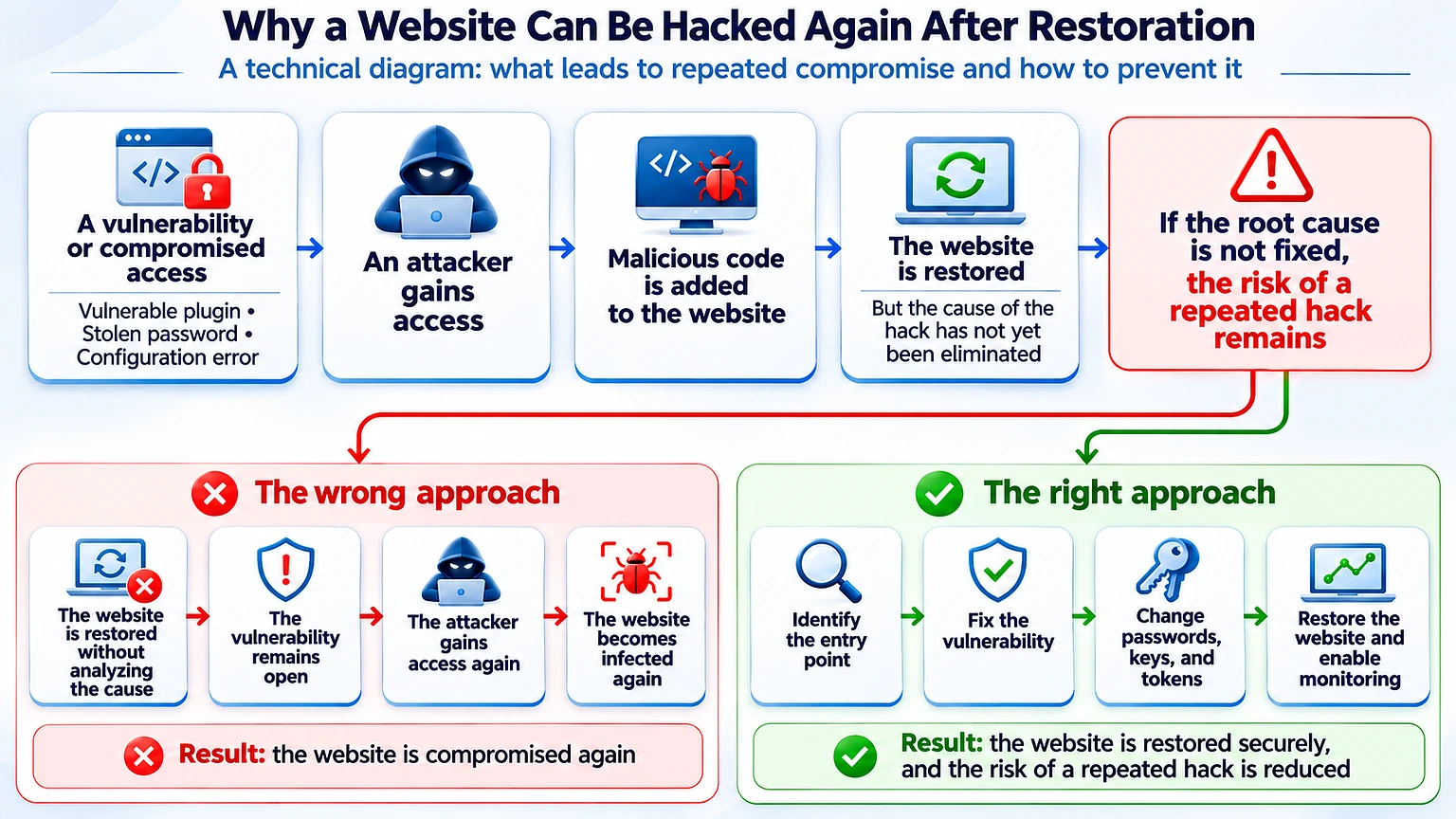
Repeat compromise becomes possible when restoration preserves a vulnerable component, stolen credential, or hidden backdoor. Prevention starts with closing those paths. Updates, access controls, tested backups, and monitoring then keep the recovery from becoming a temporary fix.
Why Websites Get Hacked Again After Recovery
Restoring a backup and changing one administrator password leaves other access paths unresolved. A vulnerable plugin or stolen deployment key can still provide entry.
Our preferred recovery path addresses the cause before public release. It combines trusted application code with reviewed data, complete credential rotation, and restricted access. Monitoring then checks whether those controls hold.
Use a Website Security Audit to Test the Controls
A website security audit should verify that controls work, including backup restoration and alert delivery. Cloudflare's recovery guidance recommends updated software, protected admin access, backups, and managed web application firewall rules. A web application firewall, or WAF, filters suspicious web requests but does not replace application fixes.
| Vulnerability or gap | Prevention | How to check | Suggested frequency |
|---|---|---|---|
| Outdated CMS, plugins, or runtime | Maintain an inventory and apply security updates | Compare installed versions with supported releases and advisories | Weekly review, with urgent vulnerabilities assessed immediately |
| Weak administrator access | Require MFA, limit login attempts, and restrict access | Test MFA enforcement and review accounts and access rules | Monthly and after access changes |
| Missing request filtering | Deploy suitable managed WAF rules | Review rule activity, bypasses, and false positives | Continuous monitoring |
| Unreliable backups | Automate off-site backups with separate access controls | Restore into an isolated environment and test the result | Monthly restore test |
| Unmonitored logs | Alert on suspicious logins and unexpected file changes | Review alerts and verify that collection remains active | Daily review |
| Excessive contractor access | Grant only necessary permissions and remove expired access | Compare active accounts with current responsibilities | Quarterly and at offboarding |
| Weak separation between systems | Separate sites, services, and credentials | Test whether one environment can access another without authorization | After infrastructure changes |
Assign an owner to each control and retain the test results. A backup job marked successful has limited value until the team proves it can restore usable data.
How Webdelo Assesses an Incident and Plans Recovery
Webdelo provides a technical incident assessment and a plan for safe website recovery. We begin with containment and evidence, then define the work required for a controlled relaunch. Timing depends on the compromise, available records, and the condition of the backups.
Webdelo builds and supports complex digital products, with technical leadership that includes Webdelo CTO Andrew Popov. Recovery planning connects application behavior with infrastructure and operational responsibilities.
The assessment covers:
- Affected systems and gaps in the available evidence.
- The identified entry point and required corrective work.
- Backup verification and the proposed rebuild approach.
- Credential rotation and integration dependencies.
- Business tests and documented relaunch criteria.
- Monitoring and measures to reduce repeat compromise.
Request a technical incident assessment and a safe website recovery plan from Webdelo. Share the affected domain, observed symptoms, and available hosting details through the agreed support channel. Keep passwords and sensitive evidence out of the initial message.
Let Verified Readiness Determine the Relaunch
A safe recovery follows a deliberate order: contain exposure, preserve evidence, establish scope, close the entry point, and validate the rebuilt site. The first 24 hours organize that work, but they do not determine when the website is ready to reopen.
Before approving relaunch, require recorded checks and named owners for ongoing monitoring. Keep unresolved risks visible until they are addressed.
Frequently Asked Questions
Website hacked: what to do first?
First, contain the attack. Serve a static maintenance page with HTTP status 503 and isolate the affected system without switching it off. Then preserve web server, application, database, and hosting logs and take snapshots before you delete anything. Restrict admin access and suspend unknown accounts, and keep cleanup until after the evidence is saved.
Can a hacked website be fully restored within 24 hours?
Not necessarily. The first 24 hours are a window for the response, not a deadline for recovery. How long it takes depends on how far the compromise spread, which logs are available, and the state of your backups. Relaunch only after the entry point is closed, secrets are rotated, business checks pass, and monitoring is running.
How do I restore a hacked website from backup safely?
Pick the backup based on the earliest credible sign of compromise, not on the day the problem was noticed, because recent backups may already contain malicious code. Restore it into an isolated environment with outbound integrations switched off. Compare the files with trusted releases, check the database for unknown admins and injected scripts, and apply security fixes before testing. Reconcile legitimate recent orders separately.
Is website malware removal enough, or is a clean rebuild better?
Malware removal can stop a known malicious behavior but may leave hidden backdoors and other changes in place. A clean rebuild replaces the compromised environment and application code with trusted versions. Reviewed content and data are then restored separately. This gives a stronger basis for validating the restored site, and a clean scan result alone does not prove the site is safe.
Why do websites get hacked again after recovery?
Usually because the restoration kept a vulnerable component, a stolen credential, or a hidden backdoor. Restoring a backup and changing one admin password leaves other access paths open, such as an outdated plugin or a leaked deployment key. To prevent a repeat, close the entry point, rotate all secrets from a trusted device, enable MFA, and monitor for signs of renewed access.
How can I check whether customer data was exposed after a hack?
Look through database logs for unusual bulk queries, exports, or unknown accounts. Search public directories for database dumps or customer files. Check form handlers and checkout scripts for changed recipients or external requests, and review outbound connections to unknown hosts. If you find data that is publicly reachable, block access right away and keep a restricted evidence copy.
How do I remove Google security warnings after my website was hacked?
Check the Security Issues and Manual Actions reports in Google Search Console. Remove attacker-created content at its source and make deleted spam URLs return 404 or 410. After cleanup, request a review. The Removals tool only hides pages temporarily and does not fix the security issue. Expect warnings and search visibility to take some time to recover.