Order Statuses in an Online Store: A Practical Guide
Four or five statuses are enough for a small store. We show which stages actually carry an order, what belongs in the admin panel only, how to name each status and who is responsible for changing it.

Introduction
Every small store owner knows the message: "Where is my order?" It usually arrives when nothing has gone wrong at all, with the parcel picked, packed and already sitting with the courier. Order statuses in an online store are the short, plain-language labels that answer that question before the customer has to ask it, and when the question still arrives, it is a status problem rather than a logistics problem.
We build and support online stores, and the request we hear most often is for more statuses. Our answer is usually the opposite one. Statuses exist to answer the customer before they ask, and every extra status you put in front of them creates a new question that someone then has to answer by phone. A small store needs four or five customer-facing statuses, mapped to the real stages an order goes through, with everything else kept inside the admin panel.
Below we walk through the four stages every order actually moves through, the split between what the customer sees and what stays internal, how to name statuses so nobody has to guess, how to set the chain up in your admin panel, and the mistakes we keep running into on real projects.
Why Status Chains Fall Apart in Small Stores
Status chains break for three reasons we see over and over: nobody updates the status on time, the names mean nothing to the customer, and the change never reaches them. All three are process problems rather than software problems, which is why moving to a different admin panel almost never fixes any of them.
Stores usually come to us asking for more statuses. What they need is fewer statuses and a clear rule about who changes each one. Before we touch any settings, we ask the owner to describe the last three "where is my order" conversations they had. The answers land in the same three buckets every time, and the niche makes no difference: we hear the same three from a homeware catalogue and from a store built around seo for beauty salons.
- The status lags reality. The parcel left the warehouse yesterday and the order record still says it is being picked. The customer checks the courier tracking page, sees the parcel moving, and now trusts the courier more than the store.
- The name means nothing. "Processing", "In work", "Status 3" - none of these tell the customer whether to wait, to pay something, or to pick up the phone. A status that needs explaining is a support call waiting to happen.
- Nothing is sent. The manager changes the status in the admin panel, the customer is never told, and the change might as well not have happened. The store does the work and gets none of the credit for it.
These three cost a small store more than they cost a large one. There is no support team to absorb the questions, so the owner takes the call personally, usually in the evening, usually about an order that is moving along perfectly well. Usability research on progress indicators in interface design makes the same point about waiting in general: people tolerate a wait far better when they can see where they are in it, and far worse when nothing on the screen tells them.
The reframe that fixes all three is the one the rest of this article is built on. Design the chain around what the customer has to know, then map your internal work onto it: what happened in the warehouse, which status it maps to, what the customer is told about it, in that order.
The Four Stages Every Order Goes Through
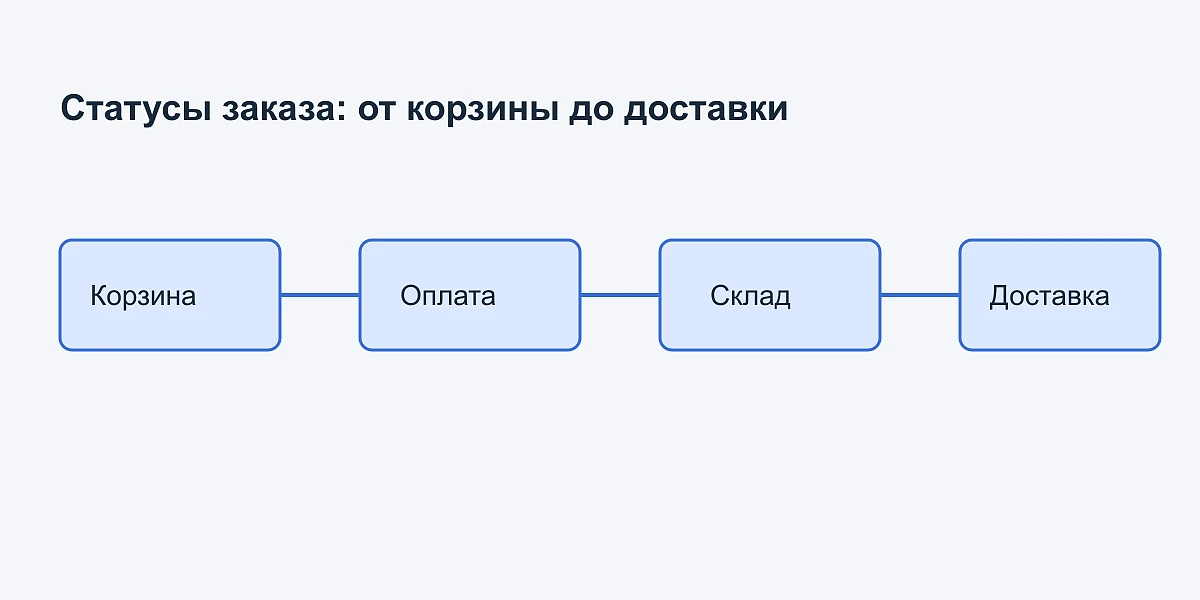
Every order in a small store moves through the same four order stages: cart, payment, warehouse and delivery. Cancellation and return are not a fifth stage - they are exits that can happen from any of the four. The whole status design follows from these stages, because a status is simply the name you give to a point on this path.
Cart and order placement
At this point the order exists in your system and nothing is committed yet: no money has moved, no stock has been set aside. The customer needs one thing here, which is confirmation that the order arrived at all. A store that stays silent for the first ten minutes after checkout gets its first message of the day right there.
Payment
Prepayment and cash on delivery produce different chains, and this is where most stores copy a template that does not fit them. With prepayment the customer is genuinely waiting for something and deserves a status for it. With cash on delivery the customer pays the courier, so payment is not a stage they wait through, and adding a payment status there means adding a label nobody reads.
Warehouse and picking
The warehouse stage generates the most internal noise. Stock gets reserved, availability is checked against the shelf, the order is picked, then packed, then it waits for the courier. Picking here simply means collecting the items of one order from the shelves. This is the stage where the temptation to show every sub-status to the customer is strongest, and where it does the most damage.
Delivery
Delivery covers the handover to the courier, the parcel in transit, and the moment it arrives. The boundary matters: once the parcel is with the carrier, your store should point the customer at the carrier's own tracking rather than duplicate it badly a few hours late. The schema.org ParcelDelivery vocabulary treats a shipment this way as well, as a separate object carrying a tracking number and a tracking link. That markup is also what assistants and search engines read back to a customer asking where their parcel is, which is why we treat it as part of GEO and AI SEO rather than as a developer detail.
Cancellation and return
An order can leave the path at any stage, before payment, after picking, or a week after delivery. What these exits have in common is that the customer's real question stops being about the parcel and becomes about the money. Any cancellation or return state that says nothing about the refund leaves the most important question open.
What the Customer Sees and What Stays Internal
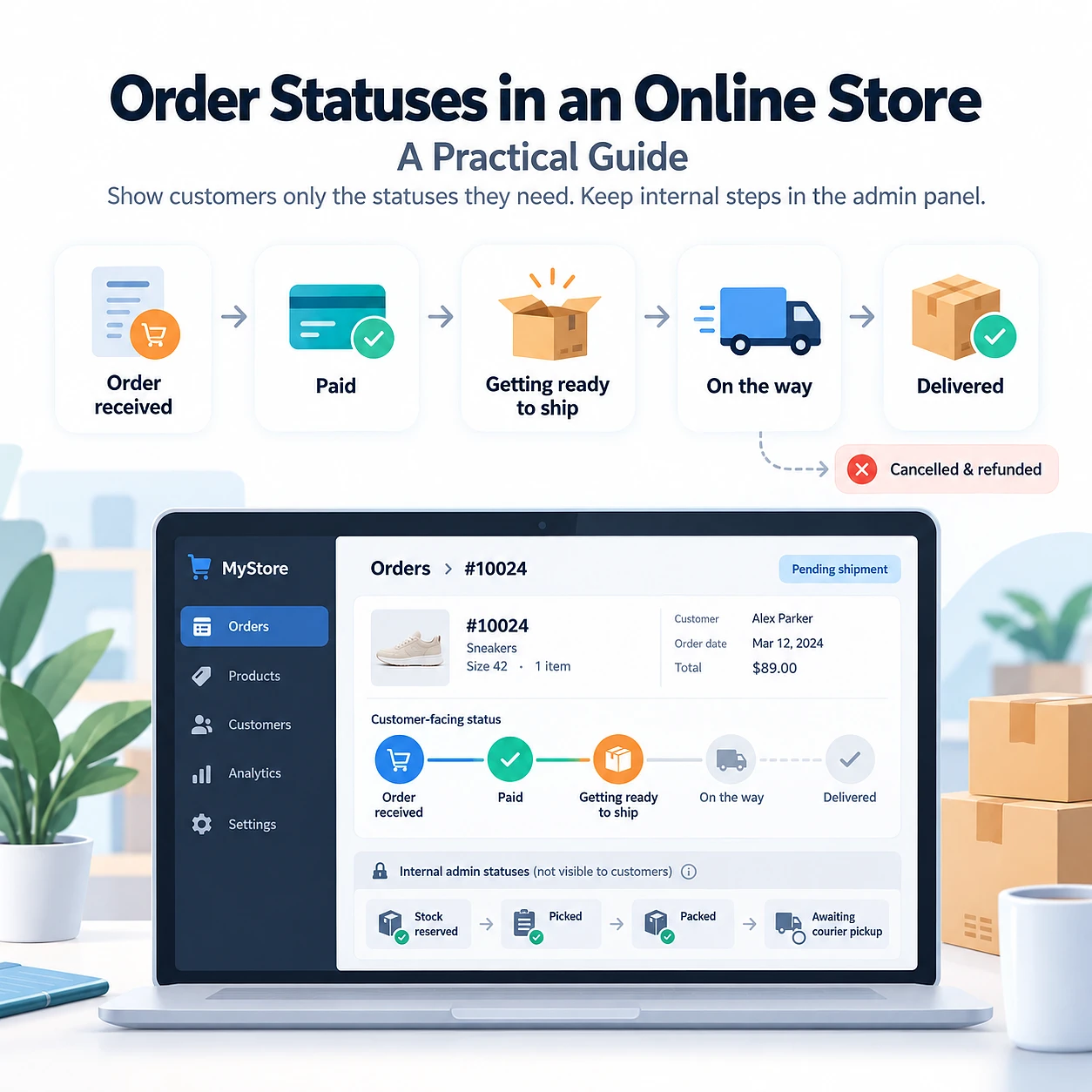
Show the customer four or five statuses and keep the rest in the admin panel. The test we apply is simple: if the customer cannot do anything differently after reading a status, it should not be visible to them. That is why a delivery status that links to the carrier's tracking earns its place, while a picking sub-status does not.
For a small store selling, say, homeware from one warehouse with a single courier service, the customer-facing chain we would ship looks like this:
- Order received - we have it, nothing is required from you yet.
- Paid - the money arrived, the order is now firmly in the queue.
- Getting ready to ship - the warehouse is working on it.
- On the way - the parcel is with the courier, here is the tracking link.
- Delivered - closed, with the return window stated.
- Cancelled and Refunded - the two exits, always paired with the state of the money.
Everything else lives in the admin panel and never appears in an email: stock reserved, payment verification, awaiting supplier, picked, packed, awaiting courier pickup, delivery attempt failed. These are sub-statuses, meaning internal states your team needs in order to work, which carry no instruction for the customer. The order status vocabulary that search engines read is deliberately short for the same reason, with a handful of states such as payment due, processing, in transit, delivered, problem and returned. Keeping your visible chain close to that shortlist is also one of the cheapest things you can do for SEO in the USA, because it is the vocabulary search engines already understand.
This is where we part ways with the "radical transparency" school that shows the customer every internal step. The mechanism is easy to miss: each visible status is an implicit promise about timing. "Awaiting supplier" tells a customer that something is wrong and simultaneously gives them no way to act on it, so they write to you to find out how wrong. The exception worth making is a genuine delay, and the right form for it is a dated message about that specific order, not a permanent new link in the chain.
There is a mapping exercise you can run in ten minutes. List every internal state your team uses, then write next to each one the sentence a customer would send you after seeing it. If there is no useful sentence, the state stays internal.
Naming Statuses So Nobody Has to Guess
A good status name says what happened and, where it matters, what the customer should do next. Write the names as short phrases in the customer's own words rather than as labels borrowed from your warehouse process, because the customer has never seen your warehouse.
Five rules cover almost every case:
- Use the customer's vocabulary. They know shipping and delivery. They do not know picking, reserves or fulfillment.
- Say what happened, not which system did it. The customer does not need to know that the payment gateway synced with your back office; they need to know they are paid up.
- Never number a status. "Status 3" is an internal code that escaped into the customer's inbox.
- Keep one tense and one voice across the chain so the sequence reads as a sequence rather than as six unrelated labels.
- Keep it short enough to survive an SMS and a narrow status column in the order list.
| Avoid | Use instead | Why |
|---|---|---|
| Status 3 | Order received | A number tells the customer nothing about their order. |
| Processing | Paid | Processing covers half the chain, so it never answers the real question. |
| Picked | Getting ready to ship | Picking is warehouse vocabulary; shipping is what the customer waits for. |
| Transferred to logistics | On the way | Names your department instead of the event the customer cares about. |
| Closed | Delivered | Closed describes your workflow ending, not the parcel arriving. |
| Cancelled | Cancelled, refund on its way | After a cancellation the customer's question is about the money. |
If your store runs in more than one language, write the status names again in each language instead of translating the English ones word for word. A label that reads naturally in English can land as stiff officialese elsewhere, and a customer who stumbles over the wording will write to you about it.
Setting Statuses Up in Your Admin Panel
Order processing comes down to three decisions: which statuses exist, who is allowed to change each one, and what the customer is told when it changes. Get those three right and the tool you use barely matters, because every admin panel worth the name can express them. When a panel cannot, that is the moment web development in the USA pays for itself, rather than another year of workarounds.
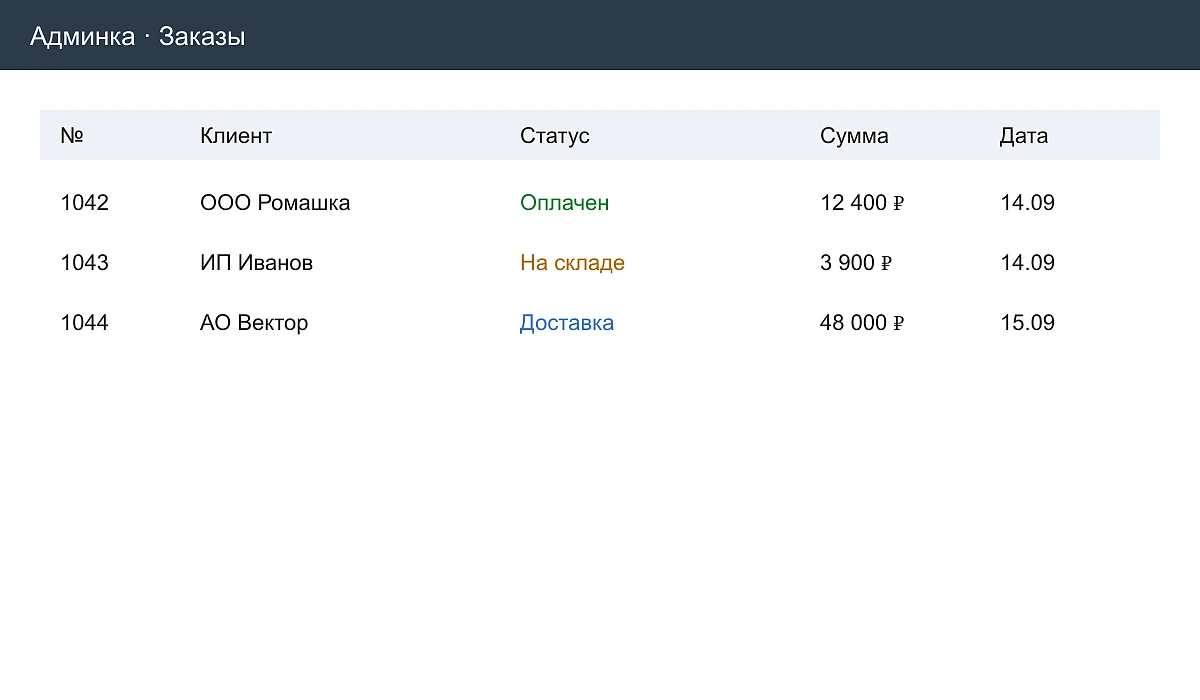
Start with the order list, since that is the screen your manager lives in. At a glance they should see the order number, the customer, the current status, the amount and the date, with color separating the orders that need attention from the ones moving along fine. If a manager has to open an order to find out whether it needs them today, the list is doing none of its job. It is a screen worth handing to a web design agency in the USA, because the hour a day a good one saves belongs to your manager.
Who changes a status and when
Give every transition exactly one owner. The warehouse flips warehouse statuses, the person handling courier pickups or the delivery integration flips delivery statuses, and nobody flips a status to keep the list looking tidy. Shared ownership is how an order ends up marked as shipped by a manager who assumed the warehouse had done it.
The rule we insist on with every store we work with: a status change is recorded when the physical event happens, not at the end of the shift. Batching status updates into one evening session is the single most common source of the lag described earlier, and it costs nothing to fix beyond the habit.
Notifications on every visible change
Every customer-facing status ships with exactly one message. Every internal status ships with none. Choose the channel per status rather than for the whole chain: email works for the ones the customer may want to find again later, such as the order confirmation and the refund, while SMS or a messenger suits the time-sensitive ones like a courier arriving tomorrow. It is the same channel split we apply in digital marketing in the USA: the channel follows the urgency of the message, never the other way round.
Four things belong in each message: the order number, what just happened, what happens next, and where to look or whom to ask. A message that reports a change without saying what follows it simply moves the question from one channel to another.
Keeping the chain honest over time
Review the status list when your process changes, not when the support load explodes. Adding a warehouse, switching couriers or introducing pickup points all change what the customer needs to be told. Retire the statuses nobody uses instead of leaving them in the dropdown for a manager to select by accident on a busy morning.
Mistakes We Keep Running Into
The expensive mistakes are not exotic ones. Stale statuses, too many of them, silent changes and a dead end after a failed delivery attempt account for almost every "where is my order" message a small store receives. Each of the five below is something we have had to unpick on a live project.
- The status updates a day late. The customer learns from the courier first and concludes the store has lost track of the order. Tie the change to the event rather than to the end of the shift.
- Fifteen statuses in the dropdown. Managers pick the wrong one, two of them mean roughly the same thing, and the chain stops meaning anything at all. Cut to the visible five and move the rest into internal notes.
- A status changes and nobody is told. The work happened and the customer experienced silence. No customer-facing status should ship without its message attached.
- "Cancelled" with no word about the money. The customer's real question is about the refund, not the parcel. US sellers are in fact required by the FTC Mail, Internet, or Telephone Order Merchandise Rule to notify buyers of shipping delays and to offer a refund, so pairing every cancellation with a refund state is good practice and, in some markets, an obligation.
- A failed delivery attempt is a dead end. Nobody was home, the courier took the parcel back, and no status describes that, so the order sits in limbo while the customer waits. Give the exception its own status and a clear action for the customer.
The diagnostic we use takes a minute. Read your chain as a customer who has paid and heard nothing for three days, and find the status that answers them. If no status does, that is the one to add, and it is usually the only one you need.
Conclusion
Order statuses in an online store work best when you build the chain the customer sees first and map your internal work onto it afterwards. Almost everything a small store runs into is covered by five decisions:
- Four real stages carry every order: cart, payment, warehouse and delivery. Cancellation and return are exits, not stages.
- Four or five statuses face the customer. Everything else stays in the admin panel where it belongs.
- A status name states what happened and what to do next, in the customer's words rather than the warehouse's.
- One person owns each transition, and the change is recorded when the event happens, not at the end of the day.
- Every visible change sends exactly one message, carrying the order number, the event, what follows and where to ask.
Send us the status list you are running today and we will go through it with you, stage by stage, and show you which statuses are earning their place and which ones are generating your support calls.